Chapter 5 REGISTRATION MODE
5.15 NIP MESSAGE (EXTRA MESSAGE 3 / P22)
1
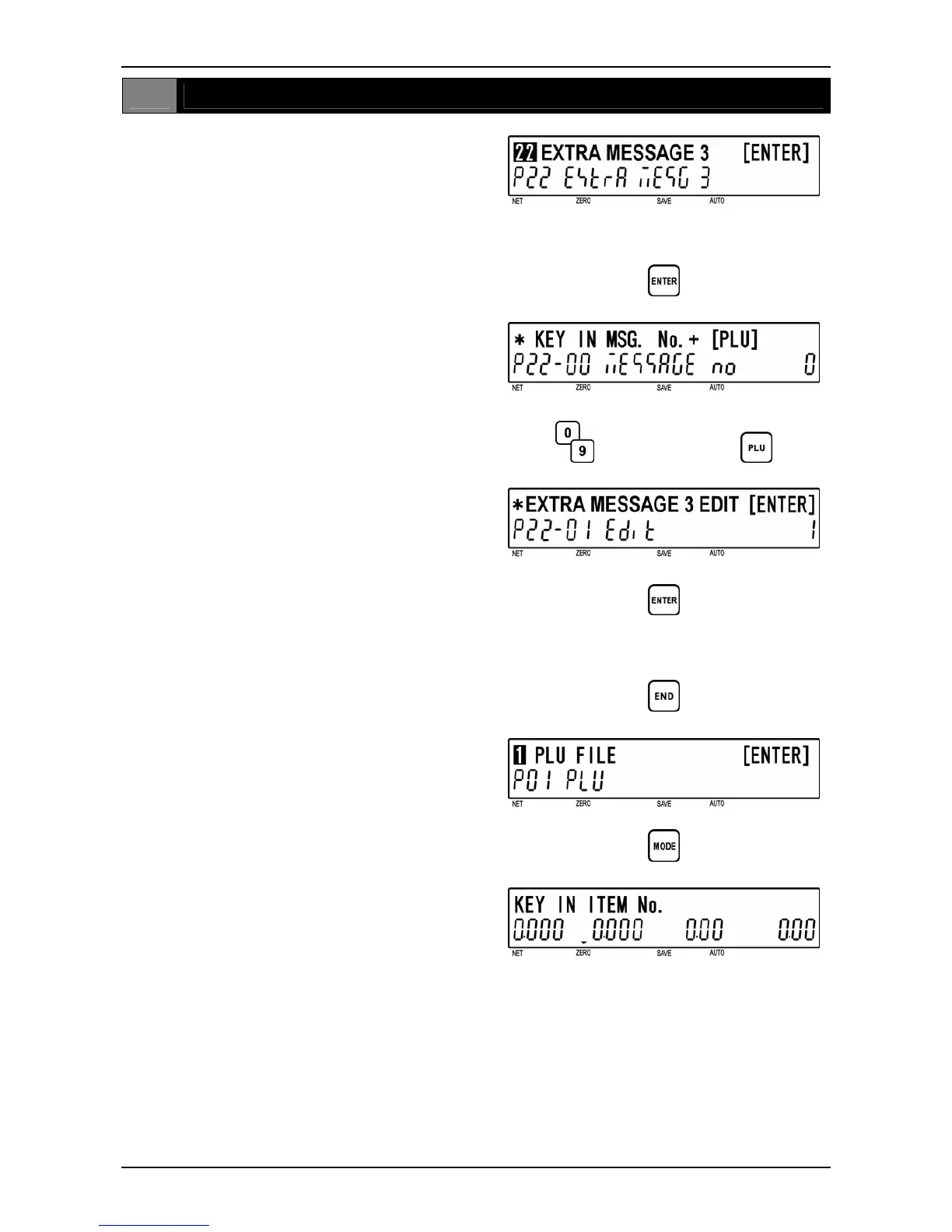
[P22 Screen]
Make sure that “Extra Message 3” screen
(P22) appears on the display.
Otherwise, enter this screen by referring to
Section 5.1: Registration Mode Entry/Exit.
2
[Key In Message No.]
Press the [ENTER] key to access “Key In
Message No.” screen (P22-00).
Key in a message number (8 digits) and
press the [PLU] key to call desired NIP
message data.
d
d
Message number
3
[Extra Message 3 Edit]
Press the [ENTER] key to access Edit Mode.
d
d
Refer to Chapter 6 for editing a text.
4
[Return to P01]
Press the [END] key to return to the P01
screen.
d
5
[Registration Mode Exit]
To exit Registration Mode, press the [MODE]
key.
The initial screen will appear.
d
BC-4000TEC User’s Manual No. JBAW97EBC-4000TEC 5-37


 To Next Page