Chapter 5 REGISTRATION MODE
5
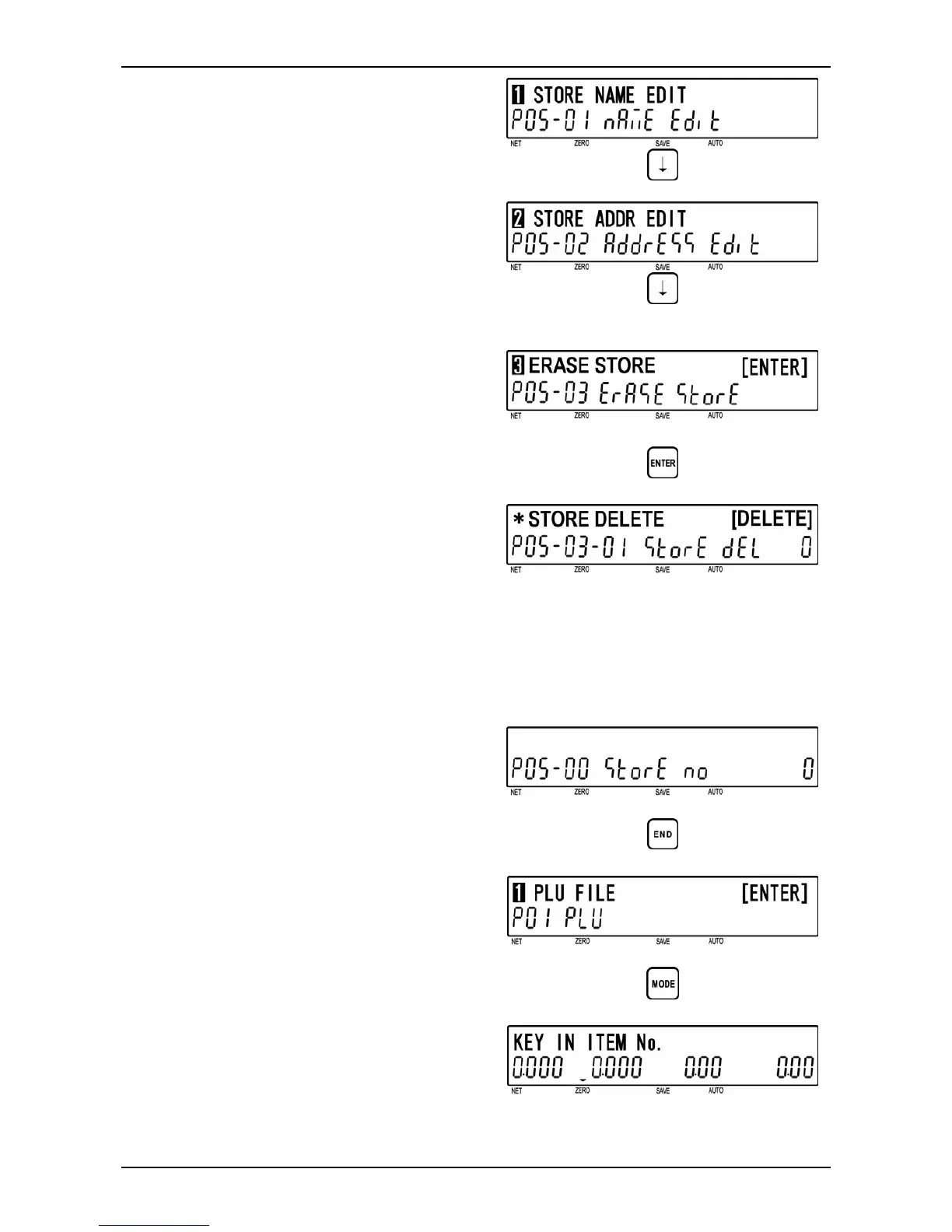
[Erase Store]
Press [ ↓ ] key twice to access “Erase Store”
screen (P05-03).
d
6
[Store Delete]
Press [ENTER] key to access “Store
Delete” screen (P05-03-01).
Press [DELETE] key to delete the store.
Note: Press [ENTER] before [DELETE] to
return to P05-00 (Store Number)
screen without deleting store.
d
d
[DELETE]
7
[Return to P05-00]
A short beep will be heard and the screen
will automatically return to the P05-00
screen.
A short beep will be heard.
d
8
[Return to P01]
Press the [END] key to return to the P01
screen.
d
9
[Registration Mode Exit]
To exit Registration Mode, press the
[MODE] key.
The initial screen will appear.
d
5-24 BC-4000TEC User’s Manual No. JBAW97EBC-4000TEC


 To Next Page