13
HOW TO PLACE THE RING
In addion to the iskn pen,
the Essenal Pack includes
a drawing pencil with a ring.
This ring is designed to make
your drawing tools compa-
ble with the Slate: it will
t several kinds of pencils,
whether they are cylindri-
cal or hexagonal. Use the
silicone adapter to place it
on your tool.
This Ring ts all pencils up
to approximately 8,1 mm
(0,31 inch) in diameter.
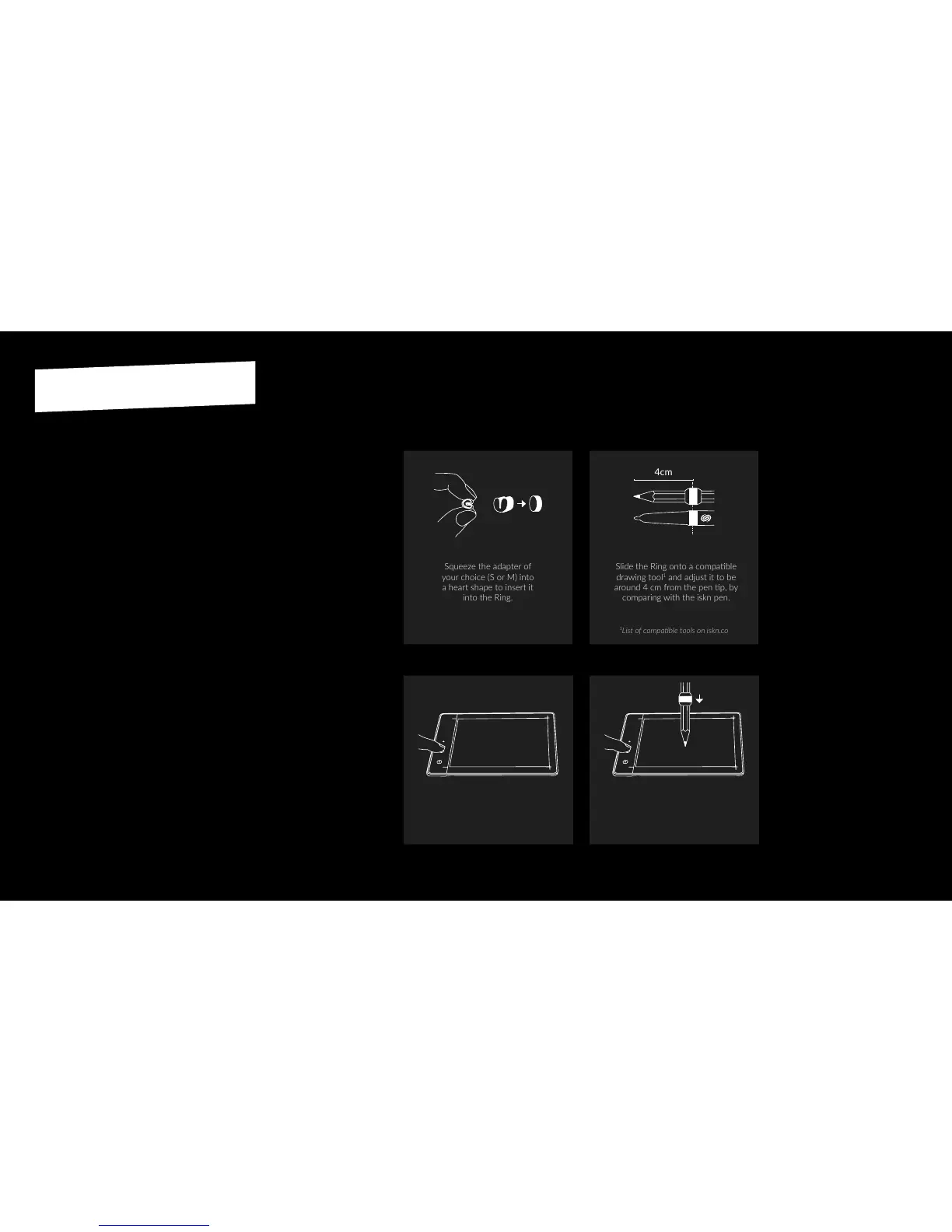
Squeeze the adapter of
your choice (S or M) into
a heart shape to insert it
into the Ring.
Slide the Ring onto a compable
drawing tool
1
and adjust it to be
around 4 cm from the pen p, by
comparing with the iskn pen.
Place the Ring on your
own drawing tool:
Calibrate the Ring:
4cm
You must renew this operaon every
me you switch tools, and only on a
sheet of paper (even if you are going
to use it on a notepad).
Press and hold the top buon,
a pink LED breathes.
Press the p of your pen at the center
of your Slate. Then release the buon.
1
2


 To Next Page