USING THE MACHINE
5 - 04
24
23
Operation
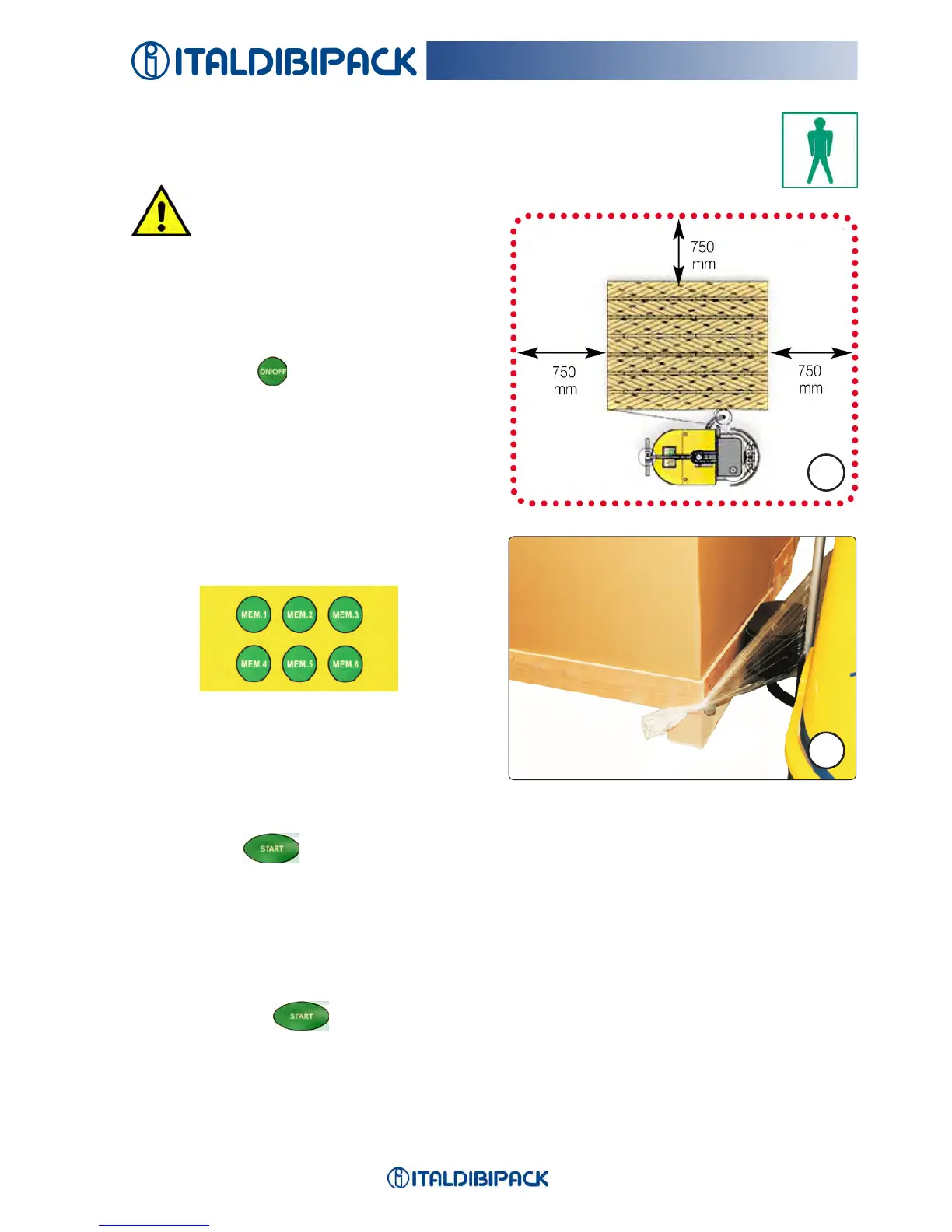
CAUTION
The robot needs a minimum
space of 750 mm around the pal-
let to be able to operate correctly
(Fig. 23).
Insertthekeyandturnittoswitchonthe
machine.
Press ON/OFF
.
Position LEOinthemiddleofthelongside,
withthetouchingarmnearthepallettobe
wrappedandsecuretheplasticlmtoit
(Fig.24).
Selectaworkprogrambypressingoneofthe
buttons (MEM. 1 - MEM. 2 etc.)ofthestored
programs.
Intheabsenceofachoice,therobotusesthe
lastusedprogram,orinthecaseofre-igni-
tion,thatofdefaultMEM. 1.
The number of the used program appears on
the display.
Press START
.
Therobotnowstartsindependentlymovingaroundtheloadtobewrappedwithconstant
speed and remaining always near.
Duringoperation,themachineemitsaluminousandsoundsignal.
UP-DOWN CYCLE
OncetheSTART keyispressed,afterthetimeselectedfordownwrappinghas
passed,thelmrollholdercarriagestartsmovingupwardsatthespeedintheselectedwork
program.


 To Next Page