Need help?
Do you have a question about the ITech IT8211 and is the answer not in the manual?
General safety precautions and warnings for operating the electronic load.
Statement of product compliance with published specifications.
Disclaimer regarding potential changes to document information.
Terms and conditions for the hardware product warranty.
Conditions and exclusions that may void the product warranty.
Information regarding the disposal of waste electrical and electronic equipment.
Descriptions and meanings of various safety symbols used in the manual.
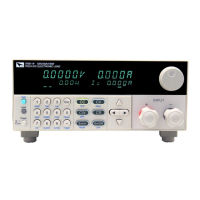
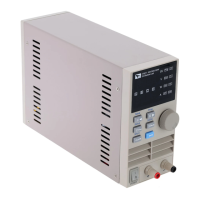
General overview and specifications of the IT8211 digital control electronic load.
Details on CC, CV, and CR work modes for the electronic load.
List of main functionalities and capabilities of the IT8211.
Labels and explanations for the controls and display elements on the front panel.
Checking the instrument for damage and setting the correct line voltage.
Step-by-step guide to setting the current value in CC mode.
Step-by-step guide to setting the voltage value in CV mode.
Step-by-step guide to setting the resistance value in CR mode.
How to toggle the input power on and off.
Switching the display between actual and preset values.
Configuration of Over Current Protection (OCP) and Real-time Reveal (REL).
Enabling or disabling the audible feedback (beep) for key presses.
Procedure for setting the device's address for communication.
Organizing stored preset values into selectable groups.
Instructions on how to save configured settings as presets.
Instructions for retrieving previously saved parameter settings.
Switching between the 3A and 30A current measurement ranges.
How to simulate a short-circuit condition using the electronic load.
Verifying and resetting preset voltage, current, and resistance values.
Guidance for resolving common operational issues with the instrument.
Overview of the LIST function for programming test sequences.
Selecting the work mode (CC, CV, CR) for each step in a list.
Setting the specific parameter value for each step in a list.
Defining the delay duration between consecutive steps in a list.
Configuring the upper limit for input voltage within a list step.
Configuring the lower limit for input voltage within a list step.
Configuring the upper limit for input current within a list step.
Configuring the lower limit for input current within a list step.
Steps to save, run, and manage list sequences.
Interpreting the display indicators for test pass or fail status.
Table detailing stepping values for voltage, current, and resistance by cursor position.
Specifications for input voltage, current, and power at operating temperatures.
Accuracy and resolution specifications for load regulation across different ranges.
Specific accuracy and resolution for Constant Voltage, Current, and Resistance modes.
Accuracy and resolution details for current, voltage, and power measurements.
Information on how to contact ITECH for product inquiries and support.
The IT8211 is a digital control electronic load designed for power testing solutions. It offers high resolution and accuracy, making it suitable for various testing purposes. The device supports multiple working modes, including Constant Current (CC), Constant Voltage (CV), and Constant Resistance (CR), providing flexibility for different test scenarios.
The IT8211 functions as a digital control electronic load, capable of simulating various load conditions for power supply testing. It allows users to set precise current, voltage, or resistance values to evaluate the performance of power sources. The device incorporates a short-test function, a user-friendly interface, and memory storage for preset values, simplifying complex test procedures.
The IT8211 features an input on/off button on the front panel, allowing users to toggle the load input. Disabling the input (zero current) does not affect programmed settings, and the load will return to its previously programmed values when the input is re-enabled.
The electronic load typically displays actual voltage and current values. A "View" key allows users to switch the display to show preset voltage, current, or resistance values, as well as actual power. Pressing the "View" key again returns the display to actual values.
The device includes an OCP function to protect the unit under test. Users can set the OCP value, and if the actual current exceeds this value, the input of the electronic load will automatically turn off. The default OCP setting is 30A.
The REL function can be turned ON or OFF. When ON, it provides real-time feedback or status, which can be useful during testing.
The device offers a configurable key sound (BEEP) function, which can be turned ON or OFF according to user preference.
The device supports two current ranges: 0-3A and 0-30A. Users can switch between these ranges using the "Shift" and "Mode" keys. The resolution for the high current range (30A) is 10mA, while for the low current range (3A) it is 1mA.
The IT8211 can simulate a short circuit at its input, turning the load on with full-scale current. This function can be toggled on/off. The short-circuit operation does not affect the programmed current value. When the short operation is off, the load returns to its original setting state. The maximum short-circuit current is 1.2 times the active current range in CC, CV, and CR modes. In CV mode, short-circuit operation is equivalent to setting CV to 0V.
Users can check or reset preset voltage, current, and resistance values. The preset values will blink for 3 seconds, and if not reset, the display will revert to showing actual values.
The LIST function is a powerful feature for testing power supplies with varying load conditions. It allows users to program a sequence of steps, each with specific working modes (CC, CV, CR), data values, delay times, and high/low limits for input voltage and current.
The hardware product is warranted against defects in material and workmanship for one year from the date of delivery. The IT8211 Electronic Load, when properly installed, is warranted not to fail to execute its programming instructions due to defects in material and workmanship for 90 days from delivery. The company will repair or replace defective products during the warranty period. The warranty does not cover uninterrupted or error-free operation of software/firmware/hardware. For warranty service, the product must be returned to a designated service facility, with the customer prepaying shipping charges and duties/taxes. The company will cover return shipping costs.
The warranty does not apply to defects resulting from improper or inadequate maintenance by the customer, customer-supplied software or interfacing, unauthorized modification or misuse, operation outside of environmental specifications, or improper site preparation and maintenance.
 General
| Model | IT8211 |
|---|---|
| Input Modes | CC, CV, CR, CP |
| Cooling Method | Forced air cooling |
| Operating Temperature | 0°C to 40°C |
| Category | DC Electronic Load |
| Current Measurement Accuracy | ±(0.1% + 0.1% of range) |
| Resolution | 1mV |
| Communication Interfaces | RS232, USB |

 To Next Page