EasyManua.ls Logo

Ivation IVALDH70PW - User Manual

Ivation IVALDH70PW
10 pages
Print Icon
To Next Page IconTo Next Page
Loading...
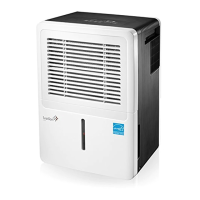
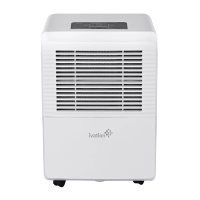
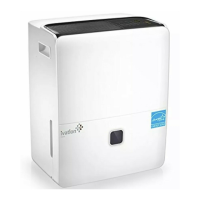
70-Pint Dehumidifier
User Guide
IVALDH70PW
Thank you for purchasing the Ivation 70 Pint Dehumidifier. This User Guide is intended to
provide you with guidelines to ensure that operation of this product is safe and does not pose
risk to the user. Any use that does not conform to the guidelines described in this User Guide
may void the limited warranty.
Please read all directions before using the product and retain this guide for reference. This
product is intended for household use only.
This product is covered by a limited one-year warranty. Coverage is subject to limits and
exclusions. See warranty for details.
This dehumidifier is Energy Star rated for quality assurance (www.energystar.gov).
European Disposal Instructions
When using this product in European countries, follow the instructions below:
DISPOSAL: Do not dispose this product as unsorted municipal waste. Collection of such waste
separately for special treatment is necessary. Disposal of this appliance in domestic household
waste is prohibited. For proper disposal, there are several possibilities:
A) Each municipality has established collection systems, where electronic waste can be
disposed of free of charge to the user.
B) When buying a new product, the retailer will take back the old product free of charge.
C) The manufacturer will take back the old appliance for disposal free of charge to the user.
D) As old products contain valuable resources, they can be sold to scrap metal dealers.
Unauthorized disposal of waste in forests and other natural land endangers public health when
hazardous substances leak into the ground water and infiltrate the food chain.
CAUTION!
This appliance is not intended for use by persons (including children) with reduced physical,
sensory or mental capabilities or lack of experience and knowledge, unless they have been
given supervision or instruction concerning use of the appliance by a person responsible for
their safety.
Do not let children play with or operate the product. Cleaning and maintenance should not
be performed by children without supervision.
Do not operate the appliance if the power supply cord is damaged.
This appliance must be installed in accordance with national wiring regulations.
Operation should take place at least three feet (one meter) from combustible materials.
Contact an authorized service technician for repair or maintenance of this unit.
1
Question and Answer IconNeed help?

Do you have a question about the Ivation IVALDH70PW and is the answer not in the manual?

Overview

The Ivation 70-Pint Dehumidifier is designed to reduce humidity levels in indoor residential spaces, helping to prevent moisture damage to books, valuables, and general household items. It operates by drawing in moist air, removing excess water, and then releasing drier air back into the room. This unit is Energy Star rated, indicating its energy efficiency.

Function Description:

The dehumidifier offers three primary operating modes:

  • Regular Dehumidifying: Allows users to set custom humidity levels and a specific operating duration.
  • Continuous Dehumidifying: Runs constantly without a timer, ideal for situations requiring continuous moisture removal.
  • Comfort Dehumidifying: Automatically maintains a comfortable humidity range between 45% and 55% Relative Humidity (RH), without manual adjustment.

The unit features an internal compressor and fan system. When frost builds up on the evaporator coils, the Auto Defrost feature activates, cycling off the compressor while the fan continues to run until the frost dissipates. For safety and efficiency, the unit includes an Auto Shut Off mechanism that activates when the water reservoir is full, removed, or not properly seated, or when the set humidity level is reached. A Three (3) Minute Restart Delay prevents immediate restarts after the unit has stopped, allowing the system to stabilize. In case of a power outage, the Auto-Restart function ensures the unit resumes operation with its previous settings once power is restored.

Usage Features:

The control panel provides intuitive access to the dehumidifier's functions:

  • Mode Button: Cycles through the three operating modes (Regular, Continuous, Comfort).
  • Filter Button: Used to reset the "Check Filter" indicator light after cleaning the air filter. This light illuminates after 250 hours of operation as a reminder.
  • Fan Button: Allows selection between High and Normal fan speeds. High speed is recommended for maximum moisture removal, while Normal speed is suitable for quieter operation once humidity is reduced.
  • Power Button: Turns the dehumidifier on and off.
  • Up/Down Buttons: These buttons serve multiple purposes:
    • TIMER Set Control: Adjusts the Auto start and Auto stop times from 0.0 to 24 hours in 0.5 or 1-hour increments.
    • Humidity Level Setting: Sets the desired humidity level within a range of 35%RH to 85%RH in 5% increments. Pressing "Up" increases the humidity level (for moister air), and "Down" decreases it (for drier air).
  • Timer Button: Initiates the Auto start and Auto stop features in conjunction with the Up/Down buttons. The display shows the set humidity level or the auto start/stop time, then reverts to showing the actual room humidity level (± 5% accuracy) in a range of 30%RH to 90%RH.

The unit is designed for continuous operation for 24 hours when first used. It operates effectively in environments between 41°F (5°C) and 95°F (35°C). For optimal performance, it should be placed on a smooth, level floor, strong enough to support the unit with a full water reservoir, and with at least 8 inches (20cm) of air space around all sides for good air circulation. It should not be used outdoors or in commercial/industrial settings. The dehumidifier is equipped with casters for easy movement, but care should be taken not to force them over carpet or move the unit when the reservoir is full to prevent tipping and spilling.

Water collection can be managed in two ways:

  • Using the Reservoir: The unit beeps and the "Full" indicator light flashes (displaying "P2") when the reservoir is full or not properly seated. The compressor and fan will shut off (after 30 seconds for the fan to dry the condenser if the unit is on). The reservoir can then be carefully removed using its handles, emptied, and replaced. It is crucial to slide the reservoir gently and securely back into place for the unit to operate.
  • Continuous Draining: For continuous operation without manual emptying, a water hose (5/16" ID, not included) with a female threaded end (M=1, not included) can be attached to the unit's drain hose outlet via an adaptor (included). The hose should be directed to a floor drain or suitable drainage facility, ensuring it is secure, free of kinks, and positioned to allow smooth, downward water flow. The reservoir must still be in place and correctly secured for continuous draining to function.

Maintenance Features:

Regular maintenance ensures efficient and safe operation:

  • Cleaning the Vent and Case: The exterior can be cleaned with water and a mild detergent. A vacuum attachment or brush can be used to clean the air intake and outlet vents. Direct splashing of water onto the main unit should be avoided.
  • Cleaning the Reservoir: To prevent mold, mildew, and bacteria growth, the reservoir should be cleaned every few weeks. This involves partially filling it with clean water and a mild detergent, swishing, emptying, and rinsing. The reservoir should not be cleaned in a dishwasher.
  • Cleaning the Air Filter: The air filter should be cleaned every two weeks under normal operating conditions. It can be removed from the top of the unit or by removing the reservoir and pulling the filter downward. After washing with clean water, it should be air-dried and then re-installed. Operating the dehumidifier without a filter is not recommended as dirt and lint can clog the unit and reduce performance.

For long periods of non-use, the unit should be prepared for storage:

  • After turning off, wait one day before emptying the reservoir to allow any trapped moisture to drip.
  • Clean the main unit, water reservoir, and air filter.
  • Wrap and bundle the power cord with the provided band.
  • Cover the unit with a plastic bag.
  • Store the unit upright in a dry, well-ventilated place.

Troubleshooting information is provided for common issues such as the unit not starting, not drying the air effectively, making loud noises, or displaying frost on the coils. Error codes (AS, ES, P2) are also explained, indicating issues with humidity sensors, temperature sensors, or the water reservoir, respectively.

Ivation IVALDH70PW Specifications

General IconGeneral
ModelIVALDH70PW
TypeDehumidifier
Coverage Area4500 Sq. Ft.
Energy Star CertifiedYes
Weight40.8 lbs
Noise Level51 dB
Auto-RestartYes
Continuous Drain OptionYes
Power Consumption700 W
Voltage115 V
Capacity70 pints per day
FeaturesAdjustable Humidity Settings
Operating Temperature41°F to 95°F

Related product manuals