8-1.2 Mobile Application Operation
After the installation, enter the Program Files menu in
your mobile device to run a file called “DVRH264”.
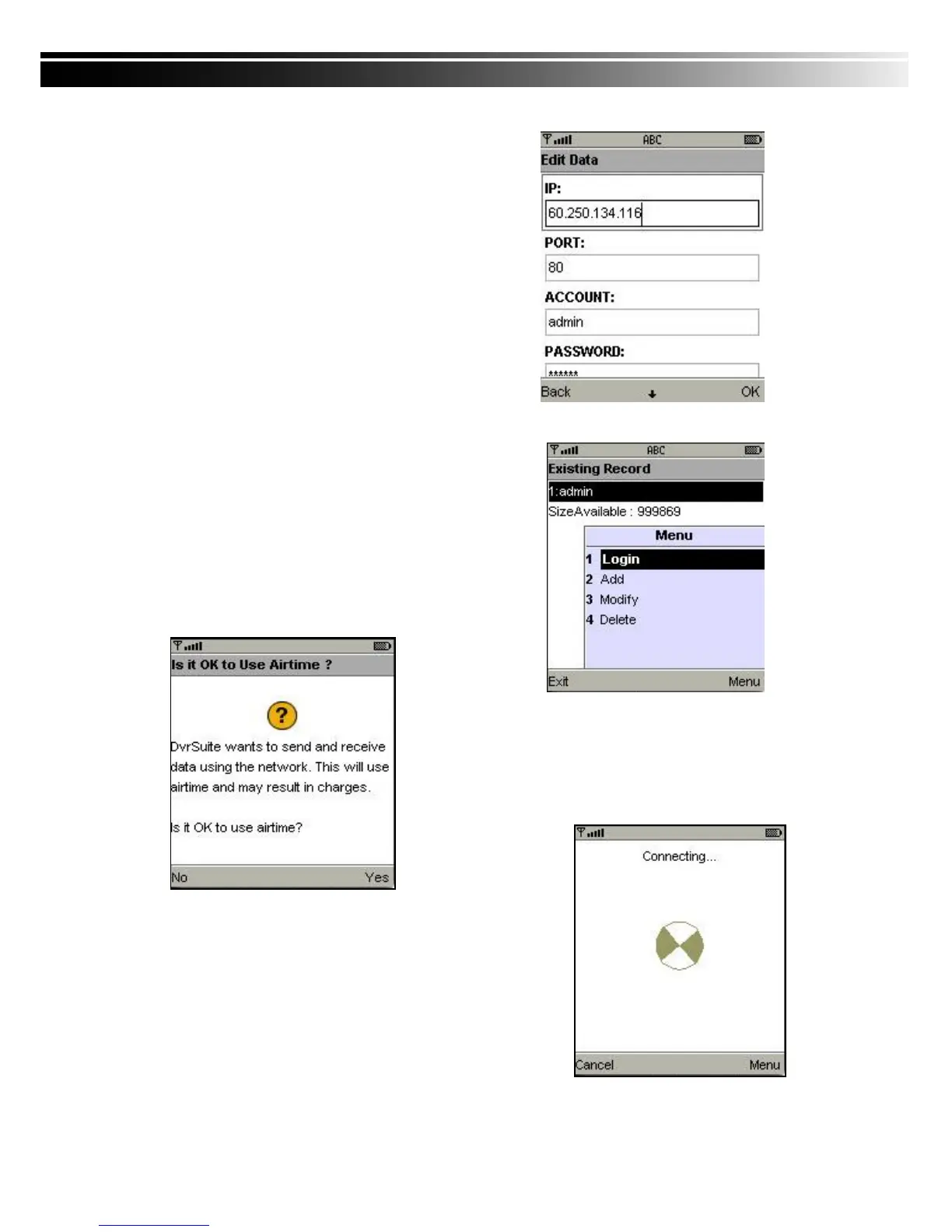
Select “Menu” at the right lower corner of your mobile
screen, 4 commands, Login Add Modify and Delete,
will show up.
8-1.2.1 Add New Login DVR
To log into the DVR, you need to enter the logging-in
DVR information. Find “Add” under the “Menu” then
enter logging-in DVR‟s IP address, Port number,
account name and password. Press “Add” to save this
information after entering.
8-1.2.2 Logging Onto the DVR
Use the Login command to log onto a DVR and monitor
live images. If multiple DVRs have been added to the
mobile application, they will be listed by name, you can
select one to log onto.
A confirmation message might show up for network
charge before connection. The fee rate will depend on the
telecom company and package fee you go with.
Network connectivity will take some time. It‟ll be affected by
networking environment and bandwidth flow.
Live image will show up after a successful connection.
PS. The Live can not be displayed in your mobile w
hen the recoding is off in local DVR.


 To Next Page