9-6.2 DVR Administration
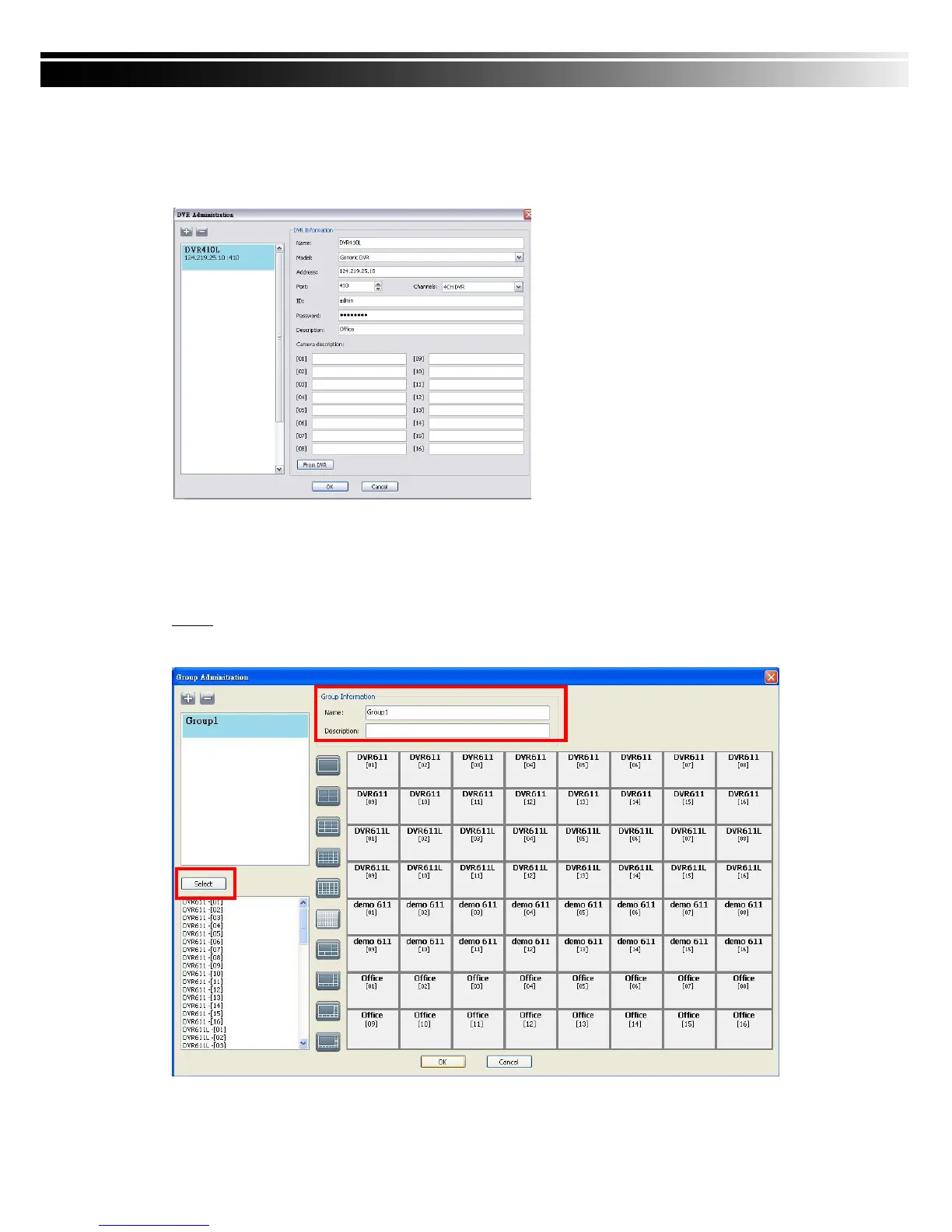
DVR connections can be added to or deleted from the CMS and their information can be edited.
DVR‟s channel names can be entered here or downloaded from the DVR by pressing „From
DVR‟. Select “OK” to save the information.
9-6.3 Group Administration
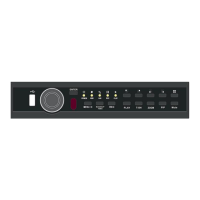
A „Group‟ means a set of video channels from one or many DVRs, which means, user can
organize channels from different DVRs to be set in a group. This function allows you to monitor
and manager channels from multiple DVRs easily and flexible.
Steps:
1. Add a new group and set its name and description.
2. Click „Select’ which will bring up a new window.
Name: DVR Name(Unrepeatable)
Model: DVR Model
Generic: For General Models
Generic MainStream: For DualStream Model
DUAL SDVR: For MPEG4 2U Models
Address: DVR IP Address
Port: DVR Network Port
Channel: DVR Camera Number
ID: DVR Login Account
Password: DVR Login Password
Description: Other Description
Camera Description: Carera Description
From DVR: Load Camera name from DVR


 To Next Page