8-3 Google Android Phone OS application and operation
System requirements:
Mobile Device operation platform:Google Android System。
Internet needed for Mobile device operation platform (GPRS/ 3G/ Wifi…etc.)
In order to remote log in to DVR to live monitoring through mobile device, first of all, please
follow the instructions for software installation:
Step 1: Google Phone applications will copy and extract to the PC (or NB).
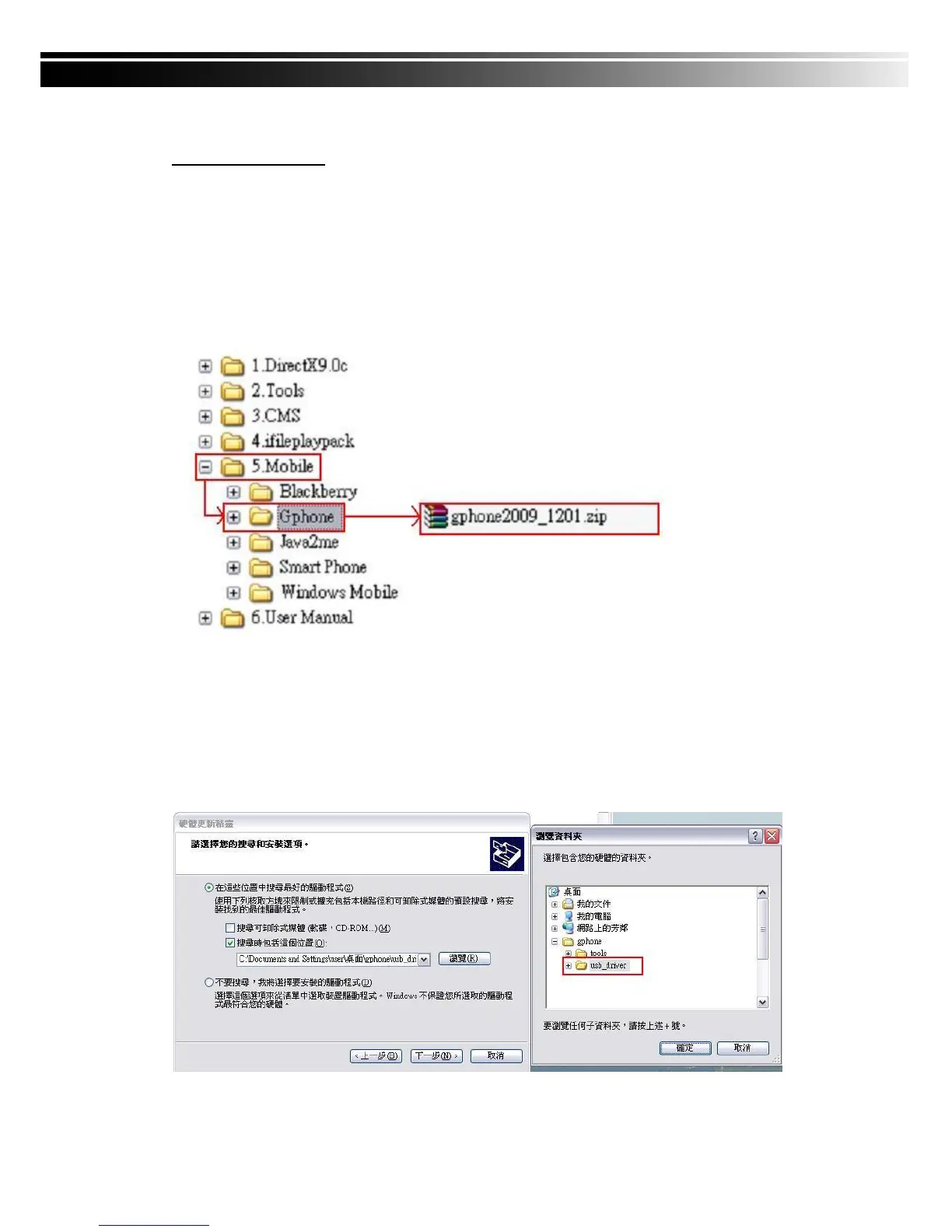
File in the shipment CD-ROM of directory Mobile → Gphone → gphone2009_1201.zip
Please Copy and unzip this file "gphone2009_1201.zip" to the desktop,
It will produce a file named "gphone" directory.
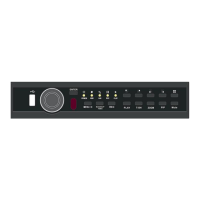
Step 2: Place the Google phone USB cable into the PC (or NB), the computer will automatically
detect the new hardware and requires the installation of the driver, please extract the
path point to the directory in step 1 (In this example to the desktop of the "gphone" →
"usb_driver"), System will begin to install phone driver.


 To Next Page