Using Swami on the Course
10
4.6 Editing Front, Center & Back Green Locations
(continued)
4. Press
[
OK/Menu
]
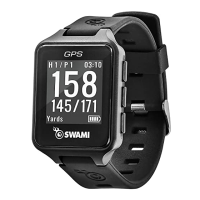
key to remark. The new location where the
GPS unit is located should read “0” yards.
(Example: If you edited the back of the green, you are now
standing 0 yards between you and the back of the green).
This change will be saved on your Swami Watch for future use.
5. Press and hold
[
Up
]
key to exit Remark mode.
4.7 End Round
1. Press and hold
[
OK/Menu
]
key to return back to Main Menu will end the
golf round.
2. Press and hold
[
OK/Menu
]
key again to return back to Time Mode page.
0
14
29
B
C
F
#2
4


 To Next Page