7. STANDARD ADJUSTMENTS
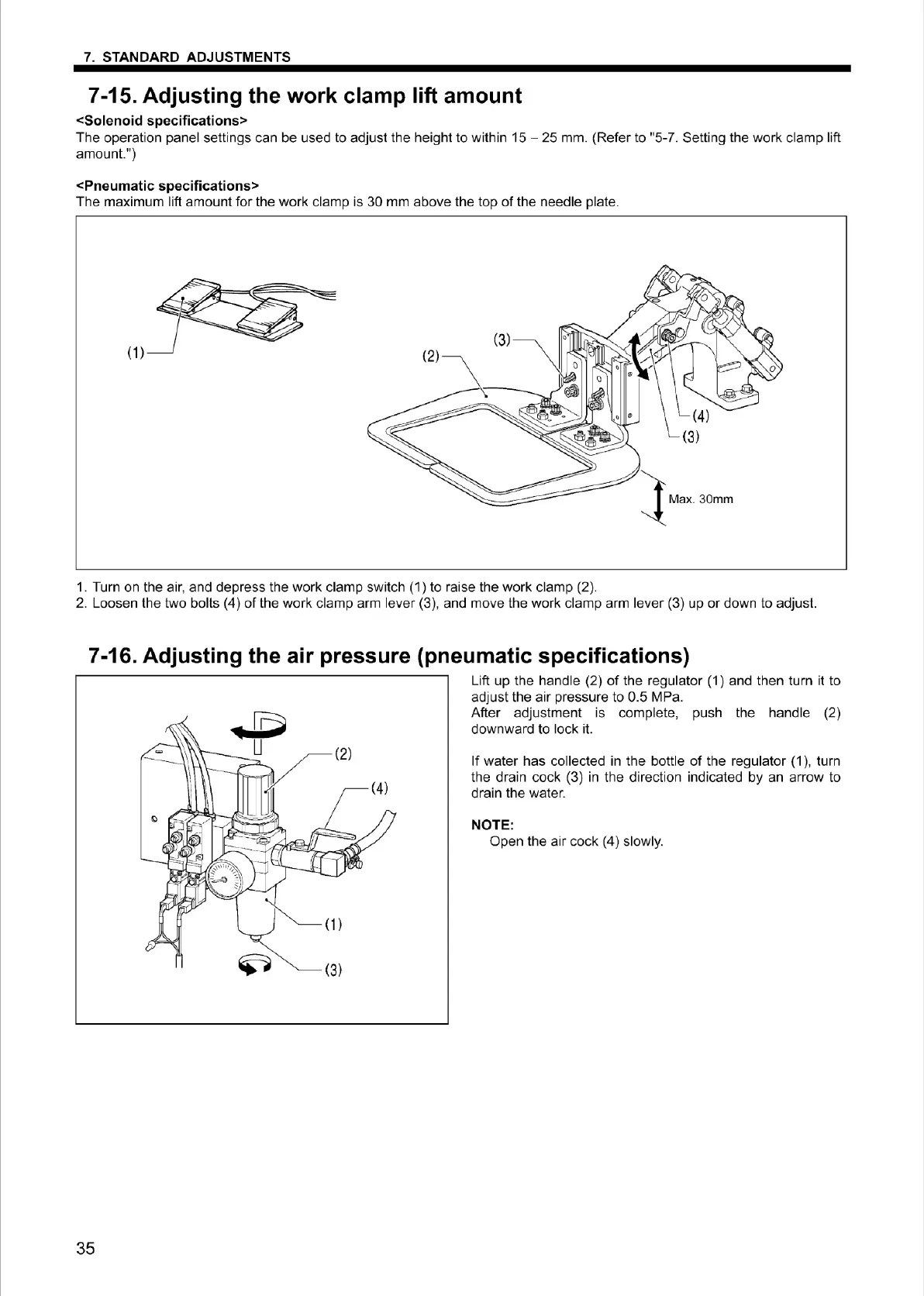
7-15. Adjusting the work clamp lift amount
<Solenoid specifications>
The operation panel settings can be used to adjust the height to within
15
- 25 mm. (Refer to "5-7. Setting the work clamp lift
amount.")
<Pneumatic specifications>
The maximum lift amount for the work clamp is 30 mm above the top
of
the needle plate.
(1)
(3)
(2)
(3)
1
M~.30mm
1. Turn on the air, and depress the work clamp
sw
it
ch (1) to raise the
wo
rk clamp (2).
2.
Loosen t
he
two bolts (4) of the work clamp arm lever (3), and move the work clamp arm lever (3) up
or
down to adjust.
7-16. Adjusting the air pressure (pneumatic specifications)
35
Lift
up
the handle (2)
of
the regulat
or
(1) and then turn it to
adjust the air pressure to 0.5 MPa.
After adjustment is complete, push the handle (2)
downward to lock it.
If
water has collected in the bottle
of
the regulator
(1
), turn
the drain cock (3)
in
the direction indicated by an arrow
to
drain the water.
NOTE:
Open the air cock (4) slowly.
From the library of Superior Sewing Machine & Supply LLC - www.supsew.com



 To Next Page