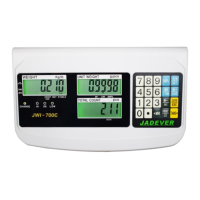
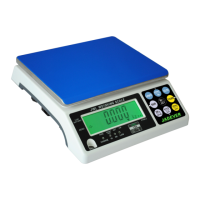
PRINT/HI key
*
Short press sends data a RS232 port; long press lower limit initials lower limit setting
*
Shift key (shift rightwards)
G/N key
*
Displays gross and net weight by turns
*
Stores current condition
MR key
*
Memory recall
*
Switches on /off check weighing function
*
Long press enters max. Capacity setting mode
MODE key Long press to initials function setting
TARE key
*
Tares the weight of the container
*
Accepts the keypad tare entrie
M+ key
*
Adds the indicated weight into Accumulation memory
*
During editing selects the next higher option or increases setting values.
M- key
*
Deletes accumulation records
*
During editing, selects the next lower option or decreases setting values.
ZERO/ESC key
*
Zeros the display (within 2% of max.capacity)
*
Exits from setting mode.
Power Supply
Please verify the local AC power source and switch the two-stage switch (110V/220V) to the
proper place before plugging into the power outlet.
Alternative Power Supply
1) AC 110V/220V (AC±10%)
2) (6V/4A) Internal Rechargeable Battery
Power Consumption
About 300mW, 80hrs (without backlight)
About 380 mW, 65hrs (with backlight)



 To Next Page