EasyManua.ls Logo

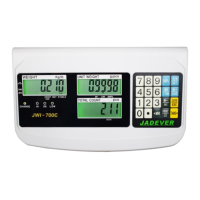
Jadever JWI 700C - User Manual

Jadever JWI 700C
20 pages
To Next Page IconTo Next Page
Loading...
JWI-700C 0
Table of Contents
1. Introduction
………………………………………………………………………………
1
2. Precaution…………………………………………………….......................................
1
3. Product Introduction
3-1 Specifications & Features………………………………………………………………....
3-2 Front Panel
3-2-1 Display ……………………………………………………………………………………
3-2-2 Keyboard………………………………………………………………………………….
3-3 Rear Panel………………………………………………………………………………….
3-4 Power Supply……………………………………………………………………………….
1
2
3
4
5
4. Installation
4-1 Load Cell Connection………………………………………………………………………
4-2 Assembly Description of Upright Pole……………………………………………………
5
5
5. Setting Mode
5-1 Maximum Weighing Capacity Setting……………………………………………………
5-2 Resolution Setting………………………………………….………………………………
5-3 Function Setting …………………………………………………………………………..
7
7
8
6. Calibration Mode
6-1 Linear calibration…………………………………………………………………………..
6-2 Single point calibration…………………………………………………………………….
10
10
7. Operation
7-1 Basic Weighing
7-1-1 Weighing………………………………………………………………………………….
7-1-2 Tare & Preset Tare……………………………………………………………………….
7-1-3 Unit Switch Operation ………………………………………………………………….
7-2 Basic Counting
7-2-1 Upper & Lower Quantity Limit Checking ……………………………………………...
7-2-2 Entering a Known Unit Weight …………….…………………………………………..
7-2-3 Sample Counting & ACAI……………………………………………..........................
7-2-4 Accumulation, Accumulation Display and Accumulation Clear……………………..
11
11
12
12
12
13
13
8. Serial Interface
8-1 RS-232 Connector………………………………………………………………………….
8-2 Single Option……………………………………………………………………………….
8-3 RS-232 Output Format…………………………………………………………………….
14
15
15
9. Troubleshooting and Error Message…………………………………………...
16

Questions and Answers

Jadever JWI 700C Specifications

General IconGeneral
BrandJadever
ModelJWI 700C
CategoryScales
LanguageEnglish

Summary

Introduction

Precautions

Product Introduction

3-1 Specifications & Features

Details the JWI-700C indicator's technical specifications and key features.

3-2 Front Panel

Describes the layout and indicators of the JWI-700C scale's front panel.

3-3 Rear Panel

Details the various ports and switches found on the rear panel of the JWI-700C.

3-4 Power Supply

Explains the power options, consumption, and low battery warning for the JWI-700C.

Installation

4-1 Load Cell Connection

Provides instructions and pinouts for connecting the load cell to the JWI-700C indicator.

4-2 Assembly Description of Upright Pole

Details the assembly steps and components for the JWI-700C upright pole.

Setting Mode

5-1 Maximum Weighing Capacity Setting

Guides on how to set the maximum weighing capacity for the JWI-700C scale.

5-2 Resolution Setting

Explains the procedure for setting the display resolution (division) on the JWI-700C.

5-3 Function Setting

Details various functional settings like backlight, filtering, auto-off, and serial transmission.

Calibration Mode

6-1 Linear calibration

Instructions for performing linear calibration to ensure scale accuracy.

6-2 Single point calibration

Procedure for single point calibration, useful for specific weight ranges.

Operation

7-1 Basic Weighing

Covers fundamental operations like basic weighing, tare, and unit switching.

7-2 Basic Counting

Details counting operations including limits, unit weight entry, sampling, and accumulation.

Serial Interface

8-1 RS-232 Connector

Diagram and pinout details for the RS-232 serial interface connector.

8-2 Single Option

Lists single options available for serial interface integration, like printers and computers.

8-3 RS-232 Output Format

Defines the data format and bit structure for RS-232 output.

Troubleshooting and Error message

Related product manuals