EasyManua.ls Logo

Jadever JWI-501 Series - User Manual

Jadever JWI-501 Series
8 pages
Print Icon
To Next Page IconTo Next Page
Loading...
JWI-501
Content
1 Main technical index…………………………………………………………….....
1
2 Keyboard and character prompt
………………………………………………
2-1 Keyboard
…………………………………………………………………………..
2-2 Character Prompt
………………………………………………………………..
1
1
2
3 Operation guide……………………………………………………………………..
3-1 Install and adjust
…………………………………………………………………
3-2 Turn on and turn off………………………………………………………………
3-3 Zero………………………………………………………………………………….
3-4 Weighing
…………………………………………………………………………....
3-5 Tare weighing………………………………………………………………………
3-6 Save power function…………………………………………………………….
3-7 Battery indicate
……………………………………………………………………
3-8 Charge……………………………………………………………………………….
3-9 Set and use parameter………………………………………………………...
3-10 Brightness………………………………………………………………………..
2
2
2
2
2
3
3
3
3
3
5
4 Calibration……………………………………………………………………………..
5
5 Notes
……………………………………………………………………………..........
5-1 Normal note
……………………………………………………………………….
5-2 For sealed lead acid battery
…………………………………………………
5
5
6
Question and Answer IconNeed help?

Do you have a question about the Jadever JWI-501 Series and is the answer not in the manual?

Summary

Main Technical Specifications

Keyboard and Character Prompts

Keyboard Functions

Describes the functions of ON/ZERO, TARE, OFF, and SET keys.

Character Prompts and Error Codes

Explains various display prompts including status, low voltage, and error codes.

Operation Guide

Installation and Adjustment

Guides on installing the scale's pole and adjusting feet for leveling.

Powering On and Off

Details the procedures for turning the scale on, off, and its auto-off functions.

Zeroing the Scale

Instructions on how to set the scale to zero, especially after taring.

Basic Weighing Procedure

Explains the fundamental steps for weighing items on the scale.

Tare Weighing Function

Describes how to use the tare function to exclude container weight.

Power Saving Function

Explains the automatic power saving feature that activates after inactivity.

Battery Status Indicator

Details the meaning of different battery indicator lights (high, mid, low).

Battery Charging

Provides information on charging the internal rechargeable battery, including duration.

Limit Setting (rAngE)

Guides on setting upper and lower limits and understanding alarming indications.

Unit Selection (UnItS)

Instructions for selecting different weighing units like kg, pcs, and lb.

Auto Power Off (A-OFF)

Configuration for the scale's automatic power off feature.

Display Filter Settings (FILt)

Details on choosing different display filter modes for weighing.

Auto Zero Setting (Zero)

Configuration options for the auto zero function and its range.

Buzzer Settings (bUZZEr)

Options for enabling or disabling the buzzer for limit alerts.

Division Selection (d)

Guides on choosing the display division (resolution) for weighing.

Powering On Range (on-rA)

Settings related to the acceptable range for zero point upon powering on.

Brightness Adjustment

Instructions on how to adjust the display brightness and select power save mode.

Scale Calibration

Notes and Battery Information

Normal Usage Notes

General advice on scale usage, maintenance, and safety precautions.

Sealed Lead Acid Battery

Information regarding battery working temperature, charging, and lifespan.

Overview

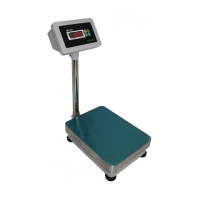
This document describes the JWI-501 series waterproof scale indicator, designed for high precision, durability, and corrosion resistance. It is suitable for retail stores, ration packing, and environments with high humidity, such as food and seafood packing. The device boasts an IP68 waterproof and dustproof grade.

Function Description

The JWI-501 scale indicator performs basic weighing, tare weighing, and counting functions. It includes features for setting various parameters to customize its operation, such as auto power off, display mode, auto zero range, buzzer, division value, and powering on range. The device also has a battery indicator and a charging function for its internal rechargeable battery.

Important Technical Specifications

The JWI-501 series offers a range of capacities:

  • Max. Capacity: 30kg, 60kg, 150kg, 300kg, 600kg
  • Min. Capacity: 20e
  • Test division e: 10g (for 30kg), 20g (for 60kg), 50g (for 150kg), 100g (for 300kg), 200g (for 600kg)
  • Display division d1: 5g (for 30kg), 10g (for 60kg), 20g (for 150kg), 50g (for 300kg), 100g (for 600kg)
  • Display division d2: 2g (for 30kg), 5g (for 60kg), 10g (for 150kg), 20g (for 300kg), 50g (for 600kg)
  • Max. tare: 100% max. capacity
  • Accuracy: III
  • Working temperature: -5~+35°C
  • Storage temperature: -25~50°C
  • Power: Inner 6V 4.5Ah rechargeable battery

Usage Features

Keyboard and Character Prompt: The device features dedicated keys for various operations:

  • ON/ZERO: Turns the device on and performs the zero function.
  • TARE: Activates the tare function.
  • OFF: Turns the device off.
  • SET/0~9: Used for setting parameters and inputting numeric values.

Character Prompts:

  • dc x.xx: Indicates the battery voltage (e.g., dc 6.25 means 6.25V).
  • -----: Appears when the weight exceeds 100%fs+9e, accompanied by a ding sound, signaling an overload.
  • -batlo-: Indicates low battery voltage, requiring immediate recharge.
  • c_end: Signals that charging is complete.
  • err-0: Indicates an overload zero of the load cell, requiring readjustment or replacement of the load cell.

Operation Guide:

  1. Installation and Adjustment: Insert the pole into the platform base and indicator, tighten screws, and adjust feet to ensure the platform is level.
  2. Turn On/Off: Press <ON/ZERO> to turn on. The device displays the software version, battery voltage (dc-x.xx), and performs a self-inspection. After a countdown, the "zero" lamp lights up, indicating it's ready for use. Press <OFF> to turn off.
  3. Auto Turn Off: If configured, the scale will automatically turn off after 10 minutes of no operation (see 3-9-3).
  4. Low Voltage Off: The device automatically turns off if the voltage drops below 5.6V.
  5. Zeroing: With no tare, if the weight display is ≤4% of max. capacity, pressing <ON/ZERO> will set the display to "0" and illuminate the "zero" lamp.
  6. Weighing: Place an item on the pan, and the device displays its weight.
  7. Tare Weighing: Place a container on the pan, press <TARE>, and the display shows "0" with the "zero" lamp off and "tare" lamp on. Add weight to the container to see the net weight. Removing the container and weight together will show negative tare. Pressing <TARE> again will turn off the "tare" lamp and return to normal weighing mode.
  8. Save Power Function: After 40 seconds of zero display, the save power function automatically starts, showing "0".
  9. Battery Indication:
    • "high": Voltage higher than 6.3V.
    • "mid": Voltage between 6V and 6.3V.
    • "low": Voltage lower than 6V, indicating power exhaustion.
  10. Brightness: Press and hold <ON/ZERO> to display "Ic-". Use <SET/0~9> to choose between "lu-1" (save power mode, recommended) and "lu-2". Confirm with <TARE>.

Parameter Settings (Press <SET/0~9> for 3 seconds to enter menu):

  • rAngE (Set Limit): Sets upper and lower weight limits. Default is "off".
    • To activate, select "on" using <SET/0~9> and confirm with <TARE>.
    • Set "under" and "over" limits by adding 1 with <SET/0~9> and confirming with <TARE>.
    • If the low limit is greater than the high limit, it displays "off" and exits.
    • Alarming: "over" lamp lights/flickers if weight ≥ high limit; "accept" lamp lights if low limit < weight < high limit; "under" lamp lights if weight ≤ low limit. No lamp lights if unstable.
  • UnItS (Choose Unit): Selects weighing units. Default is "kg".
    • Options include h9(kg), pcs (counting), lb.lb (decimal pounds).
    • Counting (pcs): When "pcs" is selected, press <TARE>. Hold <ON/ZERO> to reset to 0. Place a sample (up to max. capacity), and after stabilization, press <TARE>. Use <SET/0~9> to add 1 and <TARE> to choose. The display will show pcs and the "pcs" lamp will light. To exit counting, choose a weighing unit. Max quantity is 30000.
  • A-OFF (Choose Auto Power Off): Default is "n" (not in auto power off).
    • Select "y" for auto-off after 10 minutes of zeroing.
  • FILt (Set Display Mode): Default is "3".
    • filt-1: Shows value only when stable.
    • filt-2: Shows value slowly.
    • filt-3: Shows value fast (recommended).
    • filt-4: Shows value much faster.
  • ZEro (Set Auto Zero): Default is "1e".
    • Sets auto zero range (e.g., 0.5d, 1d, 1.5d, etc., where 'd' is division value for n=3000).
  • bUZZEr (Set Buzzer): Default is "off".
    • Select "on" to enable sound for upper and lower limit situations.
  • d (Choose Division): Default is "3000 division value".
    • Allows choosing from three divisions per capacity. Smaller divisions result in slower display speed.
  • on-rA (Powering On Range): Default is "100".
    • "100" means no limit on powering on range. If the zero point on power-on is >20% of max capacity, "Err-0" and "Err-04" will display, requiring the tare to be reduced to <20% of max capacity.

Calibration:

  1. Turn on the scale with <ON/ZERO>.
  2. Press <SET/0~9> and <ON/ZERO> together for 3 seconds. The last capacity will display. Use <SET/0~9> to select the desired capacity (e.g., c-30, c-60, c-150, c-300, c-600, c-1500, c-3000, c-6000, where 'c' is capacity in kg).
  3. Confirm with <TARE>.
  4. The offset value "0" will appear. If it's not "0", press <ON/ZERO> to zero it.
  5. Place standard weights on the plate. After the offset value is stable, press <TARE> to input the weight value. Use <SET/0~9> to add 1 and <TARE> to input the next value until finished.
  6. "CAEnd" indicates successful calibration. Note decimal placement when inputting.
  7. If "err03" displays, calibration failed due to weights being too small or an incorrect value input.

Maintenance Features

Normal Notes:

  • Always read the instruction manual before use.
  • Calibrate the scale regularly.
  • Avoid overloading or violently dropping heavy items on the scale. Damage from overload is not covered by warranty.
  • Do not expose the scale to chemicals like solvents.
  • Keep the scale clean for accurate weighing.
  • A lead seal is present on the bottom of the scale. Removing or damaging this seal voids the warranty.

For Sealed Lead Acid Battery:

  • Working Temperature: -10°C to +40°C.
  • Cycle Life: Approximately 300 charge cycles at 20°C.
  • Connection: Ensure correct connection between adapter and battery (black to black, red to red).
  • Replacement: If the battery's usage time shortens after charging, replace it with a new one.
  • Warranty: The battery has a one-month guarantee.
  • Charging: The internal 6V/4.5Ah rechargeable battery should be charged immediately when "-batlo-" is displayed. A full charge takes 12 hours. The scale does not need to be turned on during charging.

Jadever JWI-501 Series Specifications

General IconGeneral
BrandJadever
ModelJWI-501 Series
CategoryScales
LanguageEnglish

Related product manuals