6
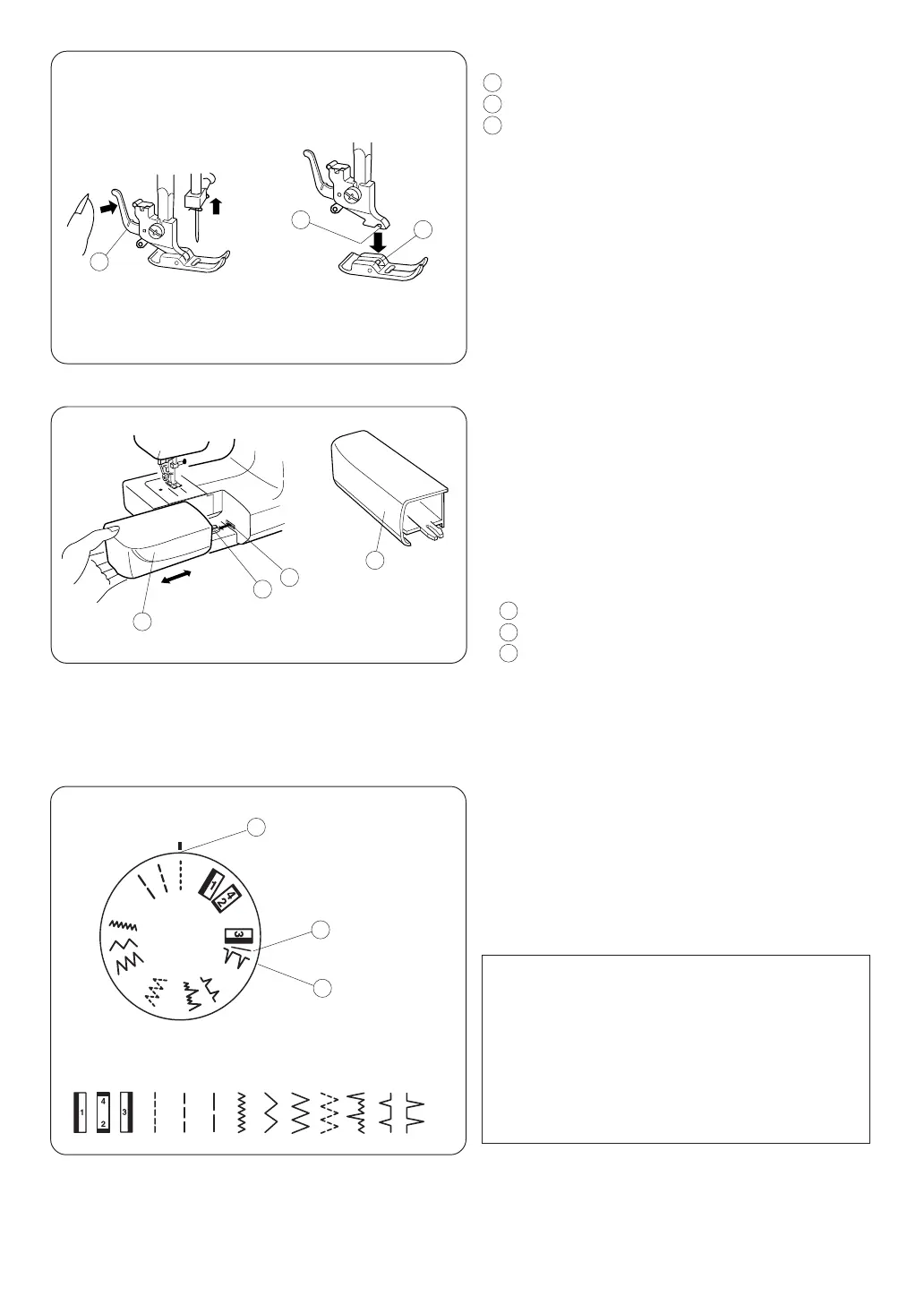
Extension Table
• Detaching the table
Pull the table away from the machine, as
illustrated, for “free-arm” sewing of cuffs and
sleeves. The extension table can be used as
accessory box.
• Attaching the table
Push the extension table until it snaps into the
machine.
1 Extension table
2 Tab
3 Hole
Changing Presser Foot
Lever
Groove
Pin
• To remove
Turn the handwheel toward you to raise the
needle to its highest position. Raise the
presser foot. Press the lever on the back of
the foot holder. The presser foot will
drop.
• To attach
Place the presser foot so that the pin on the
foot lines up directly below the groove of the
foot holder. Lower the foot holder to lock the
foot in place.
1
2
3
2
1
1
3
Stitch Selector
q Setting mark
w Stitch selector
e Stitch selector stop
Raise the needle above the fabric.
Turn the dial to select the desired pattern.
NOTE:
Stitch selector dial will turn clockwise or
counterclockwise until it reaches the stitch
selector stop.
To avoid needle or fabric damage, make sure
the needle is up and out of the fabric while
selecting a stitch.
2
1
3
2
1
A B CD E F GH I J
3
Janome 3128 Instruction Manual
3128 Owners Manual/ User Guide


 To Next Page