30
Edit
Font
A Z
AB
OK
M
L
S
AB
Mode
G
H
IJKL
M
N
OP
Q
RST
U
V
W
X
YZ
A
B
C
DEF
Gothic
AB
A(F)
A Z
(1)
(7)
Font
AB
OK
M
L
S
AB
Mode
A Z
(8)
(9)
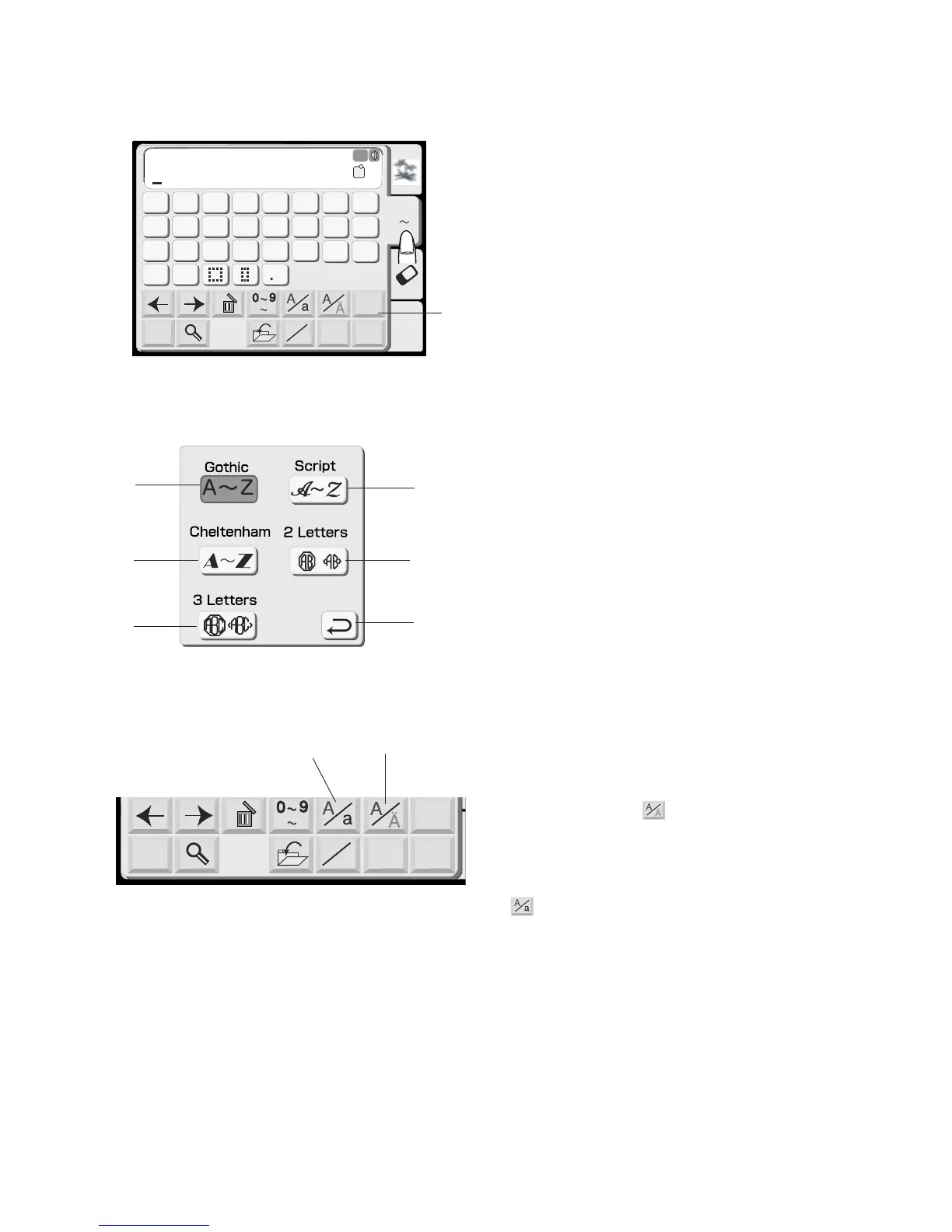
Monogram Selection Window
In the monogram selection window, you can program
words by pressing the alphabet keys directly.
After you press an alphabet key, the letter is memorized
and the cursor is moved to the right side.
Font key
You can change the type of font for monogramming by
pressing the Font Key and select one of the six choices
available.
(1) Font key
The following font selections are indicated on the
screen.
(2) Gothic font
(3) Script font
(4) Cheltenham font
(5) 2-Letters
(6) 3-Letters
(7) Return key
When you press the return key, the selected font will be
indicated.
European accented letter
You can select the European accented letters, such as
Umlaut, by pressing the key.
(8) European accented letter key
You can select upper or lower case letters by pressing
the key.
(9) Upper/lower case key
(2)
(3)
(4)
(5)
(6)





 To Next Page