32
Monogram Embroidery
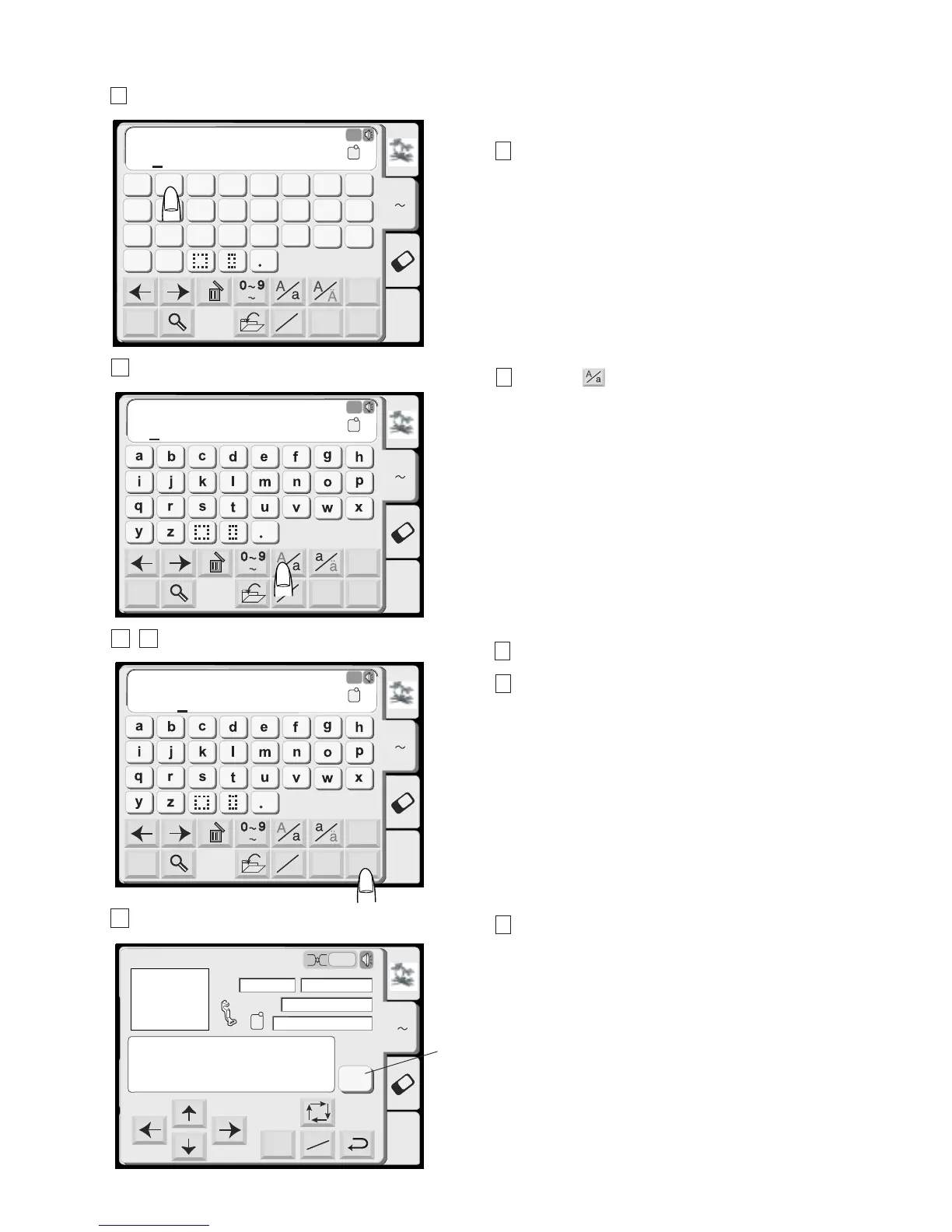
1 Press the font key and select the Gothic style
letters. Select “B”.
2 Press the key to select lowercase letters.
3 Select “e”, “a” and “r”.
4 Press the OK key.
5 The display will change to the embroidery screen.
You can sew a multi-color monogram by changing the
thread color of each letter if you press the color change
key before sewing.
The machine will stop automatically when each letter
has been sewn. Change the thread and start sewing
again.
(1) Color Change key
Edit
Font
A Z
AB
OK
M
L
S
AB
Mode
G
H
IJKL
M
N
OP
Q
RST
U
V
W
X
YZ
A
B
C
DEF
Gothic
AB
A(F)
A Z
B
Edit
Font
A Z
AB
OK
M
L
S
AB
Mode
Gothic
AB
A(F)
A Z
B
Edit
Font
A Z
AB
OK
M
L
S
AB
Mode
Gothic
AB
A(F)
A Z
B
ear
Edit
Mode
Ready to Sew
A Z
Size
2
P
A(F): 126x110mm
52x19mm
1 Color
3 min
Jog
ST
Color
Change
Bear
Bear
1
2
3 4
5
(1)





 To Next Page