14
Autoranging Digital Multimeter
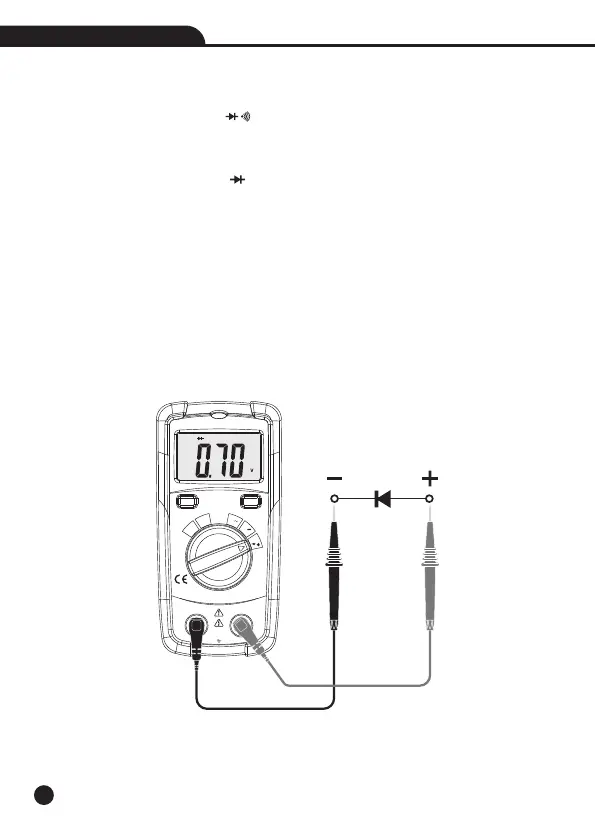
4-7.Diode Test
WARNING: To avoid electric shock, do not test any diode that has voltage on it.
1.Set the function switch to the Position.Ω
2.Insert the black test lead banana into the COM Input Jack; Insert the red test lead banana into
the Positive Input Jack.
3.Press the MODE Button until the “ ” symbol appears in the display.
4.Touch the test probe tips to the diode or semiconductor junction you wish to test, note the meter
reading.
5.Reverse the probe polarity by switching probe position, note this reading.
6.The diode or junction can be evaluated as follows:
• If one reading shows a value and the other reading shows “OL”, the diode is good.
• If both readings show “OL”, the device is open.
• If both readings are very small or 0, the device is shorted.
Note: The value indicated in the display during the diode check is the forward voltage.
Autoranging
Digital Multimeter
OFF
mA
μA
V
Auto
Power
Off
Ω
V
MODEMAX
COM
V Ω mA μA
200mA/600V
CAT III 300V
CAT II 600V


 To Next Page