8
Autoranging Digital Multimeter
4.Operation
WARNING: Risk of electrocution. High-voltage circuits, both AC and DC, are very dangerous and
should be measured with great care.
• Always turn the function switch to the OFF position when the meter is not in use, this meter has
Auto OFF that automatically shuts the meter OFF if 15 minutes elapse between uses.
• If “OL” appears in the display during a measurement, the value exceeds the range you have
selected, change to a higher range.
Note: On some low AC and DC voltage ranges, with the test leads not connected to a device, the
display may show a random, changing reading, this is normal and is caused by the high-input
sensitivity, the reading will stabilize and give a proper measurement when connected to a circuit.
4-
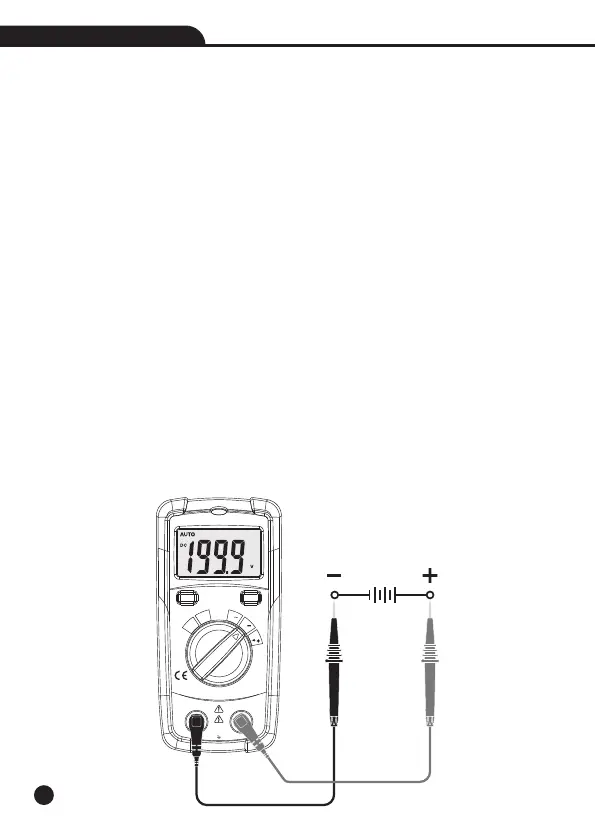
1.DC Voltage Measurement
CAUTION: Do not measure DC voltages if a motor on the circuit is being switched ON or OFF. Large
voltage surges may occur that can damage the meter.
1.Set the function switch to the VDC Position (“mV” will appear in the display).
2.Insert the black test lead banana into the COM Input Jack; Insert the red test lead banana into
the Positive Input Jack.
3.Touch the test probe tips to the circuit under test, be sure to observe the correct polarity (Red lead
to positive, Black lead to negative).
4.Read the voltage in the display.
Autoranging
Digital Multimeter
OFF
mA
μA
V
Auto
Power
Off
Ω
V
MODEMAX
COM V Ω mA μA
200mA/600V
CAT III 300V
CAT II 600V


 To Next Page