8. Video MODE
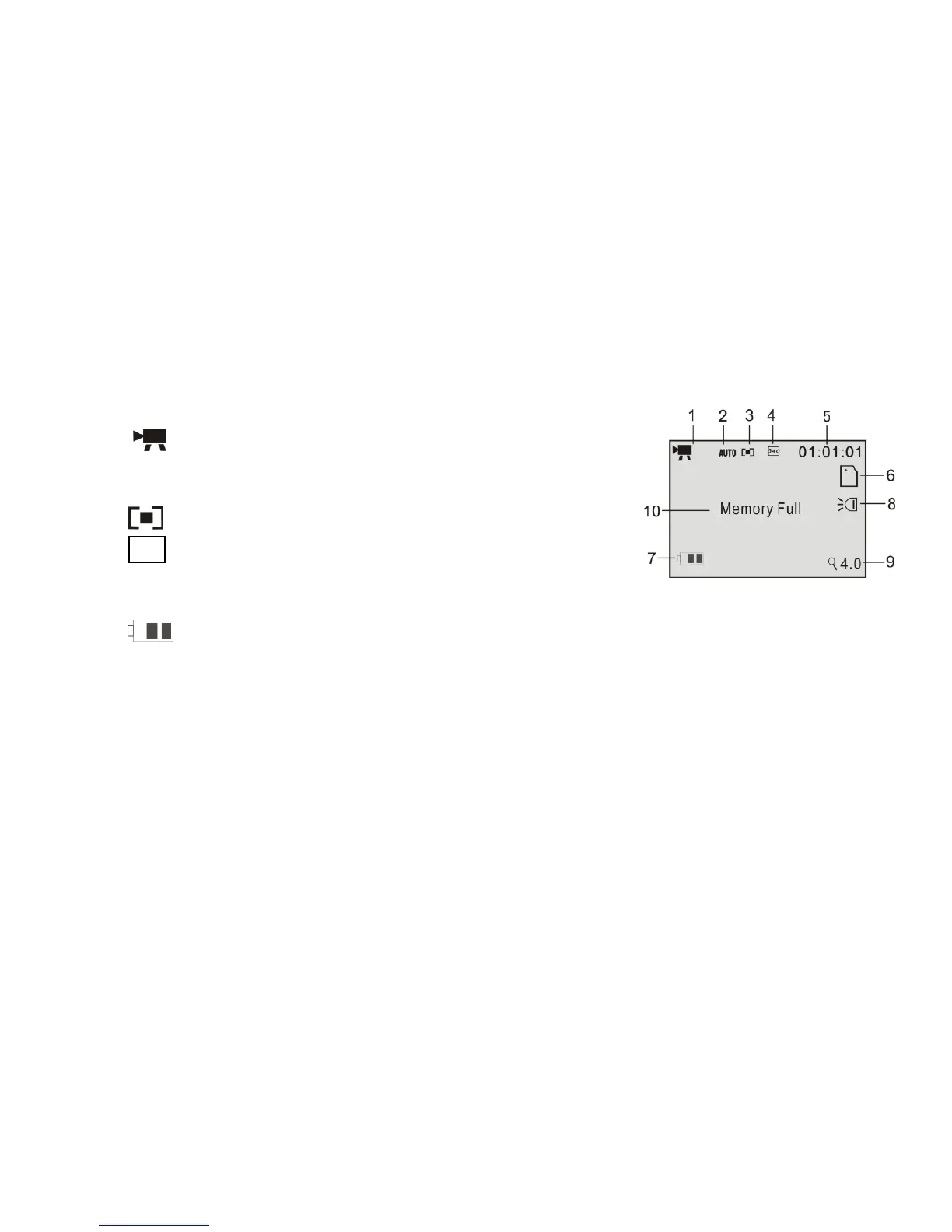
Preview / scene mode: The following icons / information are displayed on the LCD
screen in Video MODE.
1 Video Mode icon
2 Auto White Balance icon
Available: Auto/Daylight/Cloudy/Fluorescent/Tungsten
3 Metering / exposure (multi)
4 640 Video resolution indicator 640x480 or 320x240.
5 00:00:00 Video recording counter; hours, min, sec.
6 SD Card icon: the icon appears when the SD card is inserted
7 the battery power indicator
8 LED Supporting light icon: the lamp is ON
9 Zoom range: numbers indicate current setting of the zoom (max. 4X available)
10 Memory Full: message indicates that the memory (internal or SD card) is full and
no more recording is possible.
Recording the Video clip
Turn the camcorder ON and select the Video MODE
Point the lens towards the subject, observing the scene appearing on the LCD screen.



 To Next Page