ENGLISH
15EN
BLUETOOTH
present mode will be released at the same time.
2) When making an outgoing call, it’s not possible to transfer if
the call is not being answered yet.
BLUETOOTH AUDIO (A2DP)
The unit supports Bluetooth audio function.
If your mobile phone can play stereo audio, when
the paring is ok, you can choose the unit you have
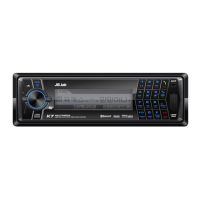
paired to play the stereo music. M1, M2 button on
the front panel of the unit serves as PAUSE/PLAY,
STOP control button. (It is up to the mobile phone,
the different mobile phone has the different define.)
Use / button (1) on the front panel of the unit to
choose the previous/next track. (It is up to the mo-
bile phone, the different mobile phone has the dif-
ferent define.)
when playing music, you can not make any phone call. When
there is an incoming call, you can choose to answer it or not.
NAVIGATION AUTOMATIC
VOICE INFORMATION TRANSFER
This equipment supports Automatic Voice Informa-
tion Transfer functionality of Navigation, which sup-
ports Bluetooth. If you want to use this function, you
have to pairing K7 and Navigation together. Finish-
ing pairing, even though you are listening to music
or radio, Voice Information will play back when it
needs without changing into specific mode. And
music that is playing back will be automatically sus-
pended.
This function doesn’t support if your navigation has no Stream-
ing function.


 To Next Page