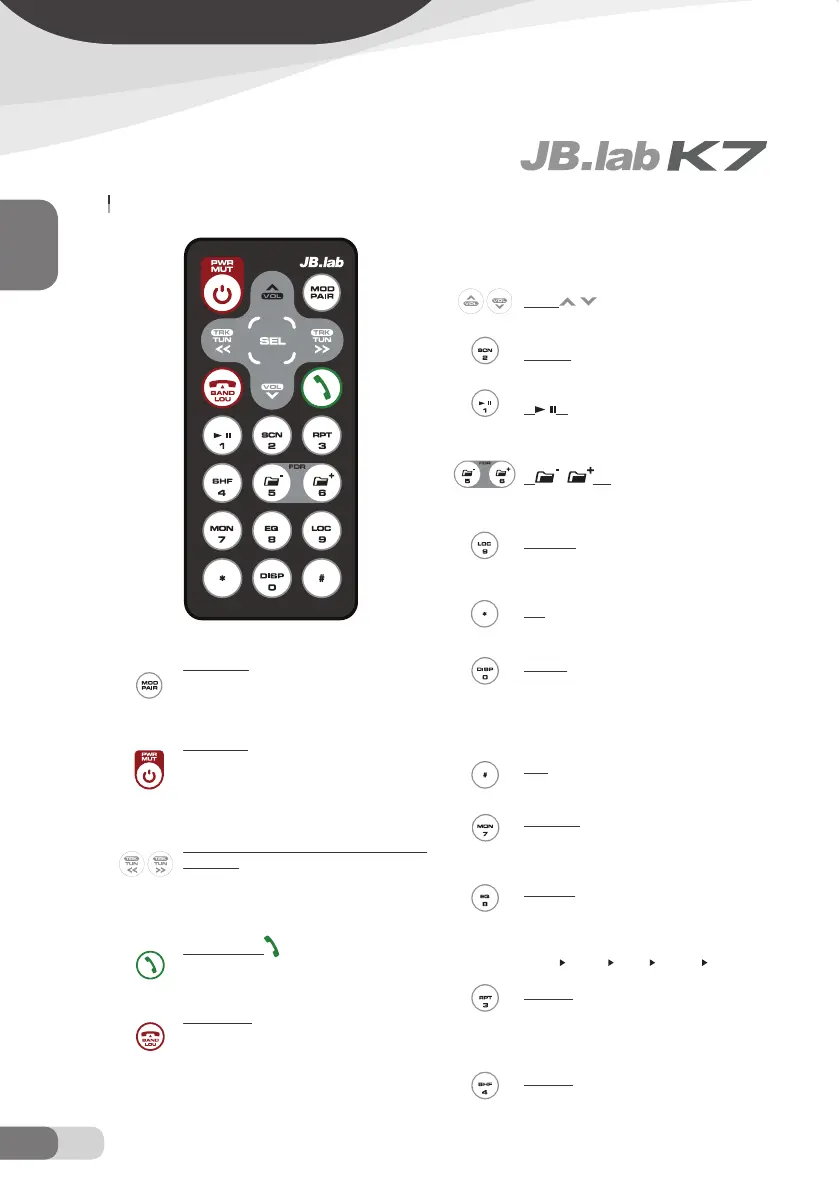
FUNCTION KEYS & CONTROL
1. MOD/PAIR
Press it shortly to change the mode among Radio,
CD, USB, SD CARD, AUX and BT Audio. Press and
hold it to enter the pair function for BT operation.
2. PWR/MUT
When the unit is not on, shortly press PWR to turn
on the unit. Press and hold it to turn the unit off.
When the unit is on, shortly press MUT to mute the
sound, shortly press it again to resume the sound.
3. previous/next track, fast reverse / forward, tune
down or up
Shortly press / to play the previous/next track.
Press and hold / to fast reverse / forward. In radio
mode, press / to tune down or up.
4. BLUETOOTH
In Bluetooth mode, press it to answer the incom-
ing call.
5. BAND/LOU
In Bluetooth mode, press it to hung up the call or
reject the incoming call. And CLR button serves
as back spaces key. In Radio mode, press BAND
to select the desired band. Press and hold LOU to
switch loudness function on or off. When playing
WMA/MP3 disc, in searching mode, use it to con-
firm the selection.
6. VOL
Press it to decrease, increase the volume level.
7. SCN, 2
Press it to scan tracks.
8.
, 1
Press it to pause the playback, press it again will
resume the playback.
9.
5, 6
When playing MP3/WMA files, use it to select di-
rectory upward, downward.
10. LOC, 9
Press and hold it to enter LOCAL/DISTANT func-
tion.
11. *
In Bluetooth mode, use it to input * icon.
12. DISP
Press DISP to change the display information.
When reading MP3/WMA files, press it to display
the corresponding information, such as: folder, file,
song title, artist and album.
13. #
In Bluetooth mode, use it to enter # icon.
14. MON, 7
Press and hold MON to change mono/stereo
mode reception.
15. EQ, 8T
Shortly press EQ to turn on equalization function
and to select desired audio mode:
FLAT CLAS POP ROCK DSP OFF
16. RPT, 3
Shortly press it to to continuously repeat the same
track. When playing MP3/WMA disc press and
hold it to repeat all the tracks in the current folder.
17. SHF, 4
Shortly press it to play all tracks on disc in random
ENGLISH
16 EN
REMOTE CONTROL


 To Next Page