EasyManua.ls Logo

JBL ON TIME 200ID - Alarm Setting; To Enable;Disable a Set Alarm; Waking to the Ipod

JBL ON TIME 200ID
19 pages
Print Icon
To Next Page IconTo Next Page
To Previous Page IconTo Previous Page
Loading...
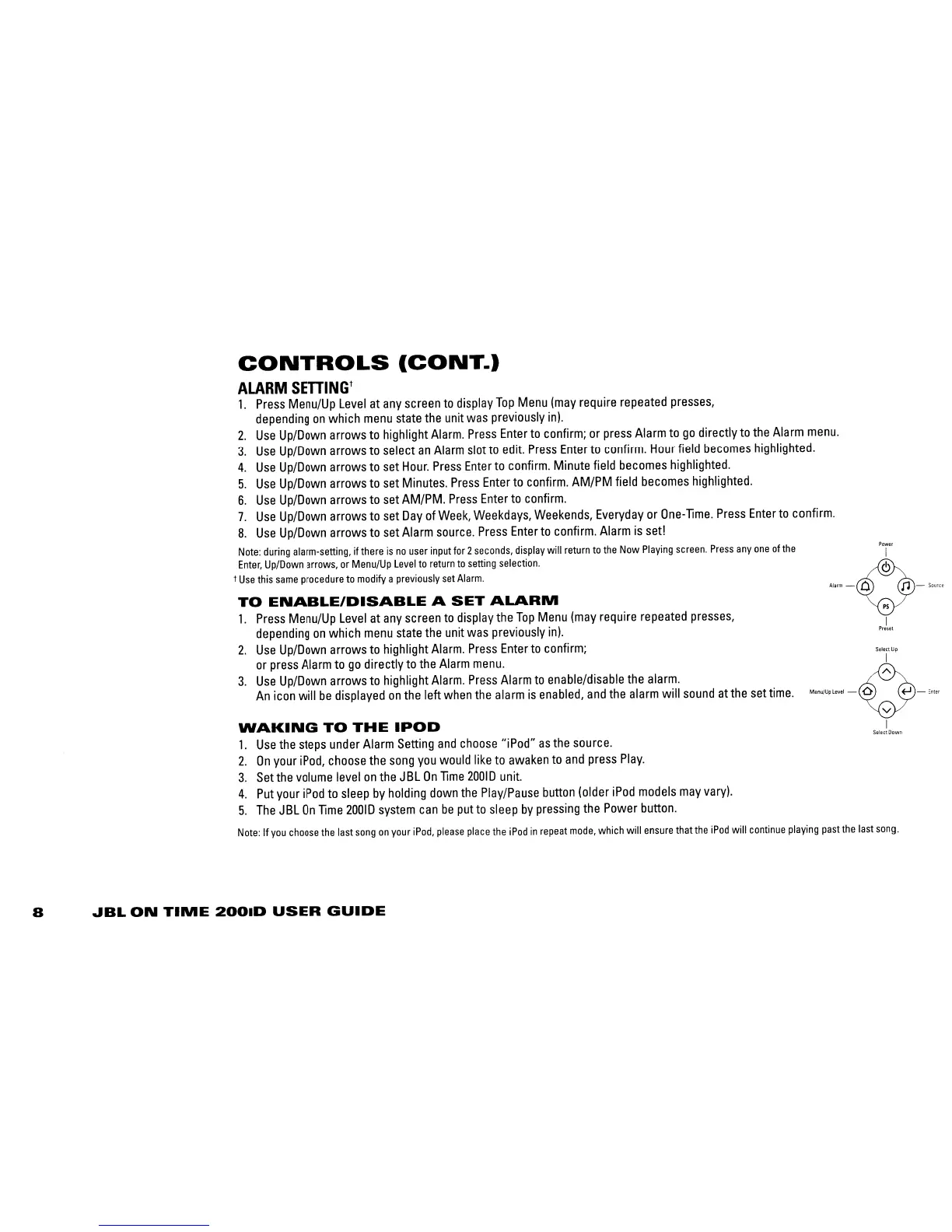
CONTROLS
(CONT.)
ALARM
SETTING
t
1.
Press
Menu/Up
Level
at
any
screen
to
display
Top
Menu
(may
require
repeated
presses,
depending
on
which
menu
state
the
unit
was
previously inl.
2.
Use
Up/Down
arrows
to
highlight
Alarm.
Press
Enter
to
confirm;
or
press
Alarm
to
go
directly
to
the
Alarm
menu.
3.
Use
Up/Down
arrows
to
select
an
Alarm
slot
to
edit.
Press
Enter
to
confirm.
Hour
field
becomes
highlighted.
4.
Use
UplDown
arrows
to
set
Hour.
Press
Enter
to
confirm.
Minute field
becomes
highlighted.
5.
Use
Up/Down
arrows
to
set Minutes.
Press
Enter
to
confirm.
AM/PM field
becomes
highlighted.
6.
Use
Up/Down
arrows
to
set
AM/PM.
Press
Enter
to
confirm.
7.
Use
Up/Down
arrows
to
set
Day
of
Week,
Weekdays,
Weekends,
Everyday
or
One-lime.
Press
Enter
to
confirm.
8.
Use
Up/Down
arrows
to
set
Alarm
source.
Press
Enter
to
confirm.
Alarm
is
set!
Note:
during
alarm-setting, if there
is
no
user
input
for
2
seconds,
display
will
return
to
the
Now
Playing
screen.
Press
anyone
of
the
Enter,
Up/Down
arrows,
or
Menu/Up
Level
to
return
to
setting
selection.
t
Use
this
same
procedure
to
modify a
previously
set
Alarm.
TO
ENABLE/DISABLE
A
SET
ALARM
1.
Press
Menu/Up
Level
at
any
screen
to
display
the
Top
Menu
(may
require
repeated
presses,
depending
on
which
menu
state
the
unit
was
previously
in
I.
2.
Use
Up/Down
arrows
to
highlight
Alarm.
Press
Enter
to
confirm;
or
press
Alarm
to
go
directly
to
the
Alarm
menu.
3.
Use
Up/Down
arrows
to
highlight
Alarm.
Press
Alarm
to
enable/disable
the
alarm.
An
icon
will
be
displayed
on
the
left
when
the
alarm
is
enabled,
and
the
alarm
will
sound
at
the
set
time.
WAKING
TO
THE
IPOD
1.
Use
the
steps
under
Alarm
Setting
and
choose
"iPod"
as
the
source.
2.
On
your
iPod,
choose
the
song
you
would
like
to
awaken
to
and
press
Play.
3.
Set
the
volume
level
on
the
J
BL
On
lime
20010
unit.
4.
Put
your
iPod
to
sleep
by
holding
down
the
Play/Pause
button
(older
iPod
models
may
varyl.
5.
The
JBL
On
lime
20010
system
can
be
put
to
sleep
by
pressing
the
Power
button.
Power
I
~'·-V-'·'"
I
Preset
Select
Up
I
"'"~.".
-0-
,~,
I
SelectOown
Note:
If
you
choose
the
last
song
on
your
iPod,
please
place
the
iPod
in
repeat
mode,
which
will
ensure
that
the
iPod
will
continue
playing
past
the
last
song.
8
JBL
ON
TIME
200lD
USER
GUIDE

Related product manuals