SYSTEM CONNECTIONS
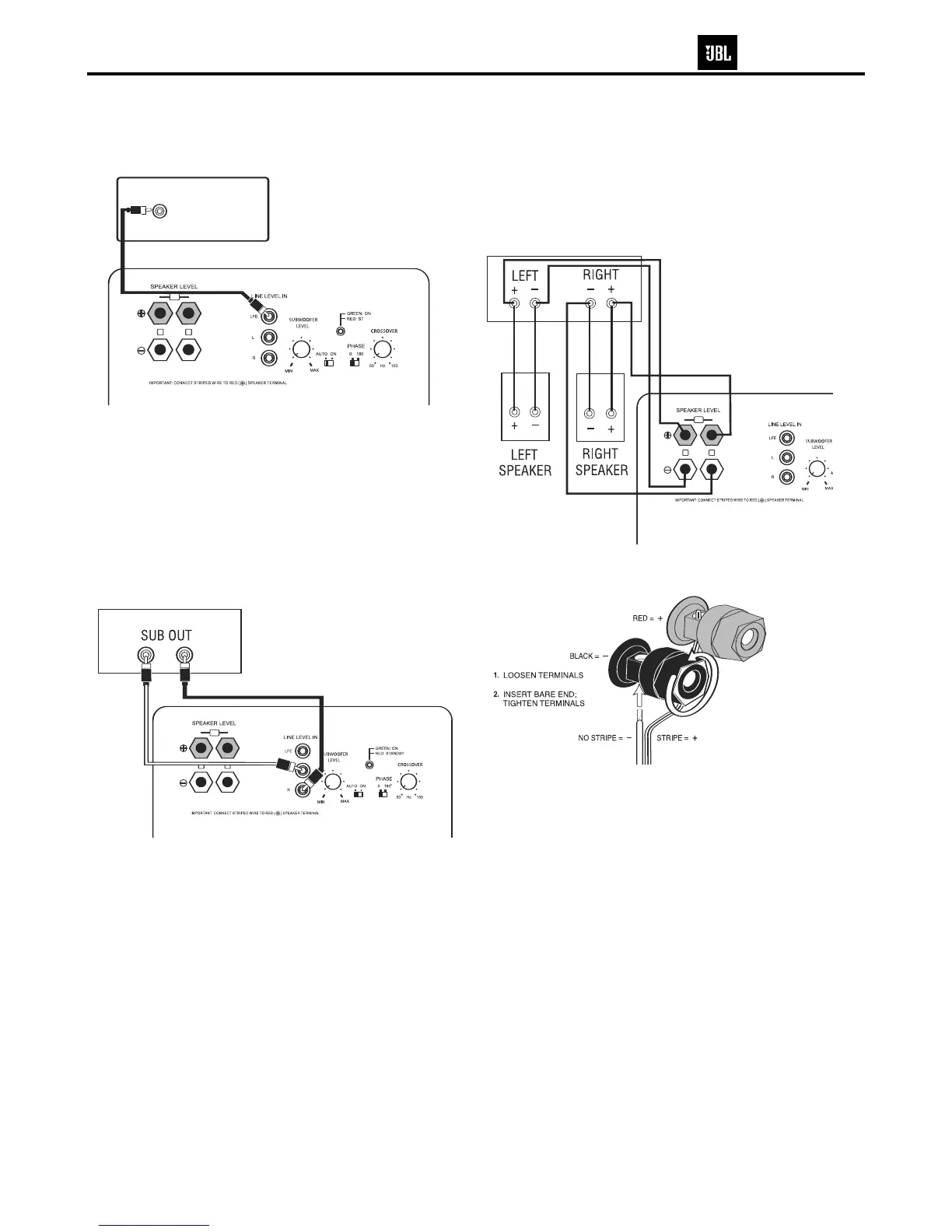
If you have a Dolby
®
Digital or DTS
®
receiver/processor with a low-frequency-
effects (LFE) or subwoofer output:
RECEIVER/AMPLIFIER
Front Speaker Output
IN
L
R
SUBWOOFER OR
LFE OUTPUT
00
ANDBY
IN
L
R
This figure shows how to connect bare wires to the speaker-level terminals.
If your receiver/processor does not have subwoofer outputs for the left and
right channels or an LFE output, connect speaker wire from your receiver/
amplifier to your speakers and subwoofer using two sets of speaker wire:
If your receiver/processor does not contain a Dolby Digital or DTS processor
but has subwoofer outputs:
NOTE: If your receiver/processor has only one sub out, you may use either the
L or R input.
RECEIVER/PROCESSOR
LR
0
L
IN
L
R
SUB10 Venture Series


 To Next Page