Optipay® CC JCM Training Overview JCM Training Overview December, 2006
Part No. 960-000153R_ Rev. A © 2006, JCM American, Corporation
18 11
Lecture NotesLecture Notes
P
ALM
A-66US
Palm A-66US is used to configure, service, and diagnose the A-66.
Using Palm A66US
To use the Palm A-66 Application perform the following steps:
1. Connect the Palm PDA to the A-66 using the Palm Dongle Cable Assembly.
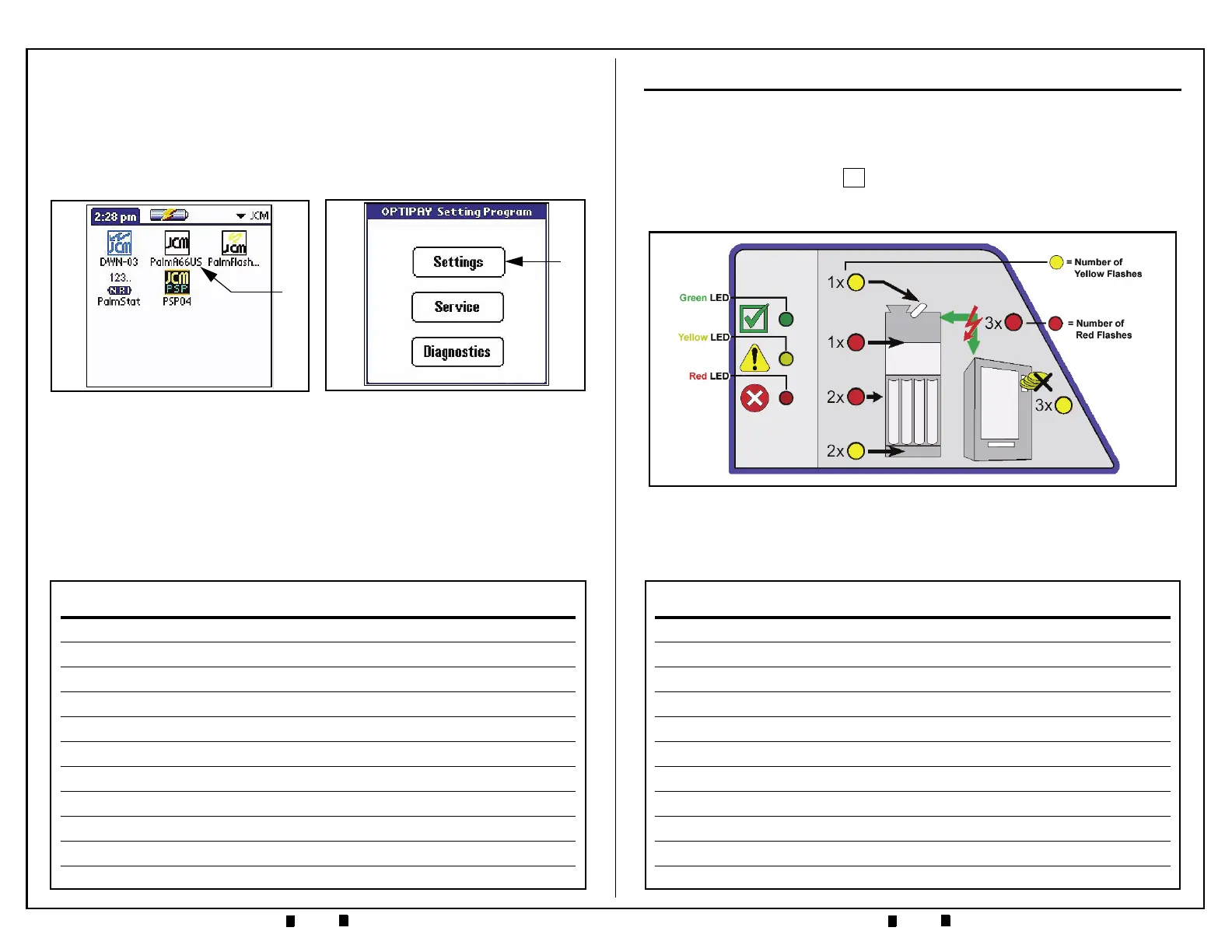
2. Run 'Palm A66US' (See Figure 17 a).
The main menu will display the following three (3) user-interactive mode
selection buttons: Settings, Service, and Diagnostics
(See Figure 18).
3. Select the ‘Settings’ Screen Button. The program now offers the following 5
sub-menus to choose from (Operating Modes, Inhibit Mask, Coin Settings,
Recycler, and Other Settings) as shown in Figure 19.
Figure 18 A-66US Main Screen
a
Figure 17 Palm A-66US Selection
a
LED INDICATORS & TROUBLESHOOTING
F
RONT
P
ANEL
LED - I
NDICATIONS
AND
T
ROUBLESHOOTING
• Green LED lit — power applied, normal operation indicated (See Figure 4)
•
Green LED flashing — A-66 is in the 'coin filling mode'. Coin filling mode is
entered by pressing the Plus Keypad Button one (1) time. If the A-66 is left in
this mode for more than 30 seconds without detecting any coin activity, it will auto-
matically reset and return to normal operation.
•
Green and Yellow LED lit — An inhibited coin was inserted. Check Vending
Machine settings. A possibility exists that high value coins were inhibited due to
empty coin tubes.
+
Figure 4 Quick Diagnosis with the Help of the Pilot Lights


 To Next Page