Optipay® CC JCM Training Overview JCM Training Overview December, 2006
Part No. 960-000153R_ Rev. A © 2006, JCM American, Corporation
16 13
Lecture NotesLecture Notes
P
ALM
S
TAT
• Palm Stat is an application used to read statistical data from the Coin Changer
• Data read out takes only a few seconds using a Palm Pilot
®
PDA.
Using Palm Stat to read out data:
Perform the following steps to read data from the A-66 memory:
1. Connect the Palm Pilot
®
PDA to the A-66 using the Palm Dongle Cable.
2. Run
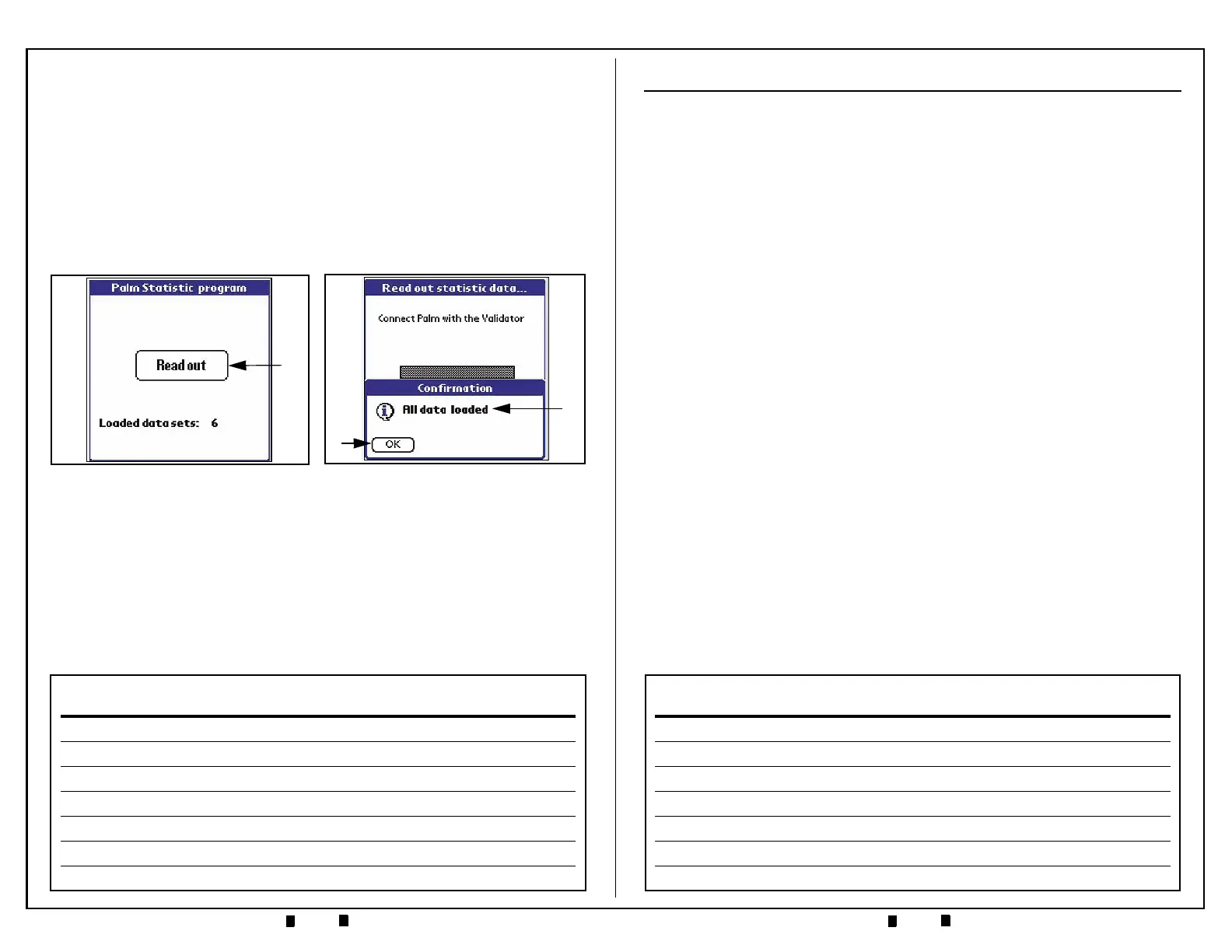
'PalmStat’, and click the 'Read Out' screen button (See Figure 11 a). The
Data will download and
‘All data loaded’ will be displayed in a Confirmation
Submenu when the download is finished (See Figure 12 a).
3. Click the ‘OK’ Screen Button when this message appears (See Figure 12 b).
4. Select the 'Cancel' Screen Button to revert back to the 'Read Out' page.
5. Tap on the upper left corner of the PDA menu bar to reveal the following two
(2) user choices: 'Transfer Data' and 'See Data'.
Figure 12 Readout Data Loaded Sub-
Menu Screen
a
b
Figure 11 PalmStat Readout Screen
a
DOWNLOADING PALM PILOT
®
APPLICATIONS
P
ALM
F
LASH
• An Application used to load operating software into the A-66 Coin Changer
• Software file required:
Palm Flash
• Firmware file required: A-66 Optipay CC.
P
ALM
S
TAT
• An Application used to read statistical data out of the Coin Changer’s
memory
• Software file required:
Palm Stat.
P
ALM
A66US
• An application used for Configuration, Service and Diagnostic functions in
the A-66 Coin Changer
• Software file required:
Palm A-66.
What you will need:
• An M100 series, M500 series, or Tungsten Hand Held Palm Pilot
®
PDA
• A Palm Pilot
®
Hot Sync Cradle assembly for connecting the PDA to a PC
• A Palm Pilot
®
Dongle interface cable assembly (JCM p/n 400-100219)
• A Desktop or Laptop PC system with internet access capabilities.
Downloading software to PC and PDA
Perform the following steps to download a copy of the Palm Pilot
®
Applications:
1. Select ‘Product Support’ at the JCM Website (www.jcm-american.com).
2. Select
‘Software’ in the ‘Product Support’ pull down menu.
3. In the
‘Software’ pull-down menu select either ‘Software Applications’ or
‘Firmware Downloads’; then download the required Palm PDA Application
files mentioned above to your PC.
4. Connect the Palm PDA to the PC using a Palm Hot Sync Cradle.
5. Using the applicable Palm Desktop software, Hot Sync the PDA to the PC to
download and install the necessary files onto the PDA.


 To Next Page