Optipay® CC JCM Training Overview December, 2006
Part No. 960-000153R_ Rev. A © 2006, JCM American, Corporation
14 15
Lecture Notes Lecture Notes
PALM PILOT
®
APPLICATIONS
P
ALM
F
LASH
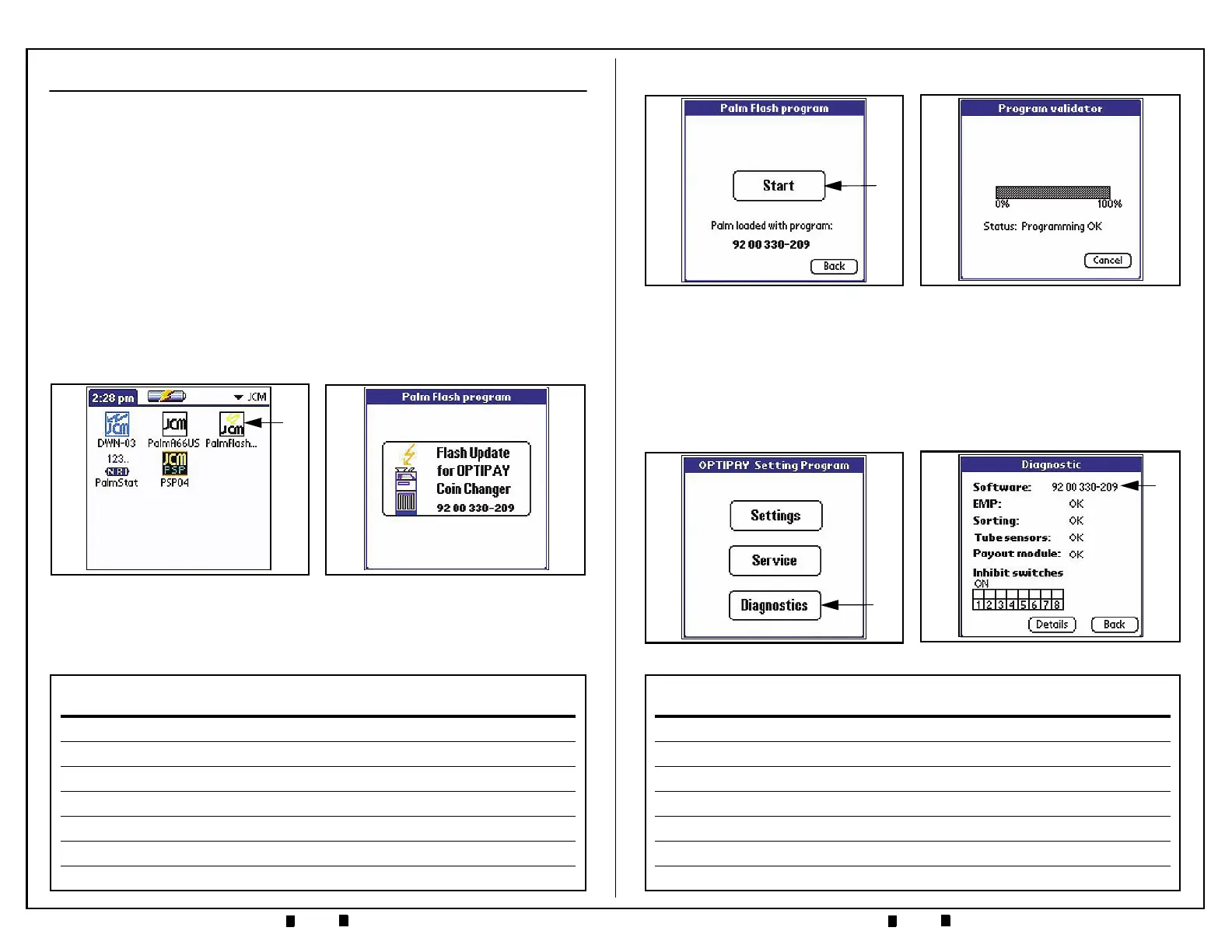
• Palm Flash is an application used to load operating software into the A-66 Coin
Changer
• The Flash Memory size of the A-66 is 32K bytes in size
• Download takes about 40 seconds using a Palm Pilot
®
PDA.
Flashing the A-66 Coin Changer Memory:
Perform the following steps to Flash the A-66 memory:
1. Connect the PDA to the A-66 using the Palm Dongle Cable Assembly.
2. Run the Palm Flash program by selecting the
‘PalmFlash’ Icon (See Figure 5 a),
then select the large
‘Flash Update for Optpay Coin Changer’ Icon (See Figure 6)
and click on the
'Start' screen button that appears (See Figure 7 a). The A-66
operating software will now be transferred into Flash Memory. When the down-
load is complete, the PDA status will indicate
'Programming OK' and stop (See
Figure 8). The
‘Back’ button will always return the user to the previous screen.
Figure 6 Flash Update Select Screen
Figure 5 Palm Optipay Apps Screen
a
P
ALM
F
LASH
A
PPLICATION
(C
ONTINUED
)
Software load verification:
Perform the following steps to verify the download operation:
1. Run the A-66US application by selecting the 'Palm A66US' Icon on the PDA.
2. On the next PDA screen, click on the
'Diagnostics' Screen Button
(See Figure 9 a).
3. The currently installed software version will be displayed at the top of the
‘Diagnostic’ Screen (See Figure 10 a).
Figure 8 Flash Program OK Screen
Figure 7 Flash Start Button Screen
a
Figure 10 Flash Load Verify Screen
a
Figure 9 Diagnostic Select Screen
a


 To Previous Page