EasyManua.ls Logo

Jensen CD-470 - Troubleshooting and Service; Problem Solving Guide; Service Information

Jensen CD-470
8 pages
Print Icon
To Previous Page IconTo Previous Page
Loading...
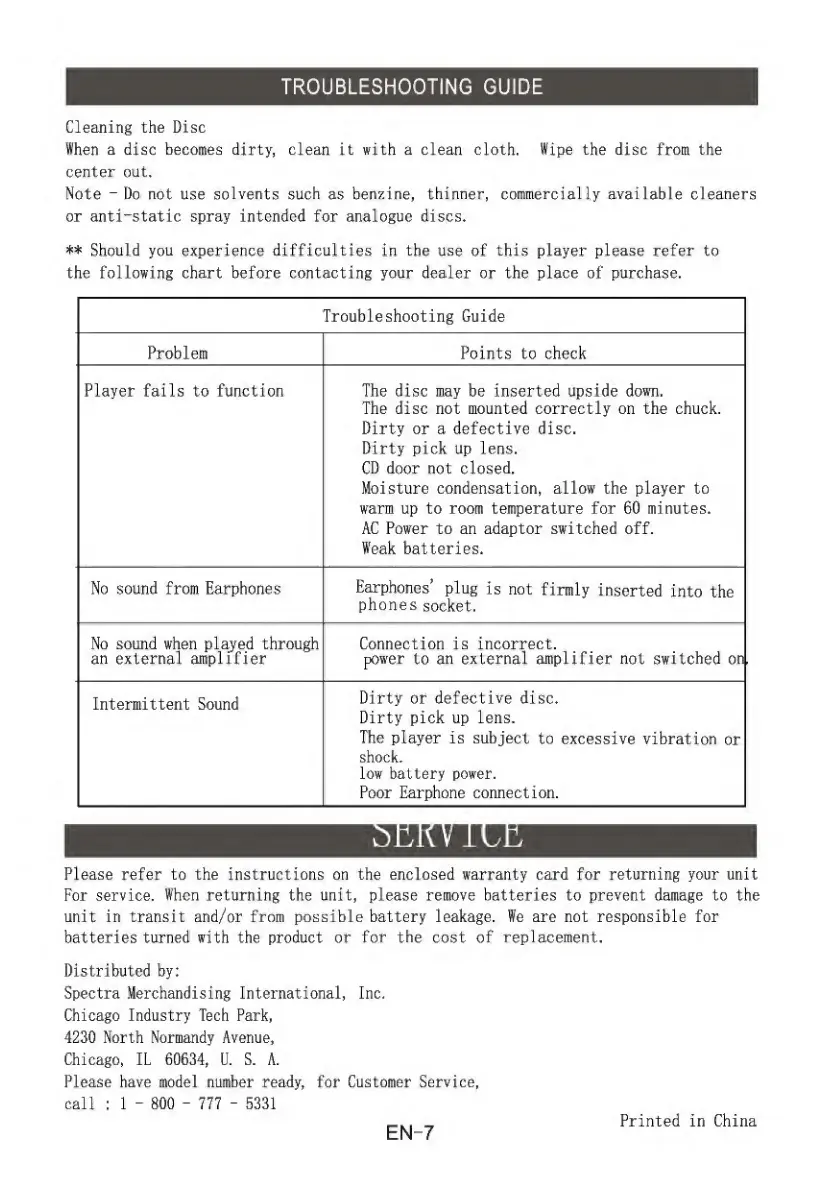
TROUBLESHOOTING
GUIDE
Cleaning
the
Disc
When
a
disc
becomes
dirty,
clean
it
with
a
clean
cloth.
Wipe
the
disc
from
the
center
out.
Note
“Do
not
use
solvents
such
as
benzinej
thinner,
commercially
available
cleaners
or
anti-static
spray
intended
for
analogue
discs,
’1'^
Should
you
experience
difficulties
in
the
use
of
this
player
please
refer
to
the
following
chart
before
contacting
your
dealer
or
the
place
of
purchase.
Troubleshooting
Guide
Problem
Points
to
check
Player
fails
to
function
The
disc
may
be
inserted
upside
down.
The
disc
not
mounted
correctly
on
the
chuck.
Dirty
or
a
defective
disc.
Dirty
pick
up
lens.
CD
door
not
closed.
Moisture
condensation,
allow
the
player
to
warm
up
to
room
temperature
for
60
minutes,
AC
Power
to
an
adaptor
switched
off.
Weak
batteries.
No
sound
from
Earphones
Earphones
plug
is
not
firmly
inserted
into
the
phones
socket.
No
sound
when
played
through
an
external
amplifier
Connection
is
incorrect.
power
to
an
external
amplifier
not
switched
on
Intermittent
Sound
Dirty
or
defective
disc.
Dirty
pick
up
lens.
The
player
is
subject
to
excessive
vibration
or
shock,
low
battery
power.
Poor
Earphone
connection.
Please
refer
to
the
instructions
on
the
enclosed
warranty
card
for
returning
your
unit
For
service.
When
returning
the
unit,
please
remove
batteries
to
prevent
damage
to
the
unit
in
transit
and/or
from
possible
battery
leakage.
We
are
not
responsible
for
batteries
turned
with
the
product
or
for
the
cost
of
replacement.
Distributed
by:
Spectra
Merchandising
International,
Inc,
Chicago
Industry
Tech
Park,
4230
North
Normandy
Avenue,
Chicago,
IL
60634,
U.
S.
A.
Please
have
model
number
ready,
for
Customer
Service,
call
:
1
-
800
-
777
-
5331
EN-7
Printed
in
China

Related product manuals