E-
Battery Low Indicator (CD Mode only)
• The Battery Low Indicator will appear in the display when the batteries
need to be changed.
CD PLAY MODE
NORMAL PLAYBACK
The whole disc is played and the player will stop after the last track is finished.
SKIP AND SEARCH MODE
1. During Play or Pause mode, tap the SKIP Forward "" or SKIP BACKWARD
"" BUTTON to go to the next track or go back to the beginning of the current
track.
2. During play mode or Pause mode, press and hold the SEARCH Forward ""
or SEARCH BACKWARD "" BUTTON to search within the current track with
audible high speed playback.
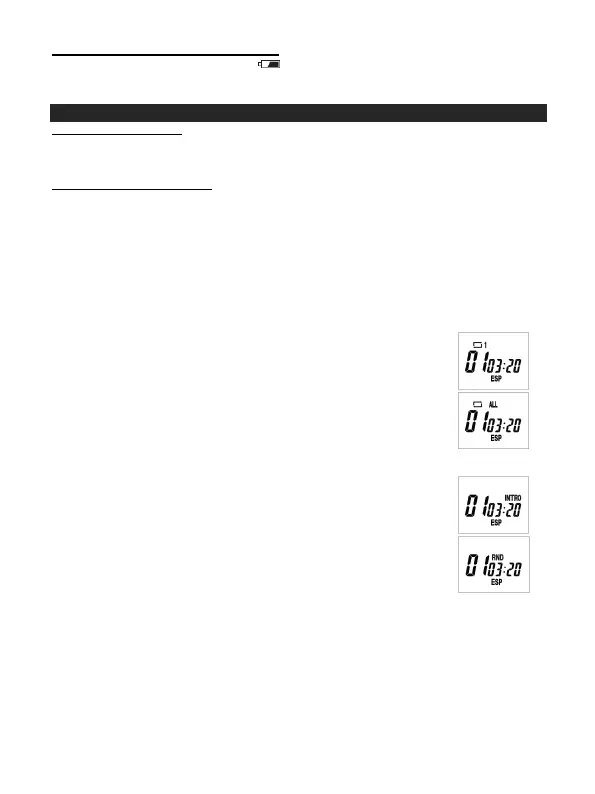
Every time the CD PLAY MODE button is pressed, the corresponding mode appears in
the display window, in the following sequence:
REPEAT 1:
When shown on the LCD display, the current track on the disc will
be repeated.
REPEAT ALL:
When shown on the LCD display, all tracks on the disc will be
repeated.
To cancel the Repeat function, press the CD PLAY MODE button
repeatedly until the icon disappears.
INTRO:
To play the first 10 seconds of each track on the disc.
RANDOM:
Enables all the tracks on the disc to be played in a random
sequence.
To cancel INTRO & RANDOM function, press the CD PLAY MODE
button repeatedly until the icon disappears.



 To Next Page