19
OPERATIONCR271ML
SiriusXM Satellite Radio Operation
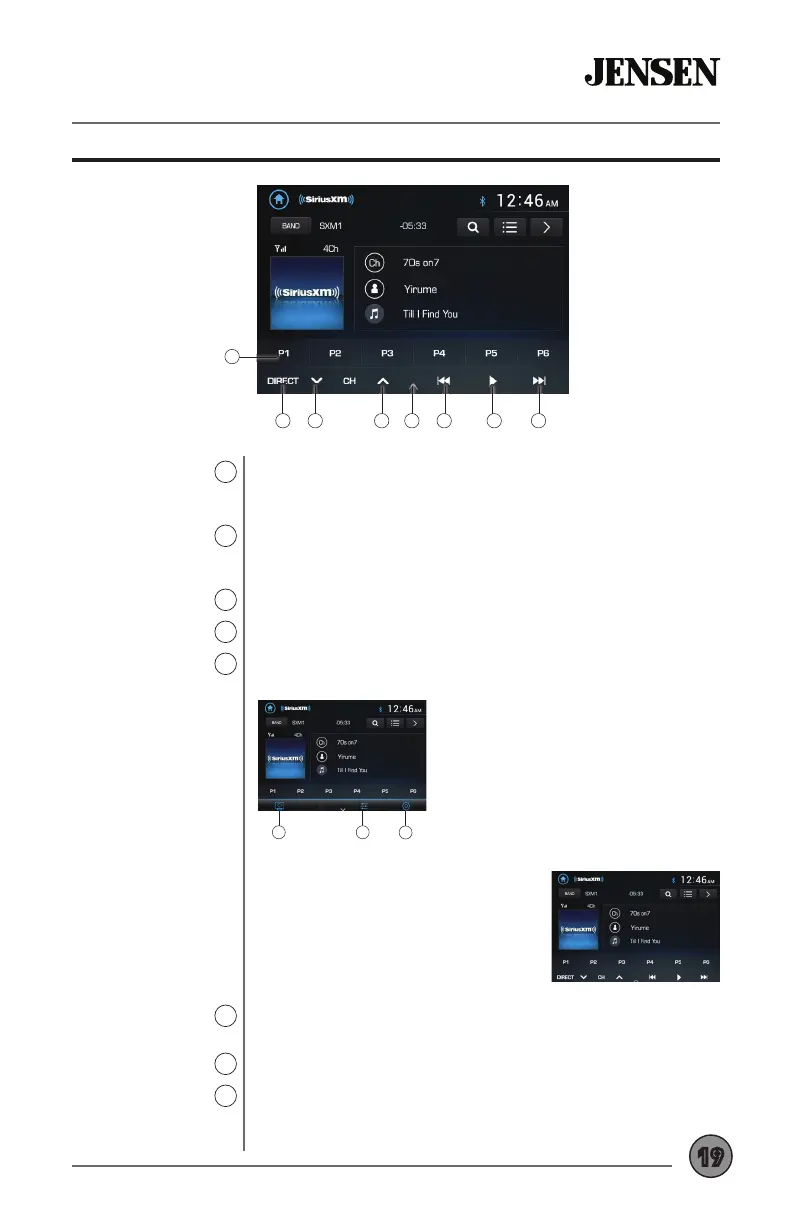
Preset Buttons
8
Direct
9
Channel Down
10
Channel Up
11
On-Screen Controls
12
Tune/Track Down
13
Play/Pause
13
Tune/Track Up
13
Press and hold any preset button (1-6) to save the current station
as a preset. Press the desired preset button to begin playback of
the corresponding preset channel.
Press to display screen for direct channel access. Press the
desired channel number, then press Enter. Playback of desired
channel will begin.
Press to go back to the previous channel.
Press to advance to the next channel.
Press to display the following controls on the bottom of the
screen.
Replay is a feature that allows the user
to pause, rewind and replay content from
the active channel. During Replay, the
Replay bar will appear towards the top of
the screen and display replay time in red
and time to live in yellow. The time to live
play will also be displayed as a number
above the Replay bar.
Press to enter Replay mode. Once in Replay mode, press to skip
to the previous track or press and hold to fast reverse.
Press to pause and replay contect from the active channel.
Press to skip to the next track. Press and hold to fast forward.
Press repeatedly to “catch up” and resume live play. Selecting Go
to Live under Additional Options will also resume live play.
8
9 11 13 14 1510 12
A CB
A. Press to adjust screen brightness or
put the monitor into standby mode.
B. Press to access audio setting such
as EQ, Surround Sound Settings and
Field Settings (Balance and Fader).
C. Press to access the Settings Menu.



 To Next Page