9
DVDB01
CONTROLS AND INDICATORS
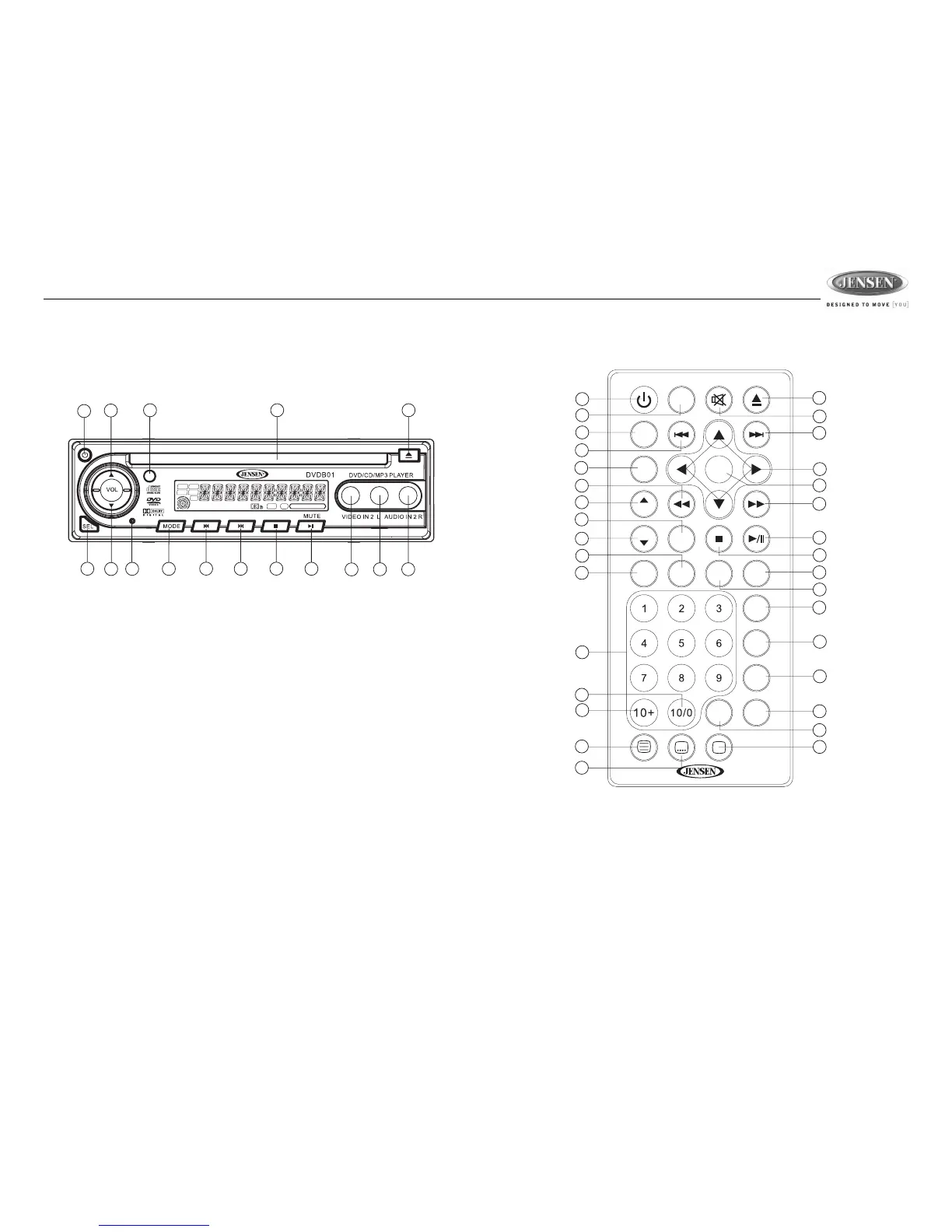
The buttons located on the unit and the remote control that perform the same function are
assigned the same number for reference on the diagrams and in the text.
Front Panel Operation
1. Power
2. Infrared Sensor
3. Eject
4. Fast Forward/Advance Chapter
5. Stop
6. Pause/Play/Mute
7. Rewind/Previous Chapter
8. Volume Up
9. Volume Down
10. Select
11. Mode
12. Disc Slot
13. Video In
14. Left Audio In
15. Right Audio In
16. Reset
Remote Control Operation
Using the Remote Control
Point the remote control towards the player front face remote sensor IR (2). The operation angle is
approximately 30 degrees in each direction of the front of the remote sensor.








 To Next Page