EasyManua.ls Logo

Jensen Heavy Duty JHD3620 - User Manual

Jensen Heavy Duty JHD3620
20 pages
Print Icon
To Next Page IconTo Next Page
Loading...
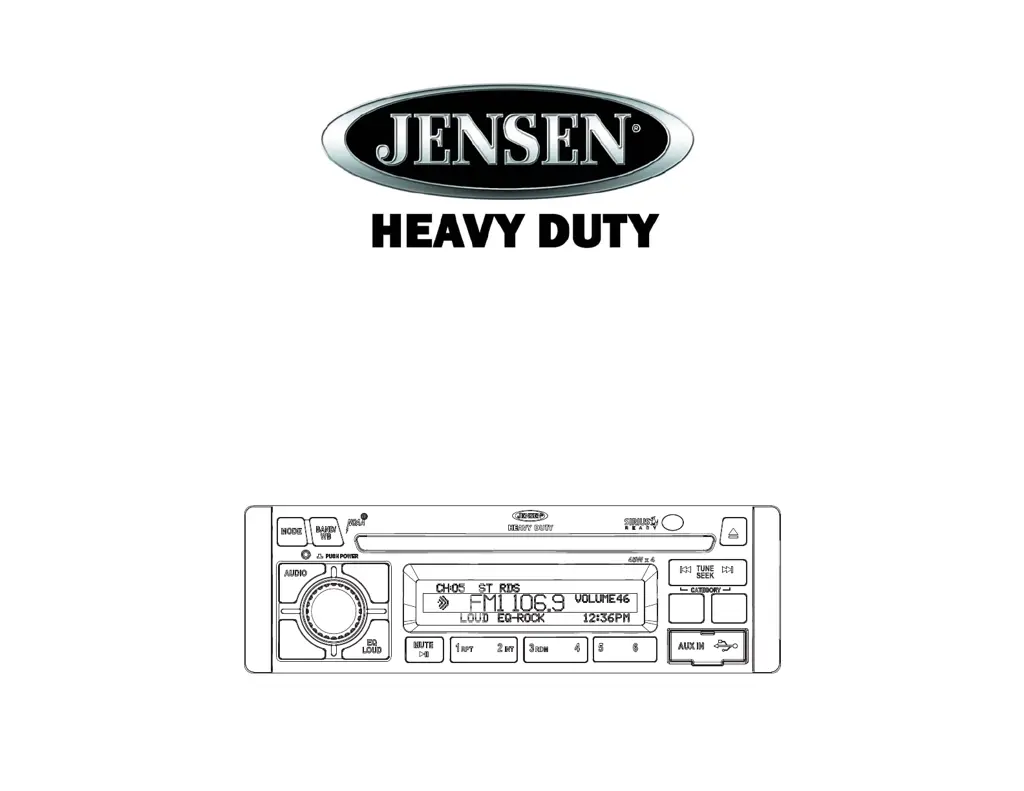
JHD3620
Installation and Operation Manual
AM/FM/RBDS/WB/CD/USB/AUX-IN/iPod Ready/SIRIUS Ready Heavy Duty Radio
CAT-
CAT+
DN UP
INFO
ENTER
INFO
ENTER
PTY/CAT
MENU
PTY/CAT
MENU
DISP
SCROLL
DISP
SCROLL
AS/PS
FAV
AS/PS
FAV
JHD3620
Guide d’installation et d’opération

Other manuals for Jensen Heavy Duty JHD3620

Questions and Answers

  • P
    pateltimothyJul 31, 2025
    Why is there no sound coming from my Jensen Heavy Duty JHD3620 Car Receiver?
    • C
      cthomasJul 31, 2025
      If there is no sound from your Jensen Car Receiver, the volume may be too low, or the system might be muted. Try adjusting the volume to a level you can hear. Also, the wiring may not be properly connected. Check all wiring connections to ensure they are secure.
  • S
    shannonglennAug 5, 2025
    What to do if my Jensen Car Receiver has no power?
    • K
      Kristi ButlerAug 5, 2025
      If your Jensen Car Receiver has no power, it could be due to a couple of reasons. First, the vehicle’s accessory switch might not be on. If the power supply is properly connected to the vehicle’s accessory terminal, switch the ignition key to 'ACC' or 'Run'. Second, the fuse might be blown. In this case, replace the fuse.
  • L
    Lisa BestAug 10, 2025
    How to fix Jensen Car Receiver if it cannot tune to radio station?
    • A
      Ashley ThomasAug 10, 2025
      If your Jensen Car Receiver cannot tune to a radio station or the auto-seek function isn't working, the antenna cable may not be connected properly. Check the antenna cable to ensure it is securely connected. Also, the radio signals might be too weak. Try selecting a station manually.
  • M
    Mrs. Leslie Smith MDAug 14, 2025
    What to do if the sound skips on my Jensen Heavy Duty JHD3620?
    • N
      Nicholas ButlerAug 15, 2025
      If the sound skips on your Jensen Car Receiver, it could be because the installation angle is more than 30 degrees. Adjust the installation angle to be less than 30 degrees. Alternatively, the disc might be dirty or defective. Clean the disc and try playing it again, or try a new disc.
  • E
    Ethan SmithAug 20, 2025
    What to do if my Jensen Car Receiver won't load or eject a disc?
    • A
      Adriana AndersenAug 20, 2025
      If your Jensen Car Receiver won't load or eject a disc: * There may already be a CD in the player. Remove the disc and insert the new one. If the disc will not eject, press the RESET button. * You might be inserting the disc in the wrong direction. Make sure the label is facing upward. * The compact disc could be dirty or defective. Clean the disc or try a new one. * Condensation may have formed. Leave the player off for about an hour, then try again.
  • J
    John HillAug 26, 2025
    Why the operation keys do not work on Jensen Car Receiver?
    • J
      James GayAug 26, 2025
      If the operation keys on your Jensen Car Receiver aren't working, the built-in microcomputer might not be operating correctly due to noise. Try pressing the RESET button.

Summary

Introduction to JHD3620

Safety Information

Disc Maintenance

Provides guidance on cleaning and handling discs to prevent playback issues and damage.

Installation Guide

Before You Begin

Outlines essential steps to take before starting the installation process, including battery disconnection.

DIN Front Mount

Details the procedure for mounting the unit into a standard DIN opening in the dashboard.

Wiring Connections

Basic Operation

Basic Controls

Essential controls for operating the unit, including power, volume, and source selection.

System Configuration

Accessing system menus, setting the clock, and understanding display information.

Weather Band Operation

Weather Alerts and SAME

Configuring weather alerts and specific area message decoding for safety.

CD;MP3;USB Playback

Media Handling

Procedures for playing digital media from discs and USB devices.

Satellite Radio Operation

iPod Operation

Jensen Heavy Duty JHD3620 Specifications

General IconGeneral
BluetoothYes
Radio TunerAM/FM
Supported FormatsMP3, WMA
SiriusXM ReadyNo
WaterproofNo
Built-in AmplifierYes
Remote ControlNo
Maximum Power200W
Display TypeLCD
USB PortYes
Aux InputYes

Related product manuals