Optional
Equipment
•
•
NAV1 02: Allows you to access navigation features. All installation and operating instructions are included
with the navigation module.
Rear
Camera
Disconnecting
the
Battery
To
prevent a short circuit, be sure to turn off the ignition and remove the negative (-) battery cable prior to in-
stallation.
NOTE:
If
the VM9224BT is to be installed in a car equipped with an on-board drive
or
navigation computer, do
not
disconnect the battery cable.
If
the cable is disconnected, the computer memory
may
be lost. Under these
conditions, use extra caution during installation to avoid causing
a short circuit.
Replacing
the
Fuse
When replacing the fuse, use a new 20A replacement fuse. Using a fuse with an improper rating could damage
the unit and cause a fire.
ISO-DIN
Installation
This unit is designed to fit into a 2.0 DIN dashboard opening, found
in
many imported cars. The unit has
threaded holes
in
the chassis side panels which may be used with the original factory mounting brackets
of
some Toyota, Nissan, Mitsubishi, Isuzu, Hyundai and Honda vehicles to mount the radio to the dashboard.
Please consult with your local car stereo specialty shop for assistance
on
this type
of
installation.
D
fJ
II
II
Remove the existing factory radio from the dashboard
or
center console mounting. Save all hardware and brackets
as they will be used to mount the new radio.
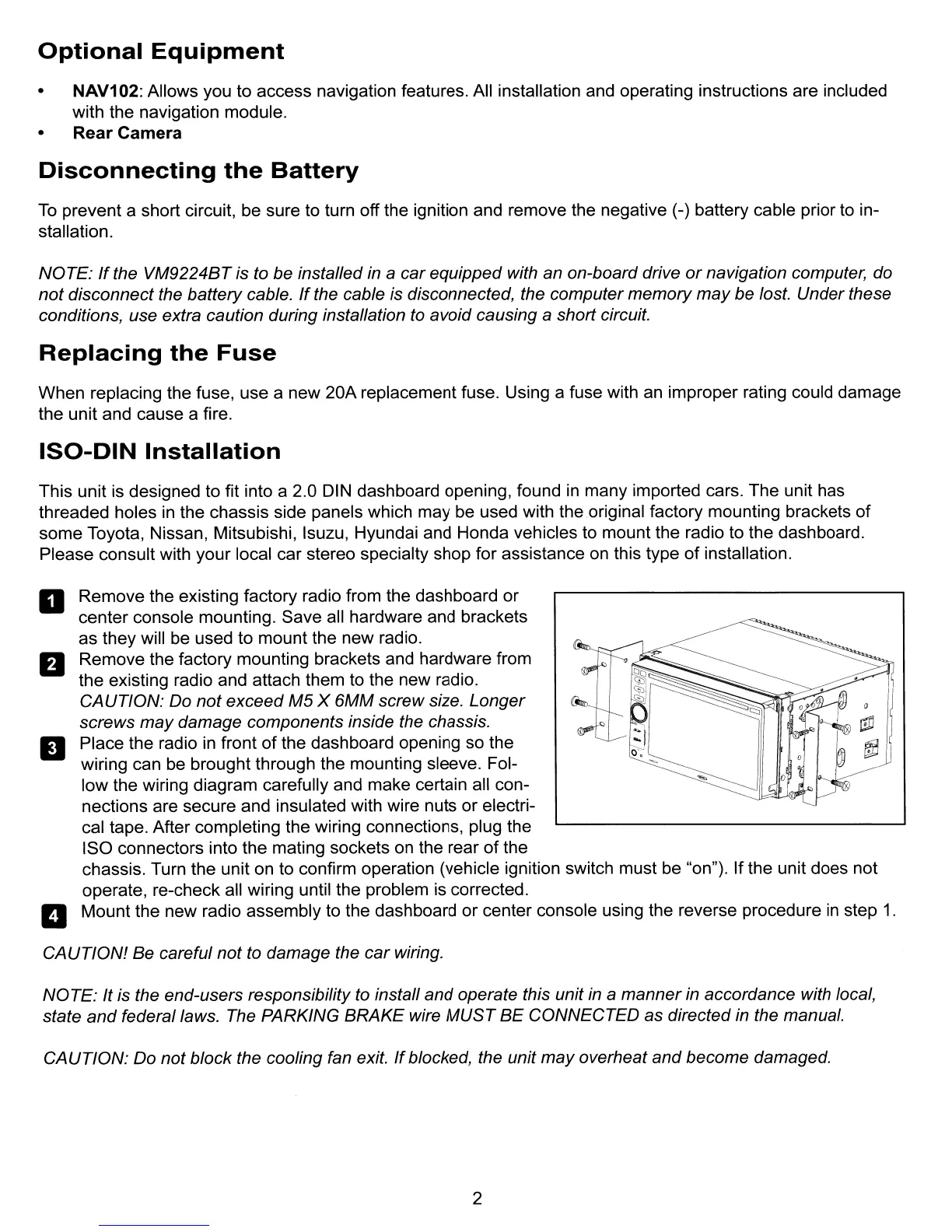
Remove the factory mounting brackets and hardware from
the existing radio and attach them to the new radio.
CAUTION: Do not exceed
M5
X 6MM screw size. Longer
screws may damage components inside the chassis.
Place the radio
in
front
of
the dashboard opening so the
wiring can be brought through the mounting sleeve. Fol-
low the wiring diagram carefully and make certain all con-
nections are secure and insulated with wire nuts
or
electri-
cal tape. After completing the wiring connections, plug the
ISO connectors into the mating sockets
on
the rear
of
the
chassis. Turn the unit on to confirm operation (vehicle ignition switch must be "on"). If the unit does not
operate, re-check all wiring until the problem is corrected.
Mount the new radio assembly to the dashboard
or
center console using the reverse procedure
in
step
1.
CAUTION! Be careful not to damage the
car
wiring.
NOTE: It is the end-users responsibility to install and operate this unit
in
a manner in accordance with local,
state
and
federal laws. The PARKING BRAKE wire
MUST
BE
CONNECTED as directed in the manual.
CAUTION:
Do not block the cooling fan exit.
If
blocked, the unit
may
overheat and become damaged.
2



 To Next Page