EasyManua.ls Logo

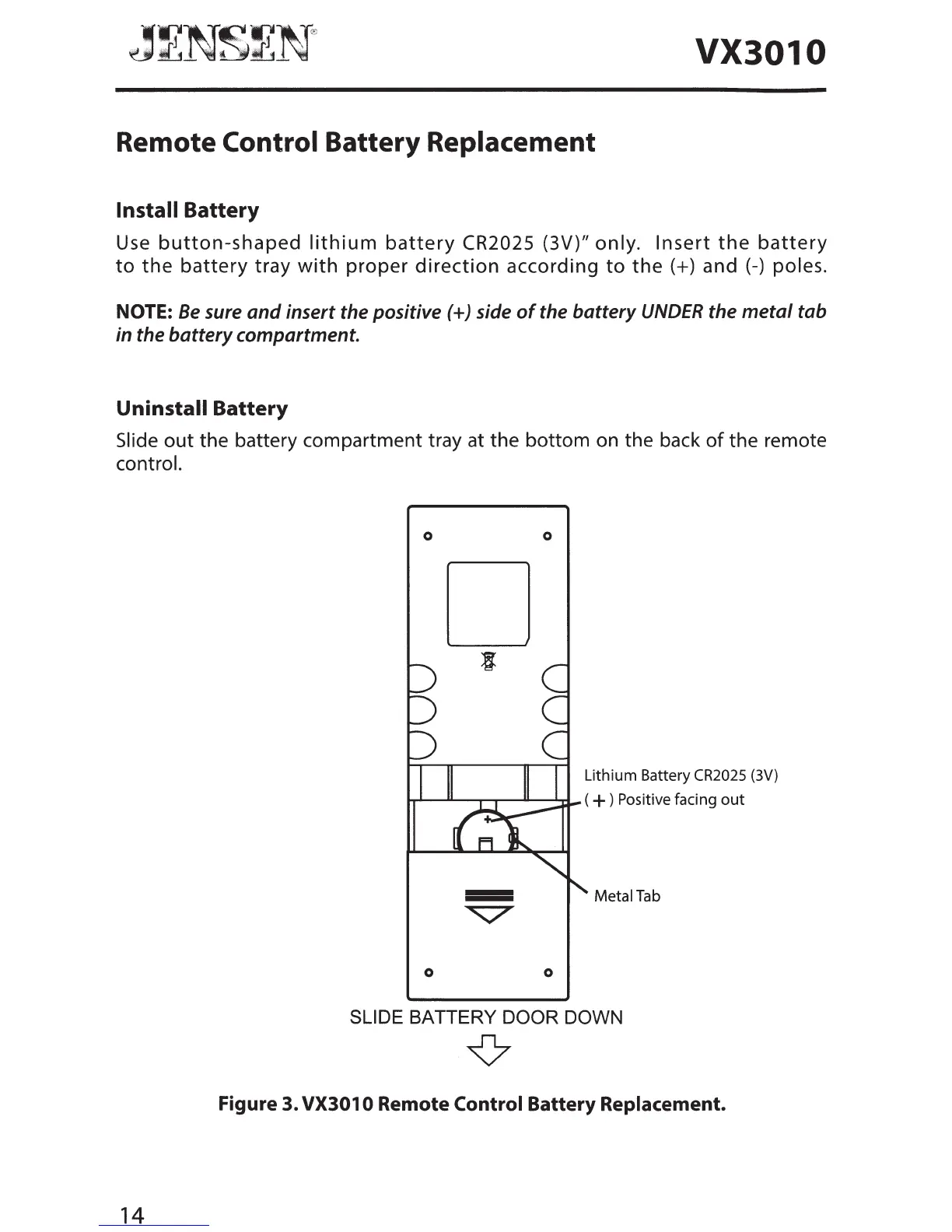
Jensen VX3010 - Remote Control Battery Replacement; Battery Installation and Removal; Battery Replacement Diagram

Jensen VX3010
54 pages
Print Icon
To Next Page IconTo Next Page
To Previous Page IconTo Previous Page
Loading...
···········~
.
...•.•...
..
. \
··············~
·.····•·
.....•... @
Jv
····N·······~·
-vN·
.ICJ
__
.,.Ill.
•IL...:....·········•·····
VX3010
Remote
Control
Battery
Replacement
Install
Battery
Use
button-shaped
lithium
battery
CR2025 (3V)" only.
Insert
the
battery
to
the
battery
tray
with
proper
direction
according
to
the(+)
and
(-)
poles.
NOTE:
Be
sure
and
insert the positive (+)side
of
the battery
UNDER
the metal tab
in the battery compartment.
Uninstall
Battery
Slide
out
the battery compartment tray at the bottom on the back
of
the remote
control.
14
0
0
Lithium Battery CR2025
(3V)
.........._----"----T"--r---"------~...rf-
( + ) Positive facing
out
Metal
Tab
0 0
SLIDE BATTERY DOOR DOWN
{7
Figure 3. VX301 0 Remote
Control
Battery
Replacement.

Other manuals for Jensen VX3010

Related product manuals