- 12 -
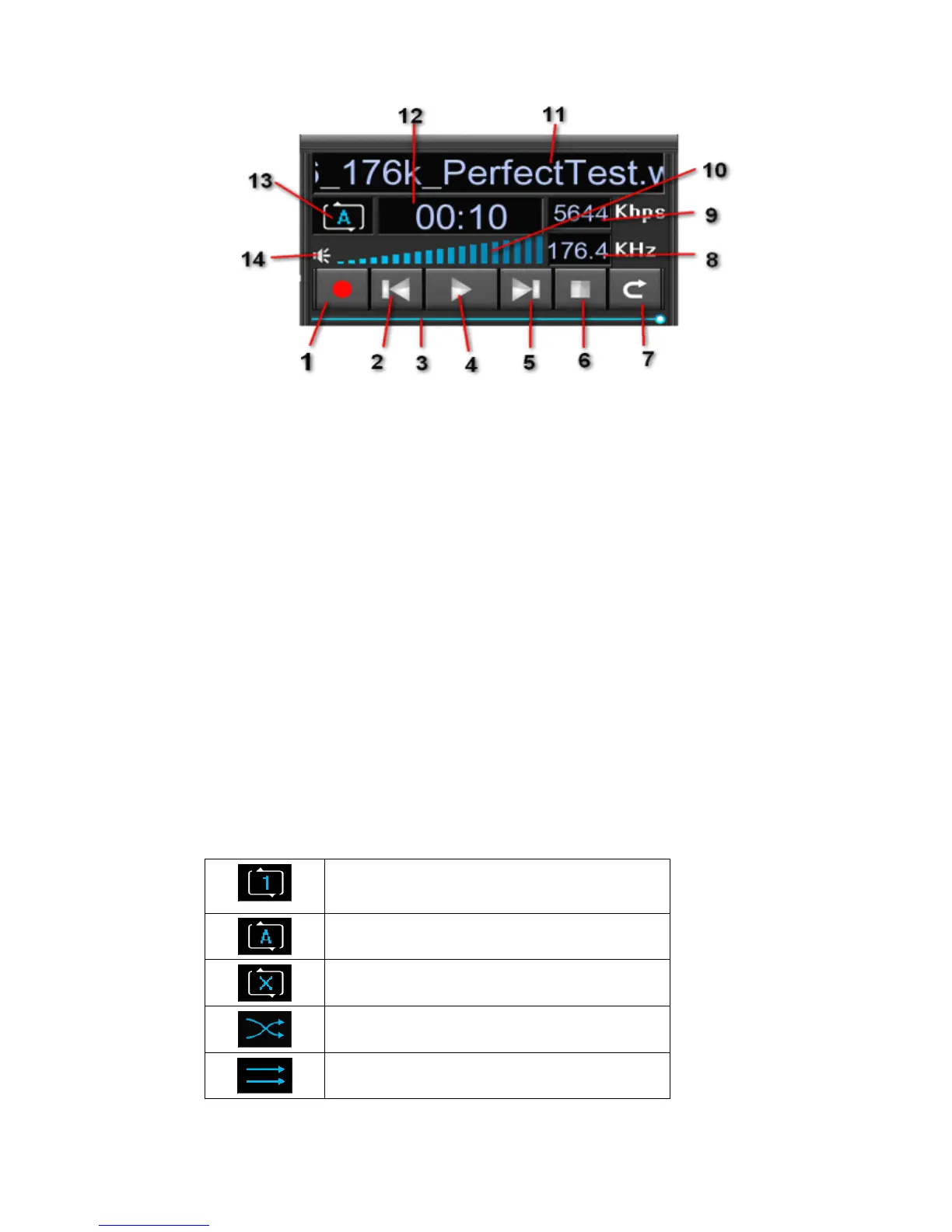
Each indicates the function as follows :
1. Record button:Remote control on the current playback audio recording when
the key red dot will zoom flash.
2. Last button:Play back the previous file by touching the button.
3. Progress bar
4. Play/Pause
5. Next button:Select the next file to play by touching the next button.
6. Stop and return to the main menu.
7. Stop and go back to the file(folder) list/radio station list.
8. Show the sampling rate of the current playing file.
9. Show the bit rate of the current playing file.
10. Volume:Adjust the volume by touch or the remote control and it will become
the lowest if pressing the Mute key.
11.
Show the track name of the current playing file(or the radio station name when
available).
12. Display the play duration of the current playing file(or Beijing time for the
internet radio).
13. Show the current playing programme status,which can be set by touching this
icon or by the remote control .Different icon indicates different status:
Single Cycle Play
List Cycle Play
Non-repetitive Play
Random Play
Sequence Play
14. Mute : Mute sounds or open audio by touching this icon.



 To Next Page