- 13 -
3.4
3.4
3.4
3.4 Remote
Remote
Remote
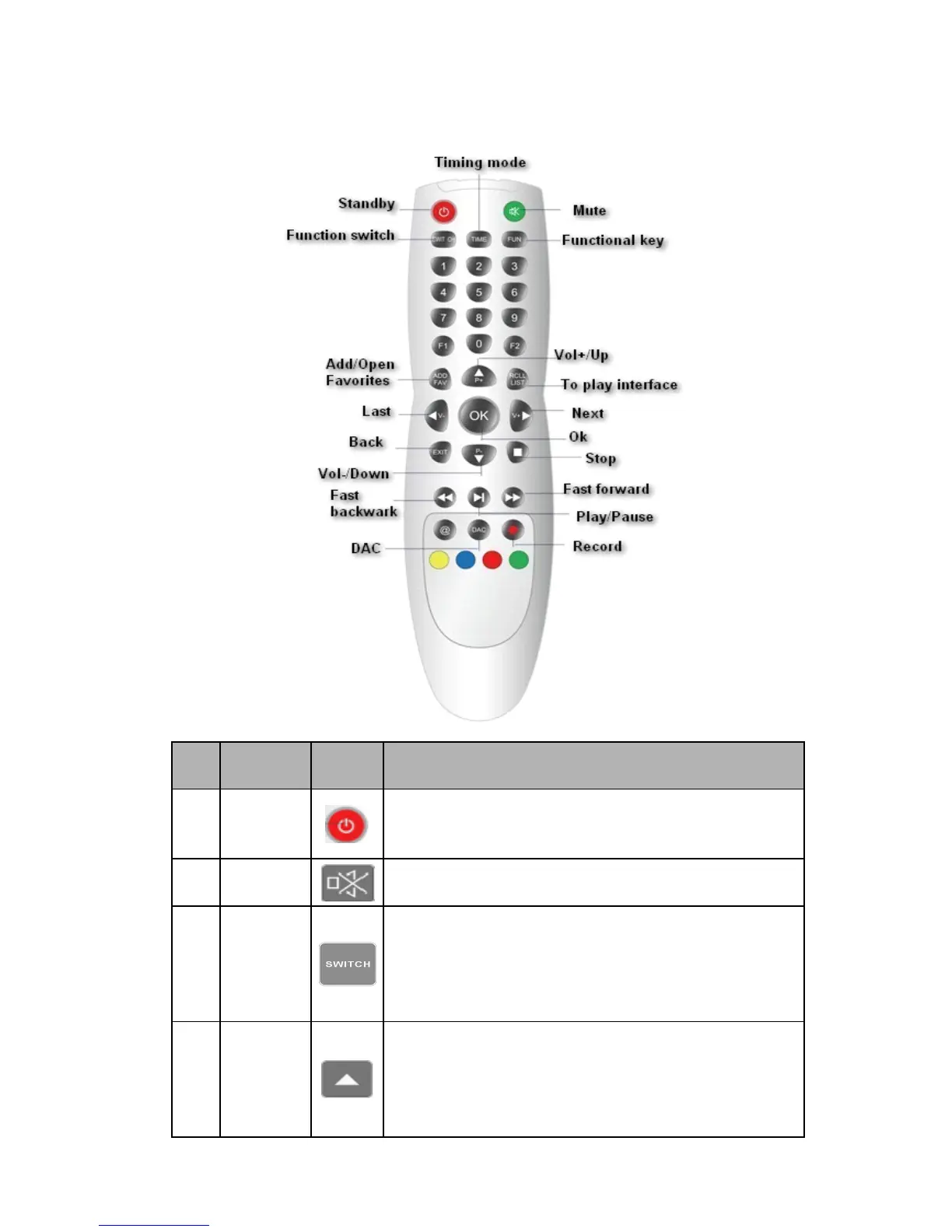
Remote Control
Control
Control
Control Guide
Guide
Guide
Guide
No.
No.
No.
No.
Button
Button
Button
Button
name
name
name
name
Button
Button
Button
Button
icon
icon
icon
icon
Functions
Functions
Functions
Functions
1 Standby
After powered on,the remote control will get into standby
status until powered off.It will take 3 seconds to power off by
pressing this key ( Not support use )
2 Mute Mute sounds or open audio.
3
Function
switch
Switch for the playing file among single play,list
cycle,non-repetitive play,sequence play , random play and
other play mode by pressing this key.In DAC status,press it
to switch for the signal input between the optical fiber and
coaxial cable.
4 Vol+/Up
The more the Vol+ key is pressed the higher the volume
becomes in playing interface or press the Vol+ key to
increase the volume continuously.Select one file in the file
list by pressing this key upwards and long press it to go
upwards for selection.



 To Next Page