GLAS Smart Thermostat Technical Bulletin
7
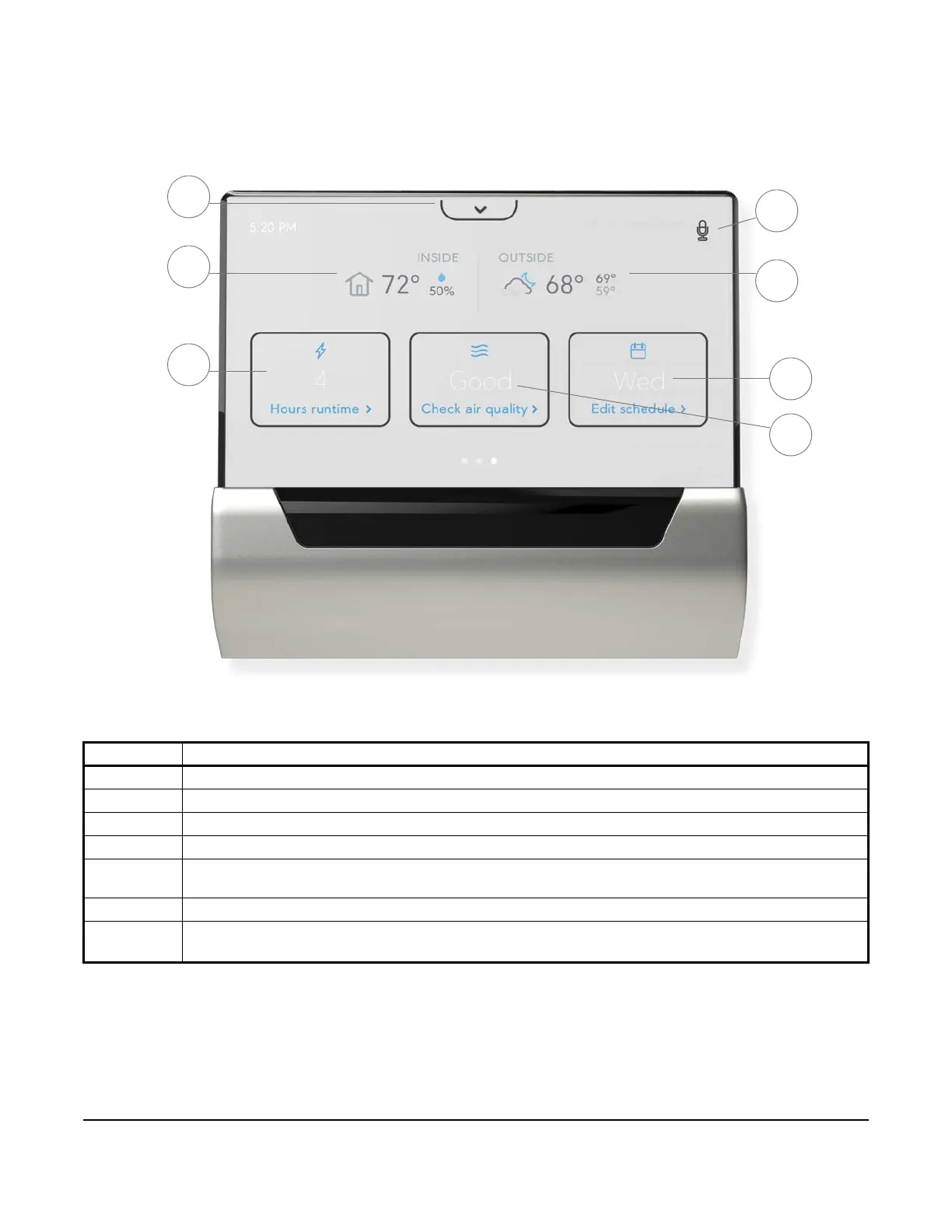
Quick View
The quick view gives you easy access to some of the most frequently used features, like scheduling, air quality,
and energy savings.
Table 2: Quick View Descriptions
Feature Description
1 Access media tray including Cortana, settings, notifications, Wi-Fi signal strength, volume, and brightness
2 The indoor temperature and relative humidity in the space
3 Total energy savings for the last 7 days, select for daily detail
4 Indicates when voice command is enabled and allows the microphone to be muted and un-muted
5 The current outdoor temperature, forecast, and the highs and lows for the day based on your postal code with
Wi-Fi connection
6 View and edit your current schedule
7 See your current indoor and outdoor air quality based on measurements tVOC, eqCO
2
, allergens, AQI, UV
index, and relative humidity
Figure 2: Quick View
4
5
6
7
2
3
1





 To Next Page