GLAS Smart Thermostat Technical Bulletin
8
Control View
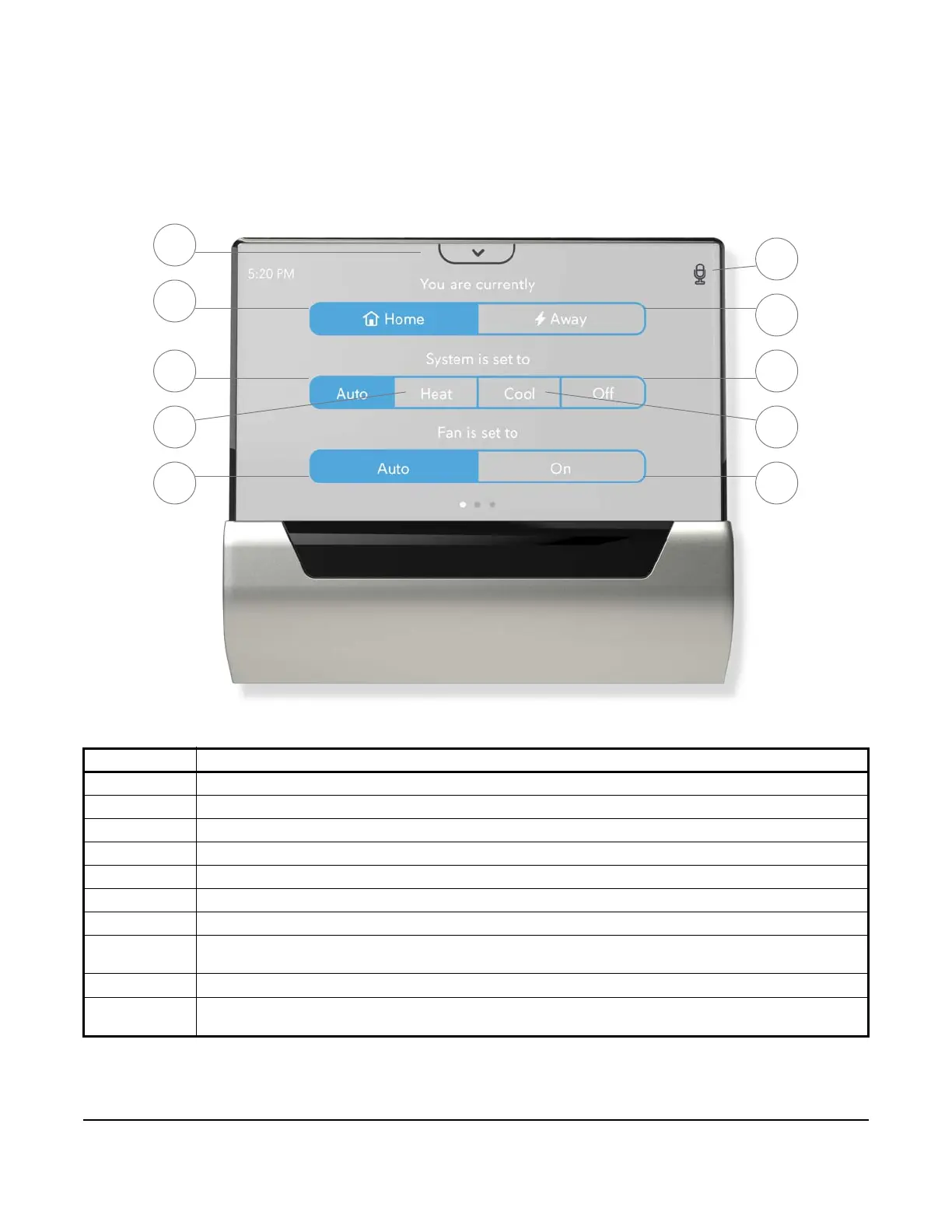
Control view allows you to change your thermostat mode, change fan commands, and place your system in home
or away states.
Note: Only the settings that work with your current HVAC system are available for selection on the control
screen.
Table 3: Control View Descriptions
Feature Description
1 Access media tray including Cortana, settings, notifications, Wi-Fi, volume, and brightness
2 Device keeps the space at the Home or Sleep setpoints, depending on the schedule
3 Auto mode will heat and cool automatically to stay within the selected setpoints
4 Heat mode will heat to stay within the selected setpoints
5 The fan will run automatically when heating or cooling
6 Indicates when voice command is enabled and allows the microphone to be muted and un-muted
7 Device keeps the space at the Away setpoints
8 Off mode will keep your heating and cooling system off unless safety features are enabled and the heat or
freeze protection temperatures are reached
9 Cool mode will cool to stay within the selected setpoints
10 Manually power on fan for air circulation with optional runtimes of 15 minutes, 30 minutes, 1 hour, 2 hours,
4 hours, and Stay On
Figure 3: Control View
6
7
8
9
10
2
3
4
5
1





 To Next Page