23
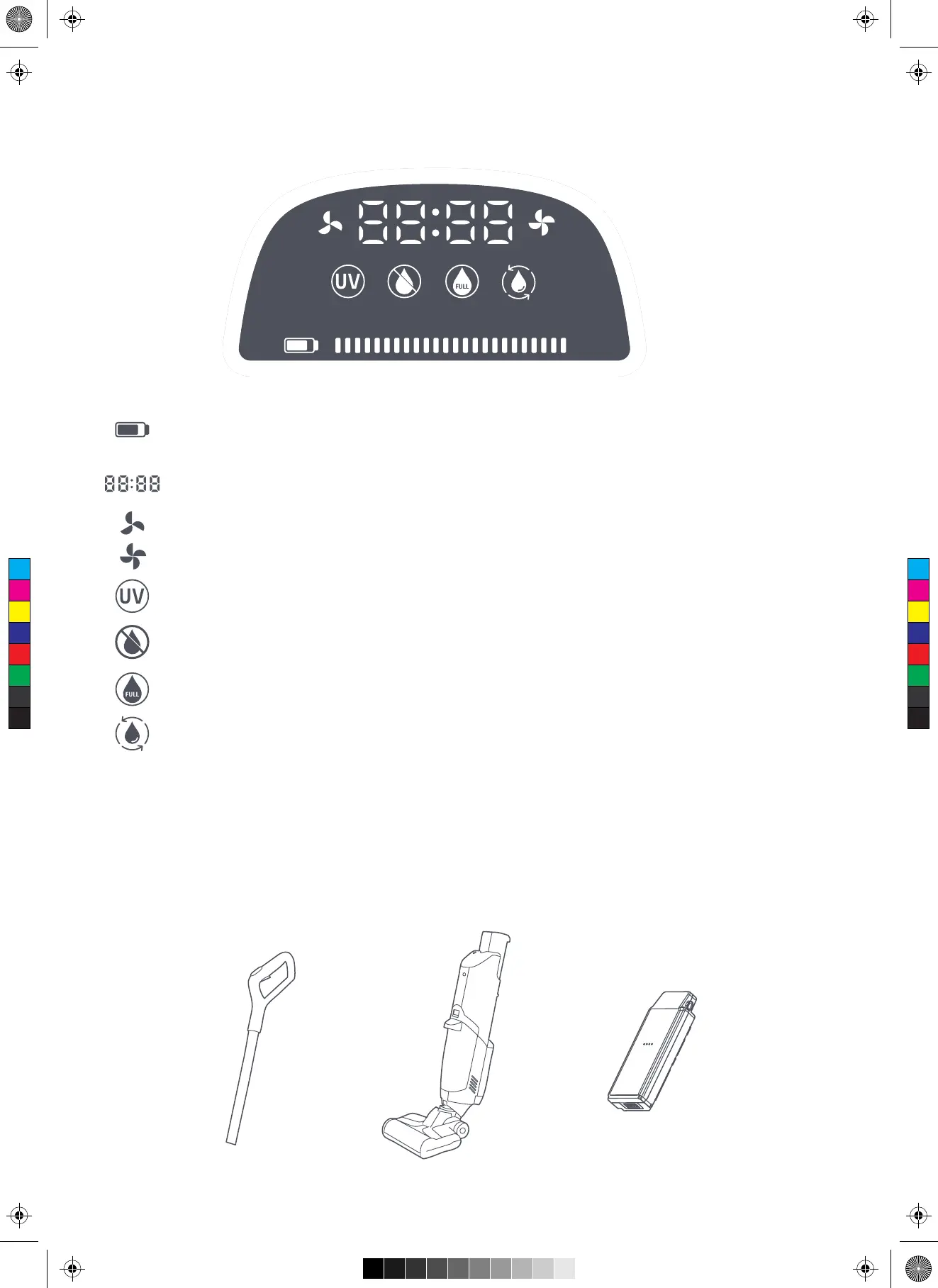
Remove the handle, main body, and battery pack
Introduction to LED Panel
Install the Product
The squares on the right side of the battery capacity indicate the battery capacity, and every square
represents 1/12 of the total battery capacity.
It displays the usage time in the form of “minute: second (XX:XX)”.
The suction and spraying flow of the product is in the Auto Mode.
The suction and spraying flow of the product is in the Turbo Mode.
When the icon lights up, it means that the product has started the sterilization function.
The flash icon indicated that the product detects Clean water shortage. If you needs to spray water,
fill more fresh water timely.
The dirty water tank is full, clean its interior timely.
Press the Self-cleaning key at the top of the screen when charging the product. The icon flashes after the
product enters the self-cleaning mode.
C
M
Y
CM
MY
CY
CMY
K


 To Next Page