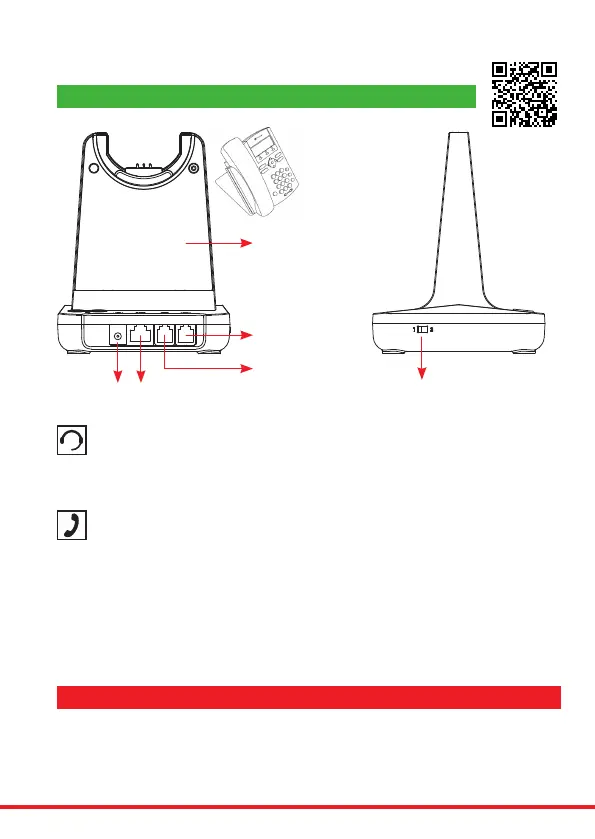
Connecting the Base Unit to your Desk Phone
DC Jack AUX Port
Handset Port
Telephone Port
• Plug the supplied telephone cord into the TEL port of the base unit
• Connect the other end of the telephone cord to the HEADSET port of the desk phone
Desk Phone with Headset Port
• On the desk phone, unplug the handset cable from the phone
• Plug the handset cable into the HANDSET port on the base unit
• Plug the telephone cord into the TEL port on the base unit and plug the other end of the
telephone cord into the HANDSET port on the desk phone
Compatibility Switch
• Select ‘1’ or ‘2’ until a dial tone is heard via the telephone connection
Desk Phone without Headset Port
Base Unit
Compatibility
Switch
This headset will auto congure to your desk phone.
The compatibility switch should be used in the alternative position, if no dial tone is heard in the headset
whenactive.Itwilltakeupto3minutesforthephoneandheadsettoestablishtheoptimumcallquality
withourAutoSetupfeature,ensuringthebestsound.Simplymakeatestexternalcallandtheheadset
willconguretotherequiredsettingsforyourphone.
IMPORTANT AUTO SET UP NOTICE
Helpful Setup Videos Found Here - https://www.jpltele.com/jpl-tutorials.aspx



 To Next Page