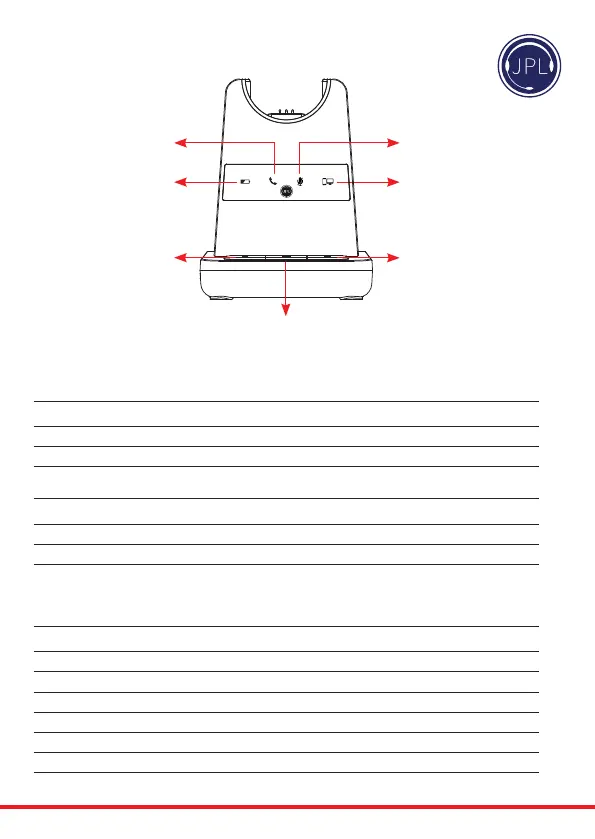
Microphone Mute Indicator
(Red Light)
PC/Bluetooth Indicator
(White Light)
Battery Charge Indicator
(Blue Light)
Telephone Indicator
(Green Light)
Bluetooth
Button
PC/TEL Selection
Microphone
Mute Button
Visual Indicator
Charging Status LED Status
Charging Battery Indicator: ‘Flashing’ 1 sec-ON, 1 sec-OFF
Fully Charged Battery Indicator: ‘ON’
LowBattery BatteryIndicator:‘Flashing’0.5sec-ON,0.5sec-OFF
Event LED Status
Press Microphone Mute Mute Indicator: ‘ON’
Press PC/TEL Selection PC/TEL Indicator - TEL: ‘OFF’ PC: ‘ON’
HookO SelectedModeIndicator:‘ON’
Audio Indicator
Event Sound Eect
Speaker / Microphone Volume Beep Sound ‘UP’ - High Tone, ‘DOWN’ - Low Tone
Max/Min Speaker Volume Double beep
Max/Min Microphone Volume Double Beep
Microphone Mute/Unmute Beep / Double Beep
MuteReminder Beep(every3seconds)
HookO/On DoubleBeep(HighTone/LowTone)
Low Battery Continuous beep in headset when battery is low
Base Unit



 To Next Page