10
Transmitter Settings And Functions
Settings and functions are programmable by entering information into the
Transmitter.
From the Transmitter keypad, press the * key to scroll down through the options.
Press # to select a displayed function.
Press 0 to move up through functions.
If information, other than what is required is entered, the display will show
‘Invalid’ and then return to ‘Enter Pager #. display’
To exit the settings and functions menu, enter ** on the keypad.
Password
To protect system settings, most menu selections are password protected.
The factory default password is “1234.” Password can be changed if desired.
Display Screen
Enter Pager #
“Enter Pager #” is the ‘Home Position’ of the Transmitter display.
See Password and Change Password? for more information.
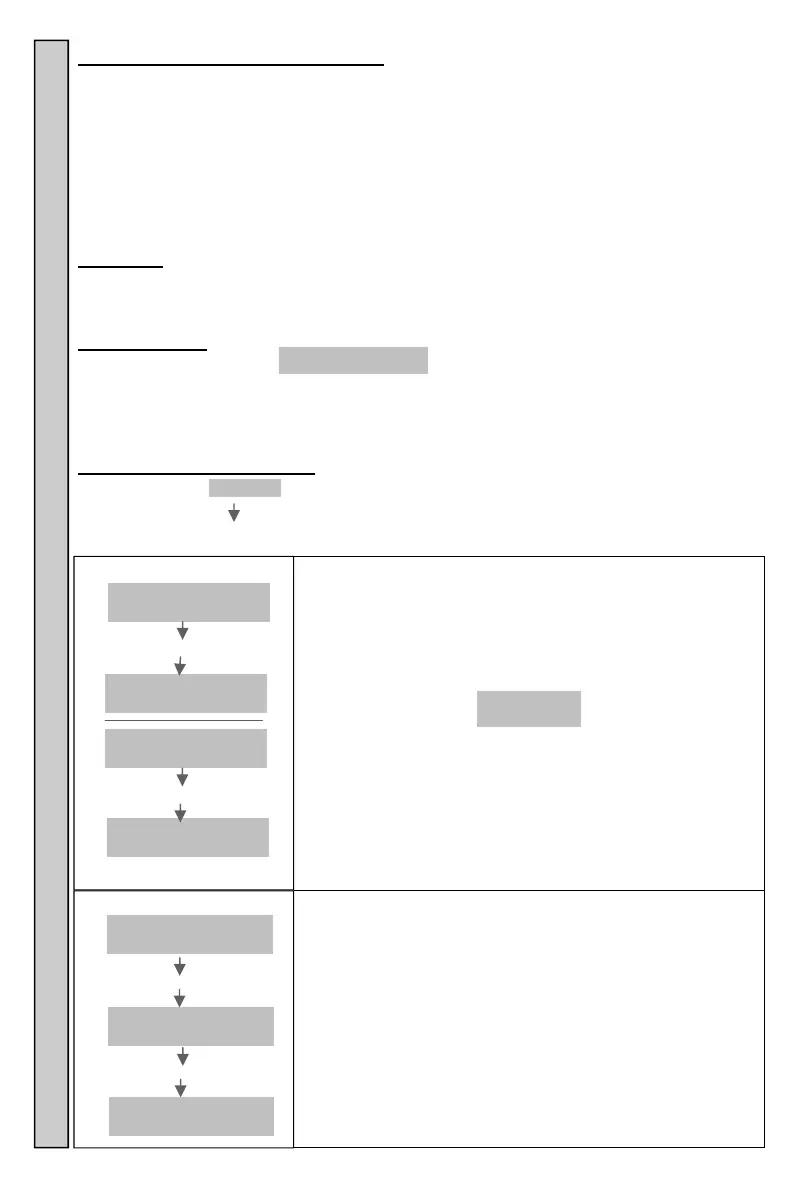
Detailed Menu information: Instructions on how to read the menus is as follows:
Information shaded is what will appear on the Transmitter display.
Follow arrows to the next step
BOLD Italics is information that needs to be entered on the Keypad.
“Home” position of the transmitter.
Vibe/Tone/Flash Pagers
Enter the Pager number and #.
Numeric Pagers
Enter Pager number, *, optional 16 digit numeric message
and #. If ZZZZ is displayed, shown as 123 in the example.
Ex. Num 2
Snd 123
Pager number 2 has been entered in the keyboard, how-
ever Pager 123 is being paged. Pager 2 has been re-
placed with Pager 123. See Replace Pager? For more
information.
To cancel a page before it was sent Enter **.
NNNN =Pager Number
ZZZZ = Replaced Pager
MMMMMMM = Message
Enter Pager #
Enter
Pager #
Enter NNNN #
Num NNNN
Snd ZZZZ
Enter
Pager #
Enter NNN*MMMMMMM#
Num NNNN
Snd ZZZZ
Enter Grp #
Enter
Pager #
Enter *
Enter
Grp #
Enter GG
Grp # GG
Snd
Pages a Group of Pagers (if programmed).
See Group for more information.
GG = Group Number
Enter Group # Enter Pager # Menu Display Password Settings


 To Next Page