Need help?
Do you have a question about the JTECH Premises and is the answer not in the manual?
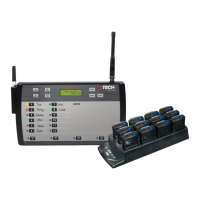
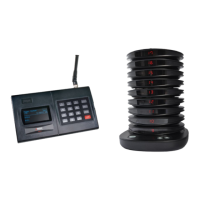
Overview of the components included in the 2600 & 2601 Series System.
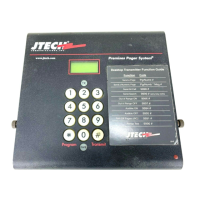
Details on the features and capabilities of the Desktop Transmitter.
Describes how to connect and use the transmitter with a computer via RS232.
Explains the phone connection capability for the Model 2601 transmitter.
Information on the optional remote keypad and its connection.
Technical specifications for the 2600 and 2601 series transmitters.
Details on the maximum transmitter range and factors affecting it.
Specifies the computer requirements for using the RS232 connection.
Table detailing information types sent and compatible pager receivers.
Information on optional antennas and their FCC approval requirements.
Step-by-step guide for connecting and operating the optional remote keypad.
Procedure for paging guest pagers using Vibe, Tone, and Flash alerts.
Instructions for connecting and operating the 2601 transmitter with a phone line.
How to page a numeric pager using a telephone and the transmitter.
Guide to programming the transmitter via the RS232 interface using specific protocols.
Details on the required RS232 baud rate and communication settings.
Explanation of RS232 handshaking protocols for data transfer.
Structure and components of a 7-digit message for RS232 communication.
Defines the function bit for POCSAG messages sent via RS232.
Explains the Cap Code structure and its role in pager addressing.
Details on message types (alphanumeric/numeric) and separators for RS232.
Formatting for numeric pager messages using RS232 communication.
List of alert types and their corresponding codes for RS232.
Defines the terminator character that marks the end of a message.
Sample Visual Basic code demonstrates RS232 pager messaging.
Example of a hex data stream format for transmitter input.
Information on obtaining assistance, warranty, and repair services.
Details on setting and changing the transmitter's password for security.
Explanation of the transmitter's main display screen and its meaning.
Instructions on how to navigate and interpret the transmitter's menu system.
Procedure for paging a single pager by entering its number.
How to page a pre-programmed group of pagers.
How to remotely turn off all pagers not in charger racks.
Using search mode to locate misplaced pagers by sending a repeating page.
Adjusts the number of alerts a pager produces for incoming pages.
Turns on the transmitter's out-of-range notification feature.
Turns off the transmitter's out-of-range notification feature.
Displays changes made to pager numbers via the Replace Pager command.
Links multiple pagers together for group paging via the transmitter keypad.
Procedure to remove a pager from an existing dynamic group.
Displays pagers associated with a specific dynamic group.
Lists all dynamic groups that have been created and are currently active.
How to change the transmitter's output power level and its effects.
Details on changing the transmitter's menu password for enhanced security.
How to exit menu options and return to the main display screen.
Configures alternate alert commands and types for pagers.
Sends a page to all Pagers in Group 99 sequentially to test range.
Turns on the tone and voice alerts if available for pagers.
Turns off the tone and voice alerts if available for pagers.
General terms, conditions, and legal disclaimers for product sales.
Further contractual terms including delays, returns, patents, and liability.
Details on the one-year warranty, covered items, and exclusions.

 To Next Page
 General