20
Easytech - planting
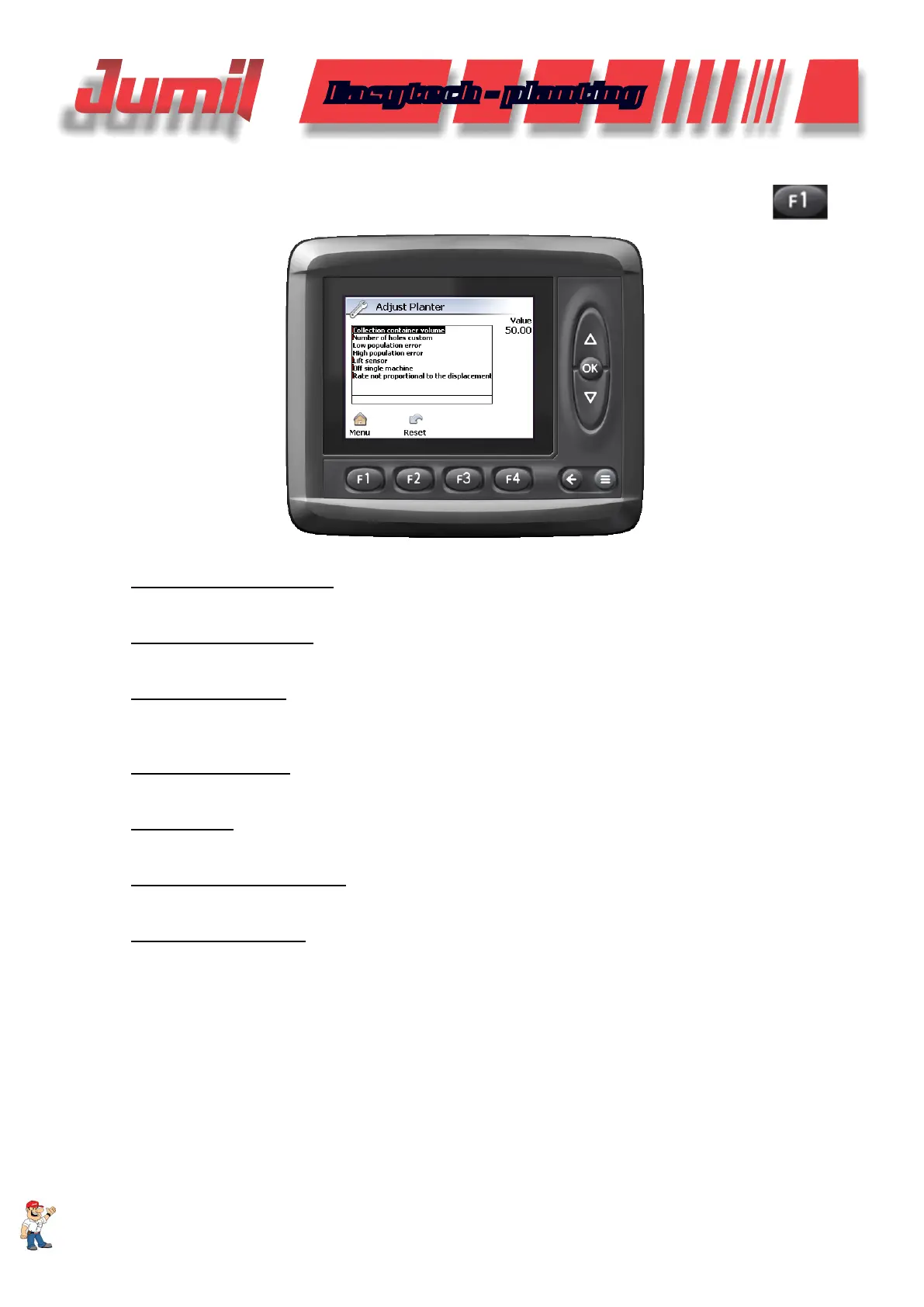
In the option “Adjust planter”, we have:
- Collection recipient volume
This option changes the volume to be collected, the seed deposit level is used as reference.
- Number of custom holes
Create an new disc in the case it is not in the pre-congured drilling
- Low population error
Decreases the seed sensors reading sensitivity in the case the monitoring is displaying failures non-compliant
with the reality.
- High population error
Increases the error tolerance for the seed monitoring rate.
- Lifting sensor
Deactivates the lifting sensor inf it is damaged during the work.
- Power off the single machine
Enables or disables the powering off of the machines manual section.
- Power off seed sensors
This option disables a line sensor, if it is not making the reading or is damaged.
4.2 - Planter Adjustment
To enter in the planter adjustment icon in the main screen, press the adjustment menu icon
, then
“Adjust planter”.
SYSTEM CONFIGURATION


 To Next Page