12
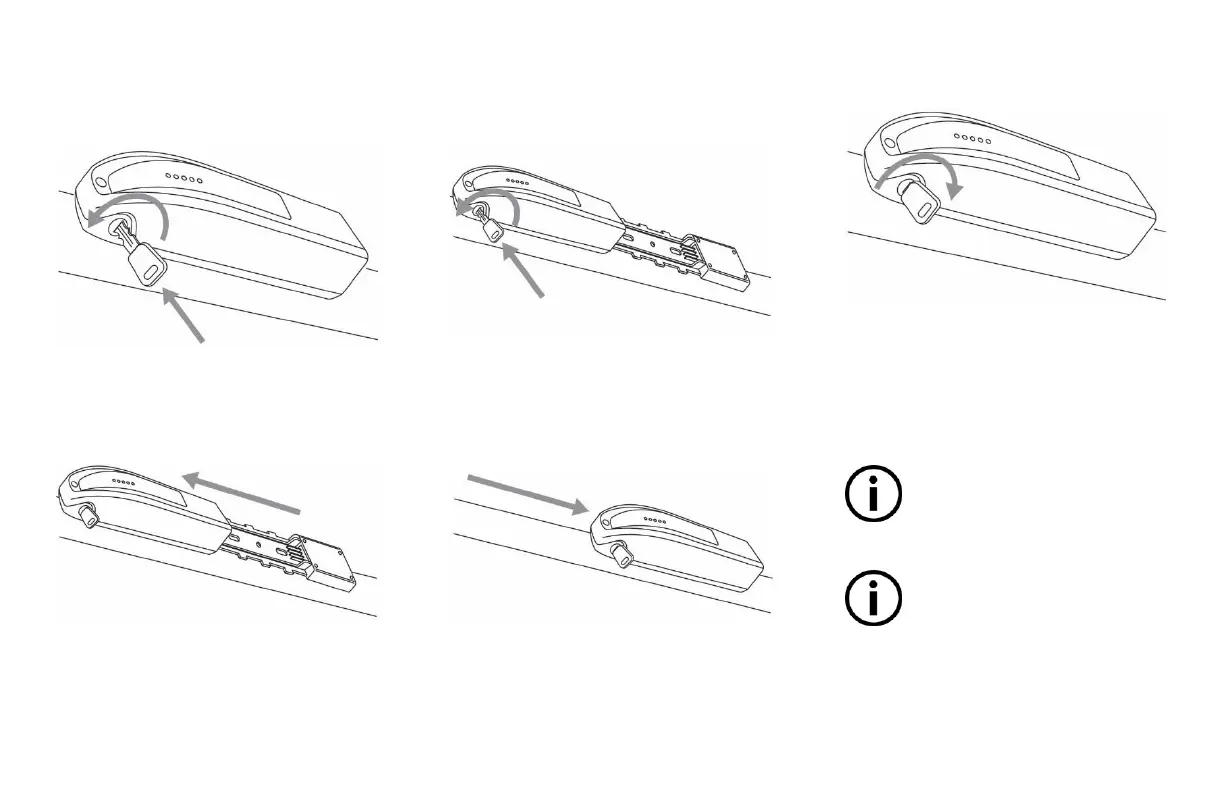
Removing or inserting the battery
To remove the battery:
▪ Insert the key into the key lock of the
battery.
▪ Turn the key for half a turn, counter
clockwise (to the left) to unlock the
battery.
▪ Firmly push the battery along the
battery holder bracket towards the
front, being careful not to hit the bicycle
frame.
To Insert the battery:
▪ Insert the key into the key lock of the
battery.
▪ Turn the key for half a turn, counter
clockwise (to the left) to unlock the
battery.
▪ Check the battery holder bracket to
ensure there isn’t any water
accumulation, then align and firmly
push the battery along the battery
holder bracket towards the rear.
▪ Turn the key for half a turn, clockwise
(to the right) to lock the battery in
position.
Your key is needed to remove the
battery to prevent it from
unintentional detachment or from
theft.
Put the provided key double in a safe
place for the event that you lost the
first key.


 To Next Page