14
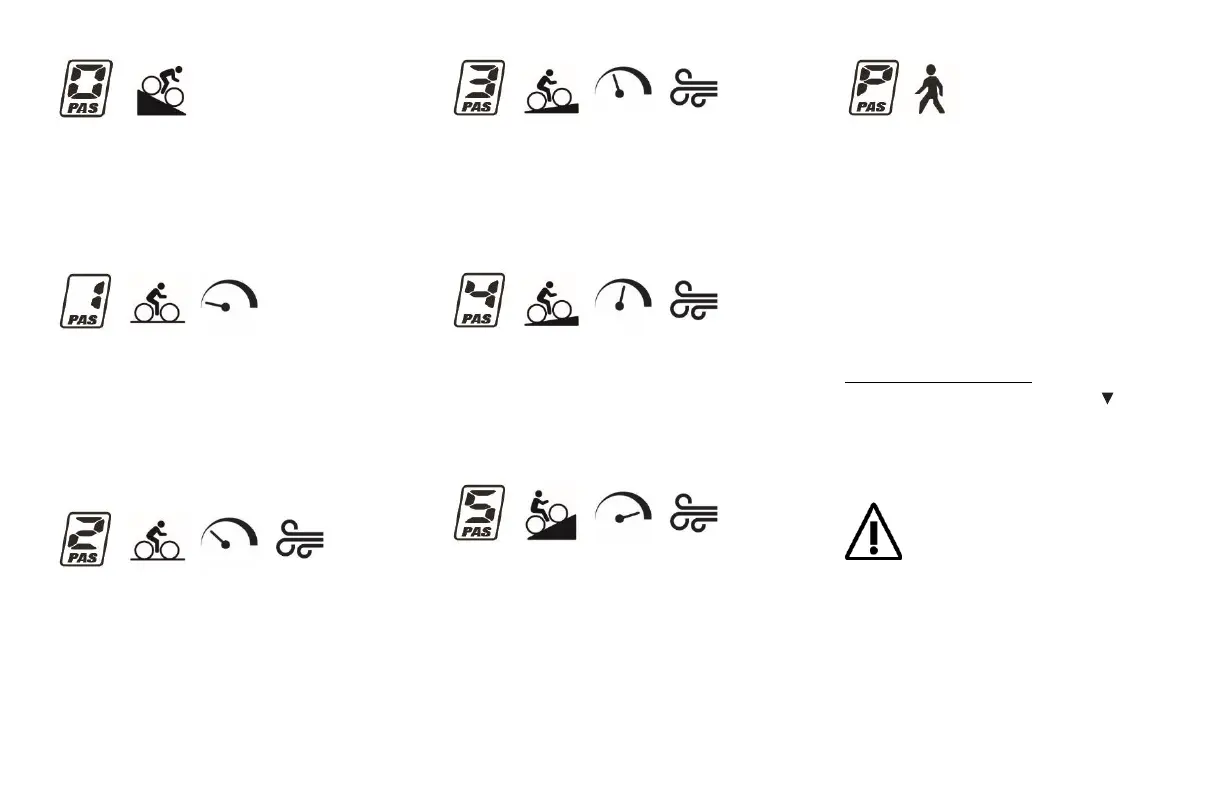
Level 0 – No assistance
At this level, there will be no power
assistance coming from the motor. Use
this level to save battery capacity while
descending.
Level 1 – Minimum assistance
Compensates for the power assist
system’s own weight without reaching
high speed. Use on flat surface with low
wind resistance. Operating range is at its
highest.
Mode 2 – Low assistance
Helps to reach a steady, slightly higher
speed than normal. Use on flat surface
with low to medium wind resistance. High
operating range.
Level 3 – Intermediate assistance
Maintains a steady speed on variable
incline surfaces with medium wind
resistance. Optimal balance between
power assistance and operating range.
Level 4 – High assistance
Reach greater speeds. Use on long inclines
and against strong wind resistance. Expect
a reduced operating range if riding with
this assistance level for a long period.
Level 5 – Maximum assistance
Reach the highest speeds or get maximum
help to climb steeper inclines. Keep a
close watch at your battery capacity if
using this mode for a long trip.
Walk Mode
Use Walk Mode when walking beside your
bicycle and you’re in need of power
assistance. For example, when walking
your bike up on an incline or carrying a
heavy luggage. As soon as Walk mode is
activated, the motor will propel the bike
at a steady speed of 6 Km/h until the
button is released.
To activate Walk mode:
Press and hold Down button for 2
seconds (from any mode). Walk mode will
instantly shut down once you release the
button.
Switching to Walk mode will instantly
ignite the motor and propel the bicycle
to a steady speed of 6 km/h. Before
activating Walk mode, make sure you are properly
holding on to your handlebar and that the path in
front of you is clear. For safety reasons, the Walk
mode will automatically shut down once the
button is released.


 To Next Page