17
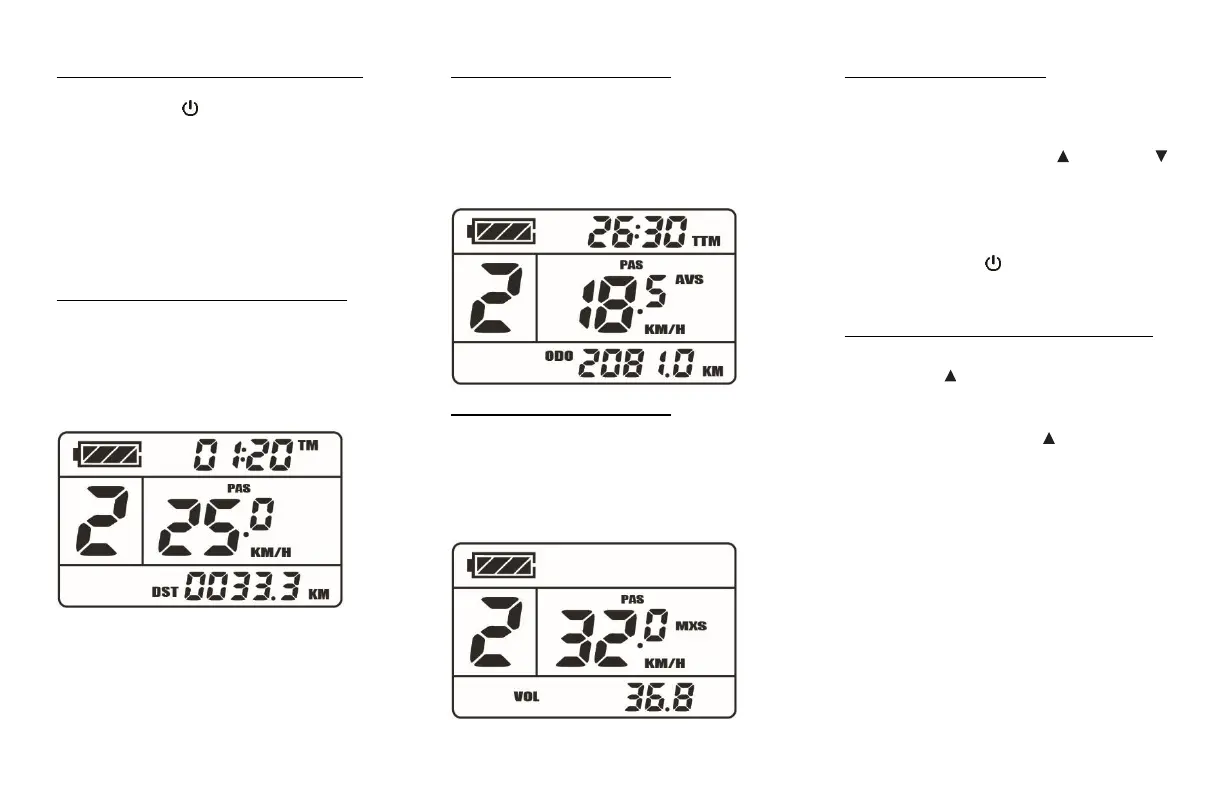
Switch to a different LCD screen mode:
Press the Power button briefly to switch
between different LCD screen modes (1 >
2 > 3) displaying information about your
speed, travelled distance and power assist
system status.
LCD screen Mode 1 (default) displays:
▪ Battery charge level
▪ Current power assist level
▪ Current speed
▪ Current trip timer
▪ Current trip distance
LCD screen Mode 2 displays:
▪ Battery charge level
▪ Current power assist level
▪ Average speed
▪ Total trip timer
▪ Odometer
LCD screen Mode 3 displays:
▪ Battery charge level
▪ Current power assist level
▪ Maximum speed
▪ Current system voltage
Reset the latest trip data:
(Wait at least 5 seconds after the LCD
controller has been turned On)
Press and hold both the Up and Down
buttons for 2 seconds until the current trip
timer and trip distance values are flicking.
Then, while they are still flicking, briefly
press the Power button to reset the
values to zero.
Turn the LCD screen backlight On / Off:
With the LCD controller On, Press and
hold the Up button for 2 seconds until
the backlight is lit.
Press and hold the Up button for 2
seconds again to turn it Off.


 To Next Page