EasyManua.ls Logo

JUNO J6SLC RGBW MW - User Manual

JUNO J6SLC RGBW MW
43 pages
Print Icon
To Next Page IconTo Next Page
Loading...
One Lithonia Way · Conyers, GA 30012 · Phone 1-(800)705-7378
Visit us at www.acuitybrands.com/juno-recessed
© 2023 Acuity Brands Lighting, Inc.
912-00386-001 REV F
DATE 10/2023
PAGE | 1
INSTALLATION INSTRUCTIONS
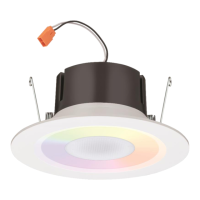
Juno Smart LED RGBW Speaker LED Trim Kit
READ AND FOLLOW ALL SAFETY INSTRUCTIONS!
SAVE THESE INSTRUCTIONS AND DELIVER TO OWNER AFTER INSTALLATION
Product Information: Juno Smart LED RGBW Speaker Downlight Retrofit may be used for incandescent housings
already installed in application or with dedicated quick connect housings by Juno
.
Product Contents: Each unit carton contains the following: 1ea LED speaker light module, 1ea E26 adapter. Check
for all contents prior to installation
.
Required Tools (not included): Safety glasses, ladder, and gloves.
Product Listings: ETL certified to US and Canadian safety standards; wet location listed; and WSEC ASTEM E283
for Air-Tight rated with IC housings. 6SL minimum lamp compartment 6 inches (152 mm) in diameter by 5.75 inches
( 146 mm) tall or minimum lamp compartment 163 in³ (2649 cm³). Use only in open luminaires. Suitable for Type IC
or Type Non-IC luminaires. The retrofit kit is accepted as a component of a luminaries where the suitability of the
combination shall be determined by ETL or authorities having jurisdiction.
The retrofit kit is accepted as a component of a luminaire where the suitability of the combination shall be determined by authorities
having jurisdiction. Product must be installed by a qualified electrician in accordance with the applicable and appropriate electrical
codes. The installation guide does not supersede local or national regulations for electrical installation.
Do not make or alter any open holes in an enclosure of wiring or electrical components during kit installation.
This device is not intended for use with emergency exits or emergency lighting.
Failure to follow any of these instructions could void product warranties. Changes or modifications to this unit not expressly approved
by the party responsible for compliance could void the user’s authority to operate the equipment. For a complete listing of product
Terms and Conditions, please visit www.acuitybrands.com. Acuity Brands Lighting, Inc. assumes no responsibility for claims arising
out of improper or careless installation or handling of its products.

J6SLC RGBW MW

Questions and Answers

  • A
    Andrew WebbJul 29, 2025
    Why does my JUNO Speakers sound cut in and out?
    • C
      Caitlin WilkersonJul 29, 2025
      Obstructions between the speaker and the Bluetooth enabled device may cause signal interference. Confirm that your device is within 30 ft of the “MASTER” unit, and that any paired “SATELLITE” units are within 30 ft of the “MASTER” unit. To prevent signal interference, do not place the JUNO speaker downlights close to heavy electromagnetic emission devices or equipment such as household appliances or ceiling fans.
  • K
    kinggeorgeAug 3, 2025
    How to factory reset JUNO J6SLC RGBW MW?
    • J
      Jermaine SmithAug 3, 2025
      To factory reset the JUNO fixture, use the wall switch to cycle power “on” and “off” five times, waiting five seconds between each cycle. Then, repeat the installation process from the beginning. Complete all power cycles within one minute.
  • J
    joshuajonesAug 8, 2025
    What to do if any JUNO J6SLC RGBW MW show “red” light after group creation?
    • R
      Robert DoughertyAug 8, 2025
      If any JUNO fixtures show a “red” light after group creation, repeat the speaker grouping process, starting again from Step 5.1 to create the Speaker Group.
  • T
    Tabitha TorresAug 13, 2025
    Why does the circuit breaker trip when JUNO J6SLC RGBW MW Speakers are on?
    • J
      John SullivanAug 13, 2025
      If the circuit breaker trips when the JUNO fixture is illuminated, it may be due to crossed wires or the power wire grounding out. Check the wire connections and consult an electrician.
  • J
    James MccallAug 18, 2025
    How to fix light flickering on JUNO Speakers?
    • M
      Michelle LopezAug 18, 2025
      To address light flickering in JUNO Speakers: 1. Verify the line voltage is correct. 2. Check the wiring and connections. 3. Consult an electrician. 4. Install a light switch on the wall. Note that dimmers are not allowed.
  • T
    tiffanydunnAug 23, 2025
    How to troubleshoot JUNO Speakers that will not illuminate?
    • E
      Erin KellyAug 23, 2025
      If the JUNO fixture will not illuminate: 1. Verify the line voltage is correct. 2. Check the wiring and connections. 3. Verify the power supply is on at the breaker.

Summary

Safety Instructions and Product Overview

Product Information

Details about the Juno Smart LED RGBW Speaker Downlight Retrofit compatibility.

Product Contents

Lists the items included in each unit carton for installation.

Required Tools for Installation

Lists the necessary tools not included with the fixture.

Product Listings and Compliance

Information on ETL certification, wet location listing, and Air-Tight rating.

Detailed Safety Precautions

General Precautions for Installation

Guidelines for installation, servicing, and maintenance by qualified personnel.

Risk of Electric Shock Warnings

Instructions for preventing electric shock during installation and servicing.

Risk of Injury Precautions

Safety measures to prevent personal injury during handling and installation.

Risk of Burn Warnings

Precautions to avoid burns from hot components.

Risk of Fire Warnings

Measures to prevent fire hazards related to combustible materials.

Risk of Product Damage

Guidelines to prevent damage to the fixture and its components.

Installation Steps

Prepare for Fixture Installation

Ensuring power is off, reading instructions, and noting speaker group setup.

Determine Wiring Method

Selecting the appropriate wiring method for connecting the fixture.

Install Unit into Recessed Housing

Procedure for physically mounting the fixture into the housing.

Set Up Smart Lighting Connectivity

Configuring the fixture for smart home integration and control.

Set Up Speaker Grouping

Steps to group multiple speaker units for synchronized audio control.

Set Up Bluetooth Audio

Connecting devices via Bluetooth for audio playback through the fixture.

Troubleshooting Guide

Fixture Will Not Illuminate

Corrective actions for when the fixture fails to light up.

Circuit Breaker Tripping

Troubleshooting steps when the circuit breaker trips during operation.

Light Flickering Issues

Diagnosing and resolving flickering light output.

Speaker Sound Cuts In and Out

Addressing intermittent audio problems and signal interference.

Red Light After Group Creation

Steps to resolve issues indicated by a red light after speaker grouping.

Add Additional Speakers to Group

Procedure for integrating new speakers into an existing group.

Factory Reset Fixture

Instructions on how to perform a factory reset on the fixture.

Update Speaker Light Firmware

Download SmartThings App

Instructions to download and install the SmartThings app.

Factory Reset Before Firmware Update

Procedure to factory reset fixtures before initiating firmware updates.

Connect Fixture to SmartThings App

Steps to connect the fixture to the SmartThings app via QR code.

JUNO J6SLC RGBW MW Specifications

General IconGeneral
BrandJUNO
ModelJ6SLC RGBW MW
CategorySpeakers
LanguageEnglish