Remote Control
A
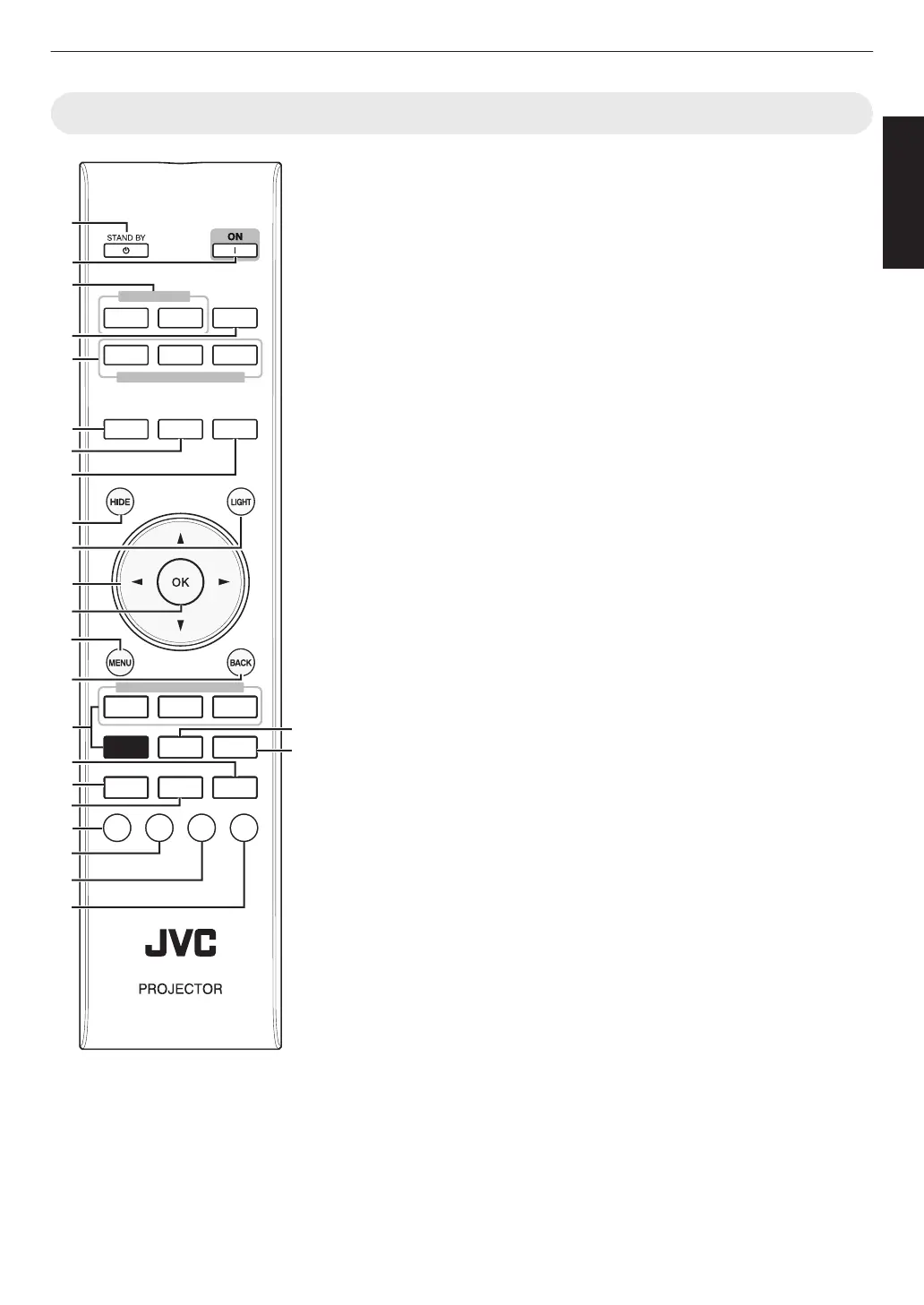
B [STAND BY]
Turns off the power. (P. 22)
B
C [ON]
Turns on the power. (P. 21)
C
[INPUT]
Switches the input to [HDMI 1] or
[HDMI 2]. (P. 21)
D
[INFO.]
Displays the information menu.
(P. 59)
E
[SETTING MEMORY]
Retrieves the [MODE 1] (LENS
MEMORY 1), [MODE 2] (LENS
MEMORY 2) or [MODE 3] (LENS
MEMORY 3) lens memory.
F
[LENS CONTROL]
For adjusting focus, zoom, and
shift. (P. 23)
0
Pressing the button each time
switches the function in the
following sequence: “Focus” "
“Zoom” " “Shift”...
G
[LENS AP.]
For setting the lens aperture.
(P. 43)
H
[ANAMO.]
Switches the anamorphic mode.
0
Pressing the button each time
switches the anamorphic mode in
sequence.
I
[HIDE]
Hides the image temporarily.
(P. 21)
J
[LIGHT]
Illuminates the buttons on the
remote control.
K
[JKH I] keys
For selecting an item.
L
[OK]
Confirms a selected item.
M
[MENU]
Displays the menu, or hides the
menu if it is displayed.
N
[BACK]
Returns to the previous menu.
O
[PICTURE MODE]
Switches the picture mode.
(P. 30)
0
Press [NATURAL], [CINEMA] or
[HDR] to switch to the respective
picture mode.
0
Pressing [PICTURE MODE]
displays the Picture mode
selection menu.
P
[COLOR PROFILE]
Displays the color profile selection
menu. (P. 31)
Q
[GAMMA SETTINGS]
Displays the gamma setting
menu.
R
[ADVANCED MENU]
Pressing the button each time
switches the menu in the following
sequence: “Picture Mode” "
“Color Profile” " “Color Temp.” "
“Gamma” " “Blur Reduction”...
S
[MPC]
Displays the MPC setting menu.
(P. 35)
T
[C.M.D.]
For setting frame interpolation.
(P. 42)
0
Pressing the button each time
switches the frame interpolation in
sequence.
U
[GAMMA]
Switches the gamut. (P. 36)
0
Pressing the button each time
switches the configurable gamma
in sequence.
V
[COLOR TEMP.]
Switches the color temperature.
(P. 47)
0
Pressing the button each time
switches the configurable color
temperature in sequence.
W
[3D FORMAT]
For setting the 3D format.
(P. 29)
0
Pressing the button each time
switches the 3D format in
sequence.
X
[PIC. ADJ.]
Displays the picture quality
adjustment gauge. (P. 48)
0
Pressing the button each time
displays the picture quality
adjustment gauge in sequence.
HDMI 1
INPUT
SETTING MEMORY
PICTURE MODE
HDMI 2 INFO.
NATURAL
CINEMA HDR
MODE2MODE1 MODE3
ADVANCED
MENU
3D
FORMAT
PIC.
ADJ.
COLOR
TEMP.
GAMMA
C.M.D.MPC
LENS
CONTROL
LENS AP.
ANAMO.
COLOR
PROFILE
GAMMA
SETTINGS
PICTURE
MODE
A
O
V
T
W
X
C
D
G
J
B
E
F
S
H
I
K
L
M
N
U
13
Getting Started



 To Next Page
 Loading...