Filename [DR-MV1SE_09Editing.fm]
Masterpage:Left+
72 EN
Page 72 March 11, 2004 7:27 pm
EDITING
L-1 Output And L-1 Input Setting
The L-1 IN/OUT connector accepts and delivers either a composite
signal (regular video signal) or a Y/C signal (a signal in which the
luminance and chrominance signals are separated). Set “L-1
OUTPUT” and “L-1 INPUT” to the appropriate mode depending on
the type of appliance connected to the unit’s L-1 IN/OUT
connector.
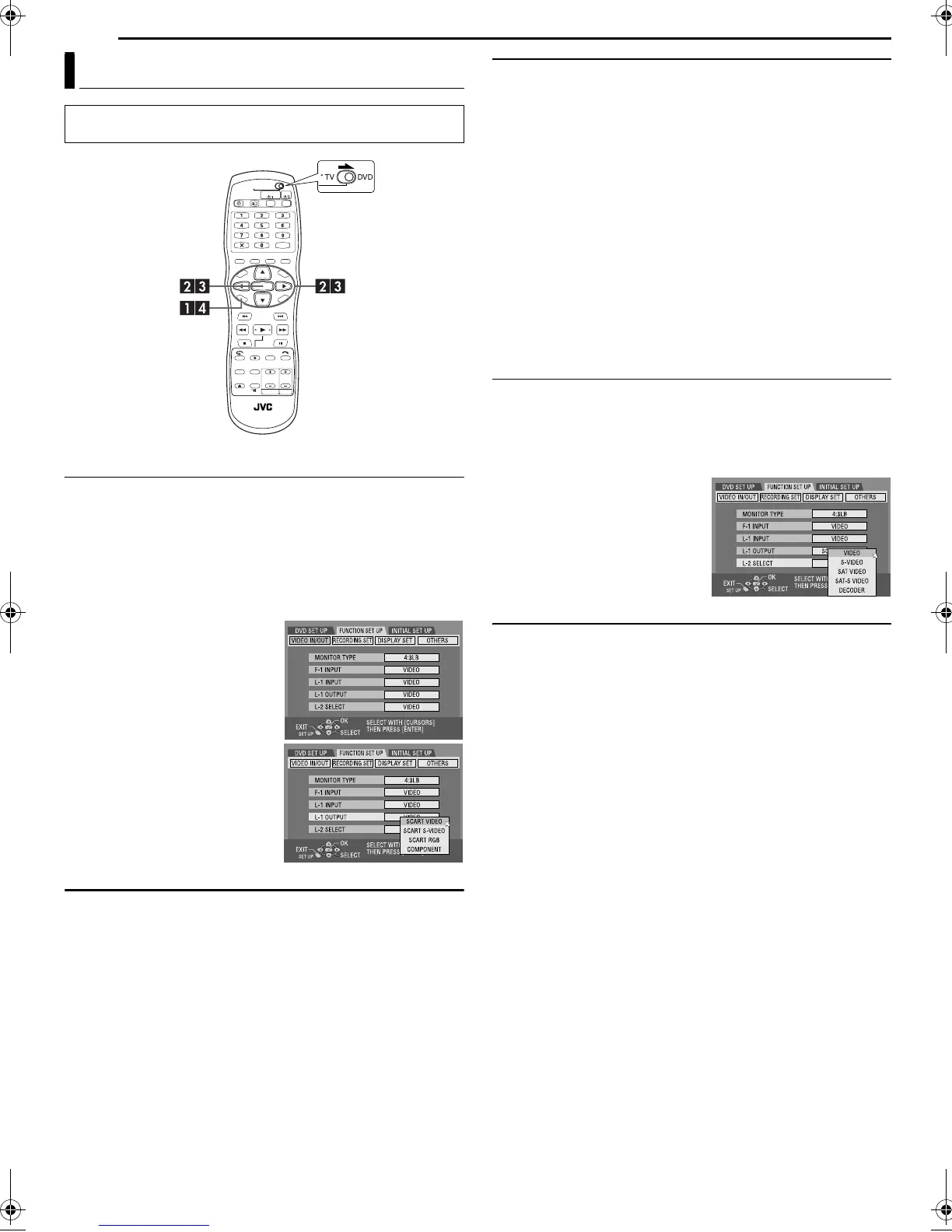
1 Press SET UP to access the Main Menu screen.
2 Press we to select “FUNCTION SET UP”, then press ENTER.
3 Press we to select “VIDEO IN/
OUT”, then press ENTER.
4 Press rt to select “L-1
OUTPUT” or “L-1 INPUT”, then
press ENTER.
5 Press rt to select the
appropriate setting, then press
ENTER.
6 Press SET UP to complete the
setting.
*The boldface settings below
indicate the settings at your
purchase.
8 L-1 OUTPUT — SCART VIDEO / SCART S-VIDEO / SCART
RGB / COMPONENT
SCART VIDEO: If a connected appliance’s input is compatible only
with regular video signals, set to “SCART VIDEO”.
SCART S-VIDEO: If a connected appliance’s input is compatible
with Y/C signals, set to “SCART S-VIDEO”. You can obtain high-
quality picture. (For connection, be sure to use a 21-pin SCART
cable that is compatible with the Y/C signal.)
SCART RGB: If a connected appliance’s input is compatible with
RGB signals, set to “SCART RGB”. You can obtain a high-quality
RGB picture.
COMPONENT: If a connected appliance’s input is compatible with
Y/P
B/PR signals, set to “COMPONENT”. You can obtain a high-
quality Y/P
B/PR picture. Switch the TV to the input that you can
watch component video pictures.
8 L-1 INPUT — VIDEO / S-VIDEO
VIDEO: If a connected appliance’s output is compatible only with
regular video signals, set to “VIDEO”.
S-VIDEO: If a connected appliance’s output is compatible with Y/C
signals, set to “S-VIDEO”. You can obtain a high-quality picture.
(For connection, be sure to use a 21-pin SCART cable that is
compatible with the Y/C signal.)
NOTES:
● If “L-1 OUTPUT” is set to “SCART S-VIDEO”, “SCART RGB” or
“COMPONENT”, it is not possible to set “L-1 INPUT” to “S-VIDEO”.
● If “L-2 SELECT” is set to “DECODER”, it is not possible to set “L-1
INPUT” to “S-VIDEO”.
● If “L-2 SELECT” is set to “DECODER”, it is only possible to set “L-1
OUTPUT” to “SCART VIDEO”.
● Component video signals are not output from the L-1 IN/OUT
connector.
● When Progressive scan mode is engaged, it is not possible to select
the setting of “L-1 OUTPUT”. (
墌 pg. 72)
L-2 Select Setting
Set “L-2 SELECT” to the appropriate mode depending on the type
of appliance connected to the unit’s L-2 IN/DECODER connector.
1 Perform steps 1 and 2 of “L-1 Output And L-1 Input Setting” on
the left column.
2 Press rt to select “L-2 SELECT”, then press ENTER.
3 Press rt to select the
appropriate setting, then press
ENTER.
4 Press SET UP to complete the
setting.
*The boldface settings below
indicate the settings at your
purchase.
8 L-2 SELECT — VIDEO / S-VIDEO / SAT VIDEO / SAT
S-VIDEO / DECODER
Select “VIDEO” or “S-VIDEO” to use this unit as the recording deck
with the player connected to the L-2 IN/DECODER connector, or to
use the satellite receiver connected to the L-2 IN/DECODER
connector.
VIDEO: If a connected appliance’s output is compatible only with
regular video signals, set to “VIDEO”.
S-VIDEO: If a connected appliance’s output is compatible with Y/C
signals, set to “S-VIDEO”. You can obtain high-quality picture.
(For connection, be sure to use a 21-pin SCART cable that is
compatible with the Y/C signal.)
Select “SAT VIDEO” or “SAT S-VIDEO” to view a satellite
programme with the TV set while the unit is turned off. (墌 pg. 76)
SAT VIDEO: If a connected satellite receiver’s output is compatible
only with regular video signals, set to “SAT VIDEO”.
SAT S-VIDEO: If a connected satellite receiver’s output is
compatible with Y/C signals, set to “SAT S-VIDEO”. You can
obtain a high-quality S-VHS picture. (For connection, be sure to
use a 21-pin SCART cable that is compatible with the Y/C signal.)
DECODER: To use a decoder connected to the L-2 IN/DECODER
connector.
Output/Input Set (DVD Deck Only)
● Turn on the TV and select the AV mode.
● Slide the TV/CABLE/SAT/DVD switch to DVD.
DR-MV1SE_00.book Page 72 Thursday, March 11, 2004 7:28 PM


 To Next Page